

Suspicious Domain Checker
Analyze a domain for suspicious characteristics commonly associated with phishing, malware, or scam websites.
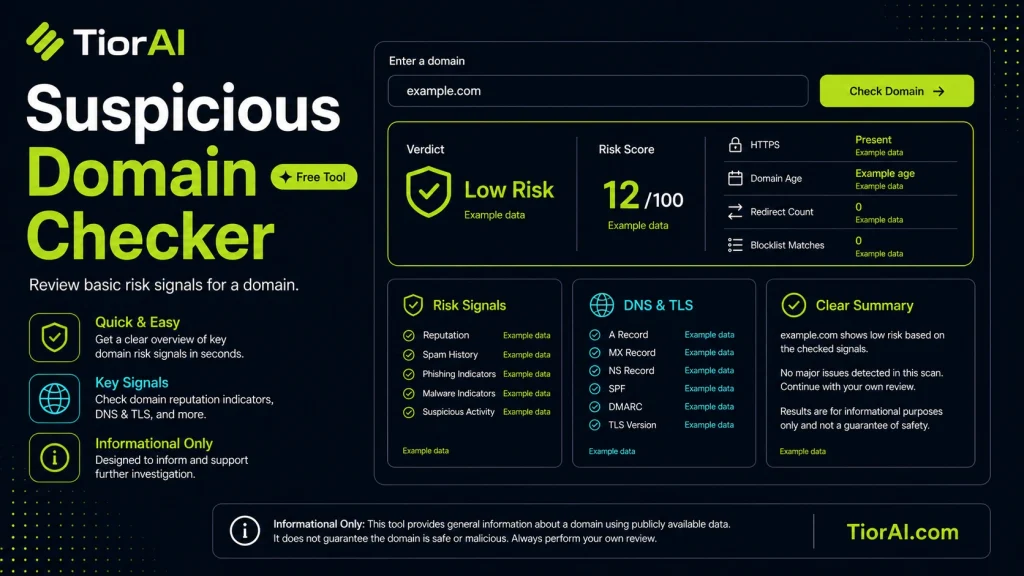
| Type | Finding |
|---|
How to use it
- Enter Target URL or Data Enter the URL, domain, or data you want to check into the Suspicious Domain Checker to initiate the security scan.
- Run the Scan Click scan to analyze your input against security databases and threat intelligence sources.
- Review the Report Examine the security report with findings, risk levels, and actionable recommendations to improve safety.
Tip Share Suspicious Domain Checker reports with your team to build a security-first culture across your organization.
About Suspicious Domain Checker
A suspicious domain checker is a security tool designed to analyze domain names and determine if they pose potential risks. Domains can be used for legitimate purposes or malicious activities such as phishing, malware distribution, or scams. This tool evaluates various factors like domain age, registration details, hosting information, and known blacklists to assess the domain’s reputation.
Understanding domain reputation is crucial because cybercriminals often register domains that look similar to trusted websites to deceive users. By identifying suspicious domains early, individuals and organizations can avoid falling victim to fraud, data theft, or other cyber threats.
Why Use Suspicious Domain Checkers?
- Prevent phishing attacks: Detect domains mimicking legitimate brands.
- Enhance email security: Identify suspicious links in emails before clicking.
- Protect networks: Block access to harmful websites.
- Verify unknown domains: Assess safety before interacting or sharing data.
These tools are commonly used by IT security teams, email administrators, and everyday users who want to verify the safety of a domain before visiting or sharing it.
Understanding Suspicious Domain Checkers
Suspicious domain checkers analyze domain names to identify potential security risks. They examine registration details, domain age, hosting information, and cross-reference blacklists to assess whether a domain might be involved in malicious activities like phishing or malware distribution.
These tools help users avoid interacting with harmful websites by providing a risk assessment based on multiple technical factors. Since cybercriminals often create domains that mimic trusted sites, using a suspicious domain checker adds an important layer of protection.
When to Use a Suspicious Domain Checker
- When you receive an email containing a link from an unknown or untrusted sender.
- Before clicking on or sharing unfamiliar or suspicious-looking URLs.
- While configuring network security to block access to risky domains.
- During security audits to evaluate the reputation of domains connected to your systems.
Common Mistakes to Avoid
- Relying solely on one blacklist or source to determine domain safety, which can miss emerging threats.
- Overlooking domain age and registration details, which are key indicators of legitimacy.
Using a suspicious domain checker is a practical step in maintaining cybersecurity hygiene. It provides actionable insights that help prevent exposure to scams, phishing, and malware by flagging domains that exhibit risky characteristics.
Frequently asked questions
Reviews and questions
Whether this tool gave people the answer they needed, and what they asked about it.
Sign in to review this tool.
Sign In to ReviewNo reviews yet
Be the first to say whether this tool gave you what you needed.
Ask how to read the result, or what the tool does with an edge case — or answer someone else.
Sign In to AskNo questions yet
Not sure how to read a result? Be the first to ask.
AI tools related to this topic
Tools from the TiorAI directory that work on the same kind of job.

42Crunch API Security
42Crunch presents itself as an AI/MCP security platform alongside API security.
Amplifier Security
Amplifier Security is a cybersecurity platform that automates penetration testing and prioritizes vulnerabilities based on risk to help organizations manage and remediate security threats effectively.

Aqua Security
Aqua Security is a cloud native security platform that protects containerized applications and Kubernetes environments by providing vulnerability scanning, runtime threat detection, and compliance management integrated into DevOps workflows.

Beagle Security
Beagle Security is a cloud-based automated vulnerability scanner that detects web application security flaws such as SQL injection and XSS, providing detailed reports and developer integrations to improve security posture.

BITE: Supply Chain Security
BITE is a supply chain security platform that helps organizations monitor third-party risks, ensure compliance, and gain visibility into their supply chains through data analytics.