

AppIconMaker - Online App Icon Generator for Mobile and Web Apps
AppIconMaker is a web-based tool that generates app icons for iOS, Android, macOS, Apple Watch and web applications by automatically resizing and formatting your uploaded image.
- Best for
- Mobile App Icon Creation
- Key capability
- Multi-Platform Support
Save AppIconMaker, follow its updates and vote on it — everything stays in your account.
Sign in or create a free account
What is AppIconMaker?
AppIconMaker is an online tool that simplifies the process of creating app icons for mobile and web applications. It allows users to generate icons in various sizes and formats required by different platforms, eliminating the need for manual resizing or graphic design skills.
Key features of AppIconMaker
The tool offers automatic resizing, multiple platform support, easy customization, and instant downloads of app icons. It streamlines icon creation to save time and ensure compliance with platform guidelines.
Multi-Platform Support
Generates icons for iOS, Android, macOS, Apple Watch and web app specifications.
Automatic Resizing
Creates all necessary icon sizes from a single uploaded image.
Customization Options
Allows background color and shape adjustments to match branding needs.
Instant Download
Provides a downloadable zip file containing all icon assets.
Pros and cons of AppIconMaker
Pros
- Easy to use with no design skills required
- Supports multiple platforms with correct icon sizes
- Fast generation and download of icon packages
- 100% free with no signup
Cons
- Limited advanced customization in free plan
- No desktop or mobile app versions, web only
Key use cases for AppIconMaker
Mobile App Icon Creation
Generate high-quality icons for iOS and Android apps quickly without design software.
Web App Icon Design
Create custom icons for web applications that meet platform-specific requirements.
App Branding
Design consistent and professional app icons to enhance brand identity and user recognition.
Rapid Prototyping
Use generated icons in early app prototypes to visualize app appearance and user interface.
How AppIconMaker works
- 1
Upload Your Image
Start by uploading your base image or logo to the platform.
- 2
Customize Icon
Adjust the icon’s background, shape, and other settings to fit your app’s style.
- 3
Generate Icons
The tool automatically creates all required icon sizes for different platforms.
- 4
Download Package
Download a ready-to-use icon package optimized for iOS, Android, and web apps.
Who is using AppIconMaker
AppIconMaker pricing
Free
$0
100% free, with no signup and no limits.
Plans and prices are as published by the vendor and can change. Check the official site before you buy. Open the pricing page (opens in a new tab)
Frequently asked questions about AppIconMaker
Yes, the tool is designed for users without graphic design skills to easily create app icons.
Yes, it automatically generates the standard icon sizes needed for iOS, Android, macOS, Apple Watch and web apps.
No. The site states it is 100% free, with no signup and no limits.
Yes, customization options are available to adjust background colors and icon shapes.
It depends on your specific needs and how you plan to use the tool. The official website and documentation are the best sources for the latest details.
It depends on your specific needs and how you plan to use the tool. The official website and documentation are the best sources for the latest details.
Yes, it can help with that use case depending on how you configure it and what features are available. You’ll get the best results with clear inputs and a defined goal.
Some tools offer a free plan or trial with limited features. Availability can vary, so confirm on the official website.
Conclusion
A single uploaded image or logo is enough for AppIconMaker to create all the necessary icon sizes, delivered as a downloadable zip file. Before generating, the background color and icon shape can be adjusted to match branding needs. Output covers iOS, Android, macOS and Apple Watch as well as web apps. No graphic design skills are needed, and it is aimed at mobile app developers, web app creators and no-code app builders. Generated icons can also serve early app prototypes.
The site states that it is 100% free, with no signup and no limits.
Sources
Sign in to review this tool.
Sign In to ReviewNo reviews yet
Be the first to share how this tool worked for you.
Ask about pricing, limits, or how it compares — or answer someone else.
Sign In to AskNo questions yet
Have a question about using or paying for this tool? Be the first to ask.
Featured on TiorAI



Alternative Tools
Explore similar AI tools that might fit your needs

Favicon.io
Favicon.io is a free online tool that lets you create favicons from text, emojis, or images quickly without registration, producing browser-compatible icon files.
More AI Design Generator tools
Other tools in the same category, for when this one is not quite the fit.

BlackInk AI
BlackInk AI is an AI tattoo generator for designing custom tattoos in seconds and visualizing them on your body.

Gentype.io
Gentype.io offers AI generated themed 3D alphabets in 5K resolution as PNG, Figma and PSD files, now free for all and supported by donations.

Illusion Diffusion Web
Illusion Diffusion Web is an AI photo illusion generator that turns uploaded photos or patterns into optical illusion artwork from a text prompt.

Propertify Ai
Propertify Ai is an AI virtual staging tool that furnishes uploaded room photos in seconds and can remove existing furniture with text prompts.

LogoGen
LogoGen is an AI-powered logo generator that creates custom logos based on your brand details and style preferences, offering easy customization and high-resolution downloads.
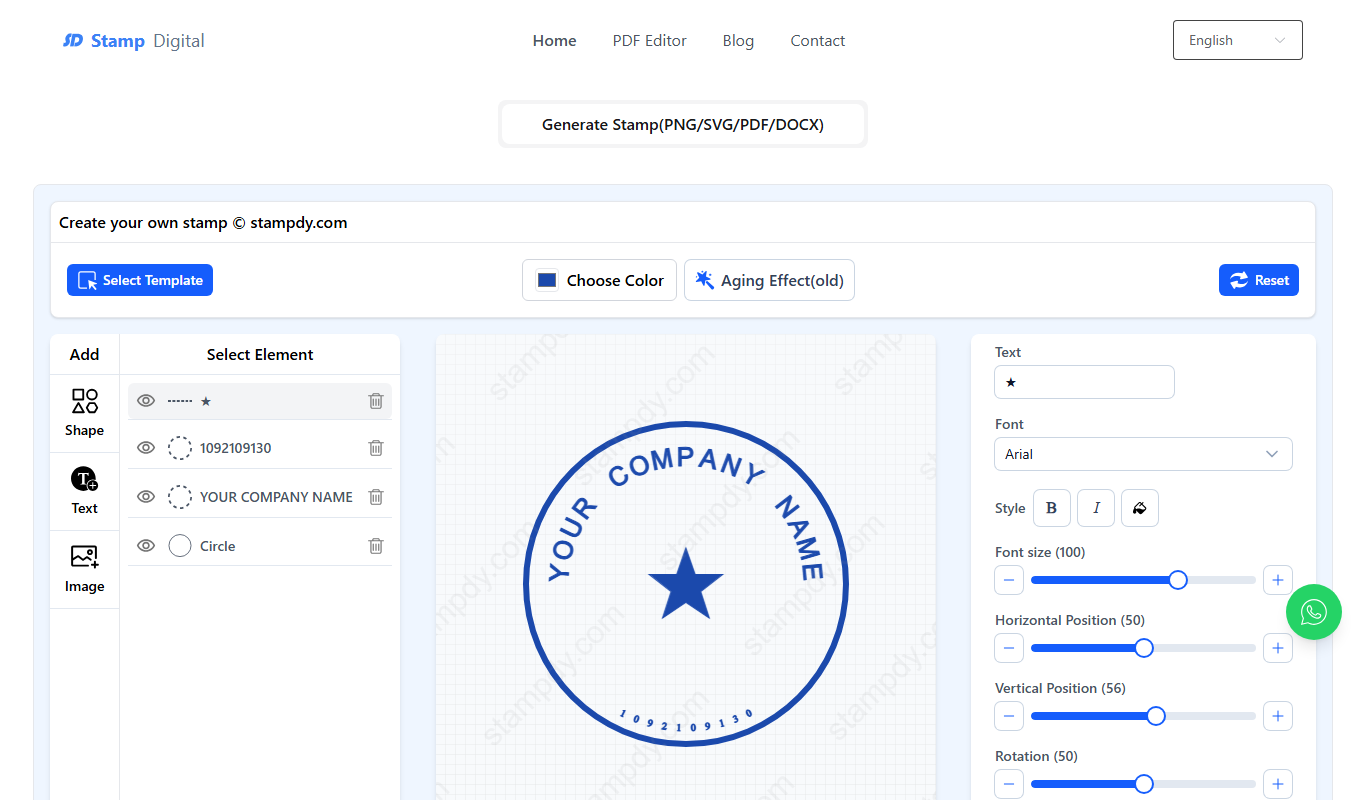
DigitalSeal Studio
DigitalSeal Studio (SealsDigital) is an online stamp maker for designing custom business stamps with templates and a live preview, then exporting them as PNG or vector files.

Image Prompt
Image Prompt (ImagePrompt.org) is a suite of AI tools, including Image to Prompt, Magic Enhance, an AI Image Describer and an AI Image Generator, for creating image prompts for Midjourney, Flux, Stable Diffusion and more.

Blunge
Blunge is an AI design agent that turns ideas into on-brand designs, applying a brand kit across campaign formats.