

Instant3D.ai AI 3D Model Generator for Rapid Design and Prototyping
Instant3D.ai is a web-based AI tool that automates 3D model creation from simple inputs, enabling rapid design and prototyping without advanced skills.
- Best for
- Rapid 3D Model Creation
- Key capability
- AI-Powered 3D Model Generation
Save Instant3d.ai, follow its updates and vote on it — everything stays in your account.
Sign in or create a free account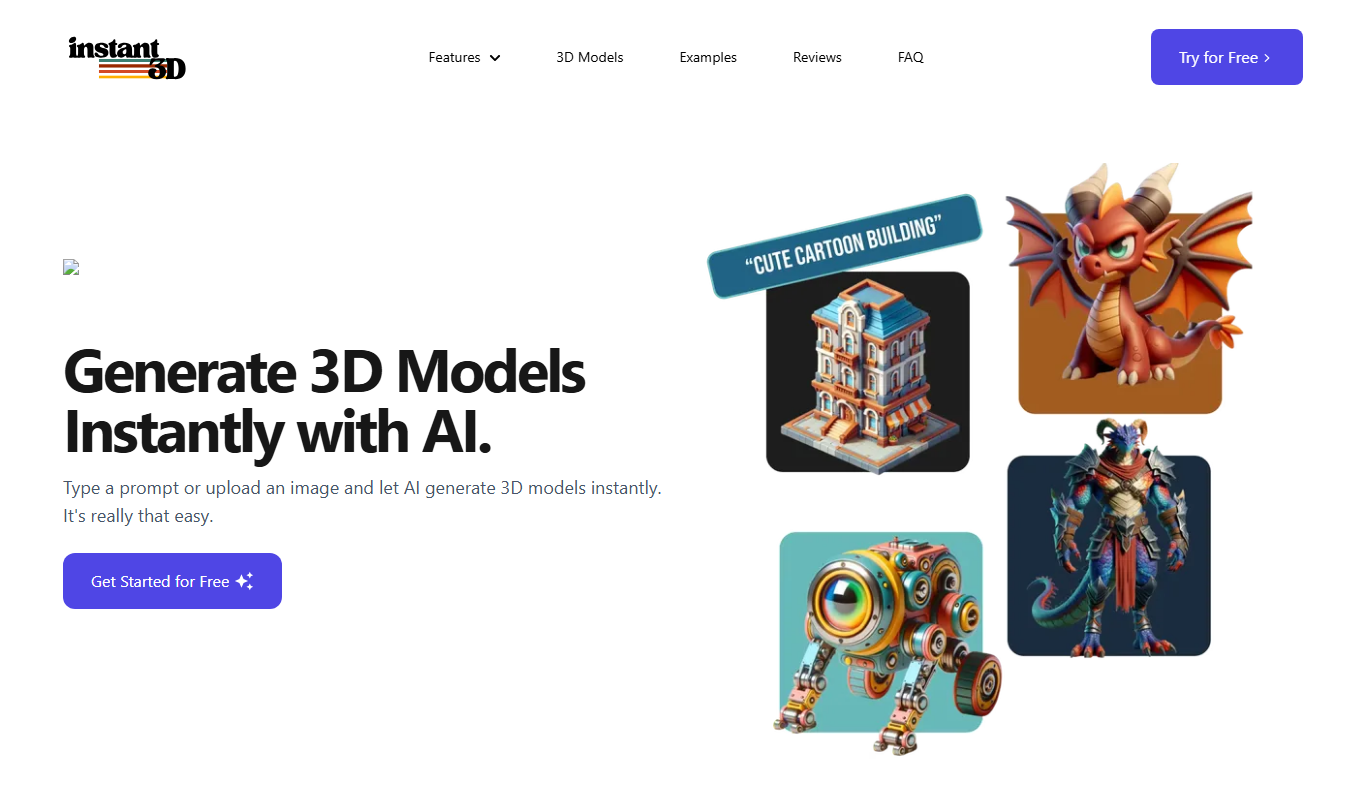

What is Instant3d.ai?
Instant3D.ai is a web-based AI-powered platform that enables users to generate 3D models rapidly from simple inputs. It leverages artificial intelligence to automate the creation of detailed and customizable 3D designs, streamlining workflows for designers, engineers, and creators who need quick prototyping and visualization.
Key features of Instant3d.ai
The platform offers AI-driven 3D model generation, customization options, export capabilities for various formats, and an intuitive web interface that requires no advanced 3D modeling skills. It supports rapid iteration and integration into design and development pipelines.
AI-Powered 3D Model Generation
Automates the creation of complex 3D models from simple user inputs.
User-Friendly Web Interface
Accessible platform that requires no prior 3D modeling expertise.
Customizable Model Parameters
Allows users to tweak and refine generated models to meet specific design criteria.
Multiple Export Formats
Supports exporting models in formats compatible with popular CAD and 3D software.
Fast Prototyping Workflow
Speeds up the design iteration process by reducing manual modeling time.
Pros and cons of Instant3d.ai
Pros
- Speeds up 3D model creation with AI automation
- Easy to use without prior modeling skills
- Supports multiple export formats
- Facilitates rapid prototyping and iteration
Cons
- Limited information on advanced customization options
- Currently only available as a web platform
Key use cases for Instant3d.ai
Rapid 3D Model Creation
Generate detailed 3D models quickly using AI, reducing manual design time.
Product Prototyping
Create prototypes for products to visualize and iterate designs before manufacturing.
Concept Visualization
Visualize design concepts in 3D to communicate ideas effectively to stakeholders.
Game Asset Development
Produce 3D assets for games and virtual environments efficiently.
Educational Use
Assist students and educators in learning 3D modeling through AI-powered tools.
How Instant3d.ai works
- 1
Input Design Parameters
Users type a text prompt or upload an image for reference.
- 2
AI Model Generation
The AI engine processes inputs to create detailed 3D models automatically.
- 3
Customize and Refine
Users can adjust model parameters and customize features to fit specific needs.
- 4
Export and Use
Finalized models can be exported in common 3D file formats for use in CAD, games, or prototyping.
Who is using Instant3d.ai
Instant3d.ai pricing
Free
Free
3 free image generations.
Unlimited generations
$10/mo
A flat monthly price for unlimited generations after the 3 free image generations.
Plans and prices are as published by the vendor and can change. Check the official site before you buy. Open the pricing page (opens in a new tab)
Frequently asked questions about Instant3d.ai
Models can be exported in popular formats like GLTF, OBJ or FBX.
No, the platform is designed to be user-friendly and accessible to beginners.
Yes, you can adjust parameters and refine the models to suit your needs.
New users get 3 free image generations, and then it is a flat $10/mo for unlimited generations.
It depends on your specific needs and how you plan to use the tool. The official website and documentation are the best sources for the latest details.
Yes, it can help with that use case depending on how you configure it and what features are available. You’ll get the best results with clear inputs and a defined goal.
It depends on your specific needs and how you plan to use the tool. The official website and documentation are the best sources for the latest details.
Conclusion
A text prompt or an uploaded reference image is the starting input, and generating a 3D model typically takes between 15 and 25 seconds. Image uploads can be concept art, photographs, product images, character designs or sketches, and multiple images of the same object from different angles can be used. Models can then get a lower poly count and refined textures and lighting before export as GLTF, OBJ or FBX for games, animations and 3D printing. Beyond generation, the studio includes an online 3D viewer, an AI character generator that works from character turnarounds and an auto remesh tool for production-quality meshes.
The generators are aimed at designers, game developers and animators as well as 3D printing enthusiasts. Usage starts with a few free image generations, followed by a flat monthly subscription for unlimited generations. Refunds are available by contacting support if a user is unhappy for any reason.
Sources
Sign in to review this tool.
Sign In to ReviewNo reviews yet
Be the first to share how this tool worked for you.
Ask about pricing, limits, or how it compares — or answer someone else.
Sign In to AskNo questions yet
Have a question about using or paying for this tool? Be the first to ask.
Featured on TiorAI



Alternative Tools
Explore similar AI tools that might fit your needs

Vectary
Vectary is an online design platform for developing concepts with AI and creating interactive 3D presentations and AR experiences, all in the browser.

Shapr3D
Shapr3D is a professional 3D CAD modeling software optimized for iPad and desktop platforms, enabling designers and engineers to create precise 3D models with an intuitive touch interface and export them for manufacturing or 3D printing.
More AI 3D Modeling Tools tools
Other tools in the same category, for when this one is not quite the fit.

Sloyd
Sloyd is a web-based AI-assisted 3D modeling tool designed to help game developers and designers quickly create customizable low-poly 3D assets with ease.
TextTo3D
TextTo3D is a web-based AI tool that converts natural language text descriptions into 3D models, enabling users to create 3D content without prior modeling experience.

Meshy
Meshy is a cloud-based AI platform that enables teams to collaboratively create and edit 3D models in real-time using AI-assisted mesh generation and version control.

AI Geometric
AI Geometric is a web-based 3D modeling software that uses AI to help users create complex geometric designs quickly and intuitively, suitable for designers, educators, and creatives.

OpalAi ScanTo3D
OpalAi ScanTo3D is an AI-driven tool that transforms 2D images and scans into high-quality 3D models with texture mapping, supporting multiple input formats and offering API integration.

cgfaces.com
CGFaces is a web-based AI tool that generates realistic 3D human faces with customizable features, ideal for game development, animation, and VR projects.
Alpha3D
Alpha3D is a 3D modeling software designed for designers and engineers, featuring CAD tools, real-time rendering, and animation capabilities accessible via web and desktop.

Stable Fast 3D(SF3D)
Stable Fast 3D is an AI-driven platform that enables fast and easy generation of 3D models for creative projects, supporting export in common 3D formats.