

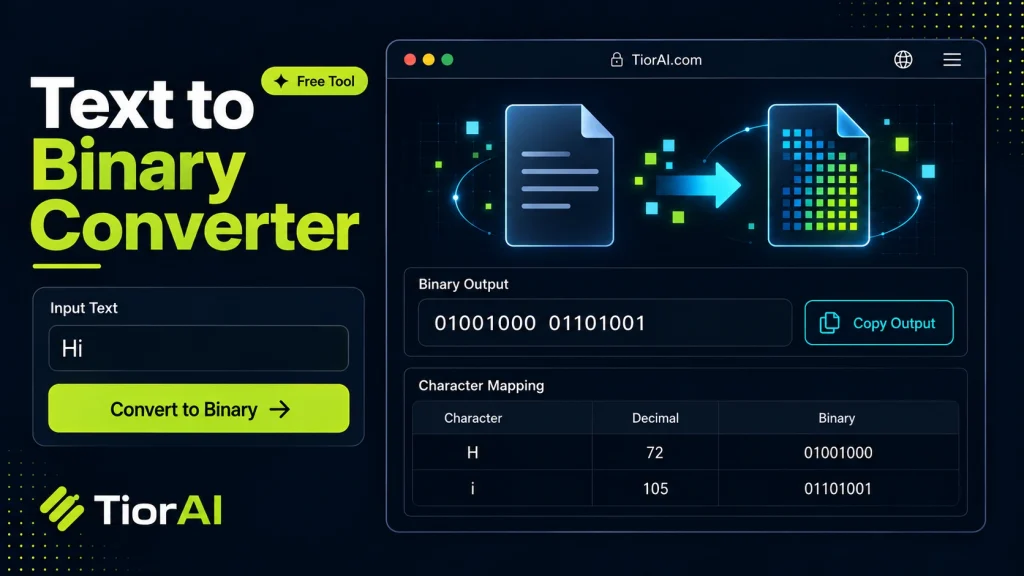
How to use it
- Enter Source Value Type or paste the value you want to convert into the Text to Binary Converter. The tool accepts a wide range of input formats.
- Select Target Format Choose your desired output format or unit from the available options. The conversion starts automatically.
- Copy the Result Review the converted output and click copy to use it in your project, document, or workflow.
Tip Switch between source and target formats in the Text to Binary Converter to quickly verify conversions in both directions.
Understanding Text to Binary Conversion
Text to binary conversion is the process of transforming readable characters into a sequence of binary digits (bits), which are the fundamental units of data in computing. At its core, this conversion is about representing text—letters, numbers, symbols—in a format that computers can process, store, and transmit efficiently.
Why Binary? Computers operate using electrical signals that have two distinct states: on and off. These states are naturally represented by 1s and 0s, forming the binary number system. Unlike humans who use alphabets and symbols, computers rely on binary to perform all operations.
How Does Text Convert to Binary? Each character in text corresponds to a specific numeric code defined by character encoding standards. The most common encoding is ASCII (American Standard Code for Information Interchange), which assigns a unique 7- or 8-bit binary number to each character. For example, the uppercase letter ‘A’ is represented by the decimal number 65, which translates to the binary sequence 01000001.
When converting text to binary, each character is first mapped to its numeric code, then that number is converted into its binary equivalent. This binary sequence can then be used by computers for processing or communication.
Character Encoding Standards
- ASCII: Uses 7 or 8 bits per character, covering English letters, digits, and some control characters.
- Unicode: A more comprehensive standard that supports characters from virtually all written languages, emojis, and symbols. UTF-8 encoding represents Unicode characters using one to four bytes, making binary sequences variable in length.
Understanding these encodings is crucial because the binary output depends on which standard is used. For example, the character ‘€’ (Euro sign) is not part of ASCII but is included in Unicode and has a longer binary representation.
Real-World Applications
- Data Storage: Text files, documents, and code are stored as binary data on disks and memory.
- Data Transmission: When sending text over networks, it is converted to binary signals for transmission.
- Programming and Debugging: Developers sometimes need to view or manipulate the binary form of text for low-level programming or troubleshooting.
- Cryptography and Encoding: Binary representations are foundational in encryption algorithms and data encoding schemes.
In summary, text to binary conversion bridges human-readable information and machine-readable data, enabling all digital communication and computing involving text.
What is Text to Binary Conversion?
Text to binary conversion is the process of translating human-readable characters into binary code, the language computers understand. Computers operate using electrical signals that represent two states: on and off, which correspond to 1s and 0s in binary. This binary system is the foundation of all digital computing.
Each character in text is assigned a numeric value by a character encoding standard, such as ASCII or Unicode. These numeric values are then converted into binary sequences. For example, the letter ‘A’ is represented by the decimal number 65 in ASCII, which converts to the binary sequence 01000001. This binary data can then be processed, stored, or transmitted by computers.
When to Use a Text to Binary Converter
- Educational Purposes: To learn how text is represented at the binary level.
- Programming and Debugging: When working with low-level data manipulation or troubleshooting encoding issues.
- Data Transmission: Preparing text data for systems that require binary input.
- Cryptography and Encoding: When encoding text for encryption or specialized data formats.
Common Mistakes to Avoid
- Mixing Encoding Standards: Assuming all text converts the same way can lead to errors, especially when dealing with non-ASCII characters.
- Ignoring Leading Zeros: Omitting leading zeros in binary output can cause misinterpretation of the data.
Understanding the technical context of character encoding and binary representation helps avoid these mistakes and ensures accurate conversions.
Worked examples
Converting a simple word to binary
Used when demonstrating how each letter is represented in ASCII binary.
Before HelloAfter 01001000 01100101 01101100 01101100 01101111Encoding a numeric string
Useful for understanding how digits are stored as text in binary.
Before 1234After 00110001 00110010 00110011 00110100Binary representation of a symbol
Shows how special characters are encoded in ASCII.
Before @After 01000000
Frequently asked questions
Reviews and questions
Whether this tool gave people the answer they needed, and what they asked about it.
Sign in to review this tool.
Sign In to ReviewNo reviews yet
Be the first to say whether this tool gave you what you needed.
Ask how to read the result, or what the tool does with an edge case — or answer someone else.
Sign In to AskNo questions yet
Not sure how to read a result? Be the first to ask.
AI tools related to this topic
Tools from the TiorAI directory that work on the same kind of job.

Any Video Converter
Any Video Converter is a multimedia software that converts video files between numerous formats, downloads online videos, and offers basic editing and DVD burning features.

Bank Statement Converter
Bank Statement Converter is an online tool that converts PDF bank statements into Excel and CSV formats, enabling easy data extraction and financial management.

Code Language Converter
Code Language Converter is a free web-based tool that translates code snippets between multiple programming languages, helping developers convert syntax quickly and learn language differences.

HD Photo Converter
HD Photo Converter is a free online tool that allows users to convert images between popular formats like JPG, PNG, BMP, and TIFF while maintaining high quality. It supports batch conversion and requires no installation.
Humanize AI Text Converter
Humanize AI Text Converter is a web tool that rewrites AI-generated text to make it sound more natural and human-like, improving readability and engagement.