

Decimal Degrees to DMS Converter
Convert coordinates between decimal degrees and degrees, minutes and seconds, in either direction. Every common notation is listed in the result, ready to paste into a map or a GPS device.
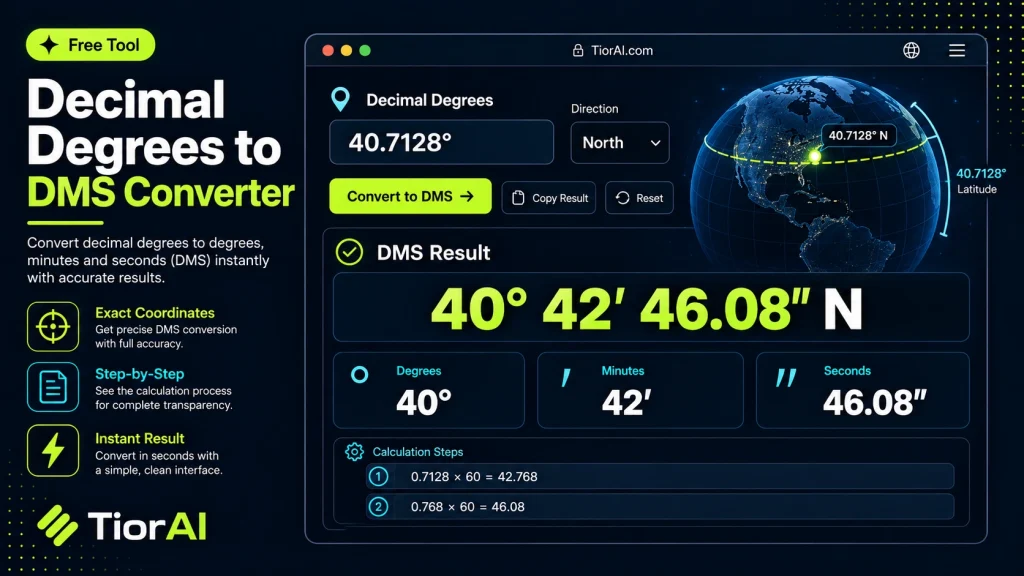
A negative value means south of the equator or west of the prime meridian — the hemisphere is worked out for you.
Formulas and Notation
- Decimal degrees to DMS
D = ⌊|dd|⌋,M = ⌊(|dd| − D) × 60⌋,S = ((|dd| − D) × 60 − M) × 60- DMS to decimal degrees
dd = D + M / 60 + S / 3600(negated for South or West)- Degrees and decimal minutes
M.mmm = M + S / 60— the notation most marine GPS units use.
Latitude runs from −90 at the South Pole to 90 at the North Pole; longitude runs from −180 to 180, measured east and west of the prime meridian. A value outside those ranges is not a valid coordinate.
One second of latitude is roughly 31 metres, so four decimal places in decimal degrees is about 11 metres — enough to identify a building. Six places is finer than any consumer GPS can actually resolve.
How to use it
- Enter Source Value Type or paste the value you want to convert into the Decimal Degrees to Dms Converter. The tool accepts a wide range of input formats.
- Select Target Format Choose your desired output format or unit from the available options. The conversion starts automatically.
- Copy the Result Review the converted output and click copy to use it in your project, document, or workflow.
Tip Chain the Decimal Degrees to Dms Converter with other conversion tools on TiorAI to handle multi-step format transformations.
Understanding Decimal Degrees and DMS Coordinate Formats
Geographic coordinates are commonly expressed in two formats: Decimal Degrees (DD) and Degrees, Minutes, Seconds (DMS). Decimal degrees represent latitude and longitude as decimal fractions of degrees, such as 40.7128° N, -74.0060° W. In contrast, DMS breaks down each degree into 60 minutes and each minute into 60 seconds, for example, 40° 42′ 46″ N, 74° 0′ 21″ W.
This conversion is essential because different mapping systems, GPS devices, and geographic information systems (GIS) may require coordinates in one format or the other. DMS is often used in traditional navigation, surveying, and legal descriptions, while decimal degrees are preferred in digital mapping and programming due to their simplicity and ease of calculation.
Why convert between these formats?
- To ensure compatibility between various software and hardware that accept only one format.
- To improve readability and precision depending on the application.
- To facilitate manual navigation or data entry where DMS is standard.
Understanding both formats and how to convert between them helps professionals and hobbyists alike work accurately with geographic data.
What is Decimal Degrees to DMS Conversion?
Geographic coordinates can be represented in decimal degrees (DD) or degrees, minutes, and seconds (DMS). Decimal degrees express latitude and longitude as decimal fractions, while DMS breaks each degree into 60 minutes and each minute into 60 seconds. This conversion allows users to switch between a format suited for digital applications and one preferred in traditional navigation and surveying.
When to Use a Decimal Degrees to DMS Converter
- Entering coordinates into GPS devices or software that require DMS format.
- Converting digital map data for use in legal or survey documents.
- Sharing location information with users familiar with the DMS format.
- Improving readability and precision when working with geographic data.
Common Mistakes to Avoid
- Mixing up the sign of the coordinate with the hemisphere, which can lead to incorrect positioning.
- Misunderstanding minutes and seconds as decimal values rather than sexagesimal units, resulting in errors.
Understanding the difference between DD and DMS and knowing when to convert between them ensures accurate geographic data handling across various applications.
Frequently asked questions
Reviews and questions
Whether this tool gave people the answer they needed, and what they asked about it.
Sign in to review this tool.
Sign In to ReviewNo reviews yet
Be the first to say whether this tool gave you what you needed.
Ask how to read the result, or what the tool does with an edge case — or answer someone else.
Sign In to AskNo questions yet
Not sure how to read a result? Be the first to ask.
AI tools related to this topic
Tools from the TiorAI directory that work on the same kind of job.

Any Video Converter
Any Video Converter is a multimedia software that converts video files between numerous formats, downloads online videos, and offers basic editing and DVD burning features.

Bank Statement Converter
Bank Statement Converter is an online tool that converts PDF bank statements into Excel and CSV formats, enabling easy data extraction and financial management.

Code Language Converter
Code Language Converter is a free web-based tool that translates code snippets between multiple programming languages, helping developers convert syntax quickly and learn language differences.