

Decimal Converter
Convert a decimal number to binary, octal, hexadecimal and base 36 in one step. Fractional values are converted too, not rounded away.
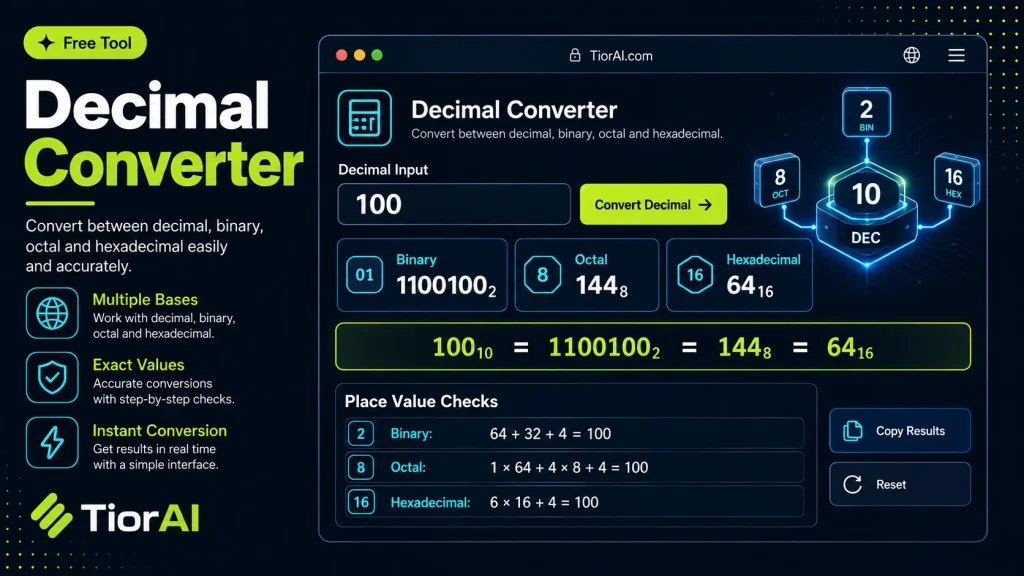
Negative numbers and decimal fractions are both accepted.
About These Number Bases
- Binary (base 2)
- Digits 0 and 1 only. This is how numbers are actually stored in hardware.
- Octal (base 8)
- Digits 0 to 7. Still used for Unix file permissions, such as 755.
- Hexadecimal (base 16)
- Digits 0 to 9 then A to F. One hex digit stands for exactly four binary digits, which is why it is used for colours, memory addresses and byte values.
- Base 36
- Digits 0 to 9 then A to Z — the most compact form that still uses only letters and numbers, which suits short identifiers and URL slugs.
Fractions are converted by repeatedly multiplying the fractional part by the base. Many decimal fractions never terminate in another base — 0.1 in decimal repeats forever in binary — so fractional digits are shown to a fixed length and the result is marked as approximate when it had to be cut short.
How to use it
- Enter Source Value Type or paste the value you want to convert into the Decimal Converter. The tool accepts a wide range of input formats.
- Select Target Format Choose your desired output format or unit from the available options. The conversion starts automatically.
- Copy the Result Review the converted output and click copy to use it in your project, document, or workflow.
Tip Switch between source and target formats in the Decimal Converter to quickly verify conversions in both directions.
Understanding Decimal Conversion
Decimal conversion involves changing numbers from the decimal system (base 10) to other numeral systems or vice versa. The decimal system is the standard numbering system used in everyday life, consisting of digits 0 through 9. However, computers and digital systems often use different bases, such as binary (base 2), octal (base 8), or hexadecimal (base 16).
Why convert decimals? Conversion is essential because different systems represent data differently. For example, binary is fundamental in computing because it directly corresponds to the on/off states of transistors. Programmers, engineers, and students frequently convert decimal numbers to binary or hexadecimal to understand how data is stored or processed.
Common situations for decimal conversion include:
- Programming and debugging low-level code where binary or hex representations are needed.
- Networking, where IP addresses and subnet masks may be represented in decimal and binary.
- Educational purposes, such as learning number systems and computer architecture.
- Data encoding and decoding tasks in software development.
Decimal converters automate this process, allowing quick and accurate transformations between decimal and other bases without manual calculation.
What is Decimal Conversion?
Decimal conversion is the process of changing numbers from the decimal system (base 10) to other numeral systems like binary (base 2), octal (base 8), or hexadecimal (base 16), or vice versa. The decimal system is the most common numbering system used in daily life, but computers operate using binary. Converting between these systems is essential for understanding how data is represented and manipulated in digital devices.
When to Use a Decimal Converter
- When programming or debugging code that requires binary or hexadecimal input.
- When working with network configurations that use different number bases.
- When learning about number systems in computer science or mathematics.
- When analyzing data formats or performing data encoding tasks.
Common Mistakes to Avoid
- Entering invalid characters or symbols that the converter cannot process.
- Confusing the input base, such as inputting binary numbers as decimal without specifying the base.
- Assuming the tool supports negative numbers or fractional values without checking.
- Not verifying the output format, which can lead to misinterpretation of results.
Understanding decimal conversion is fundamental for anyone working with computers or digital systems. This tool simplifies the process, ensuring accurate and quick conversions without manual calculations.
Frequently asked questions
Reviews and questions
Whether this tool gave people the answer they needed, and what they asked about it.
Sign in to review this tool.
Sign In to ReviewNo reviews yet
Be the first to say whether this tool gave you what you needed.
Ask how to read the result, or what the tool does with an edge case — or answer someone else.
Sign In to AskNo questions yet
Not sure how to read a result? Be the first to ask.
AI tools related to this topic
Tools from the TiorAI directory that work on the same kind of job.

Any Video Converter
Any Video Converter is a multimedia software that converts video files between numerous formats, downloads online videos, and offers basic editing and DVD burning features.

Bank Statement Converter
Bank Statement Converter is an online tool that converts PDF bank statements into Excel and CSV formats, enabling easy data extraction and financial management.

Code Language Converter
Code Language Converter is a free web-based tool that translates code snippets between multiple programming languages, helping developers convert syntax quickly and learn language differences.

HD Photo Converter
HD Photo Converter is a free online tool that allows users to convert images between popular formats like JPG, PNG, BMP, and TIFF while maintaining high quality. It supports batch conversion and requires no installation.
Humanize AI Text Converter
Humanize AI Text Converter is a web tool that rewrites AI-generated text to make it sound more natural and human-like, improving readability and engagement.