

AssemblyAI Speech-to-Text API for Accurate AI Transcription and Audio Analysis
AssemblyAI is an AI platform providing speech-to-text transcription and speech understanding through APIs, with customizable transcripts in 99 languages.
- Best for
- Automated Transcription
- Key capability
- High Accuracy Speech Recognition
Save AssemblyAI, follow its updates and vote on it — everything stays in your account.
Sign in or create a free account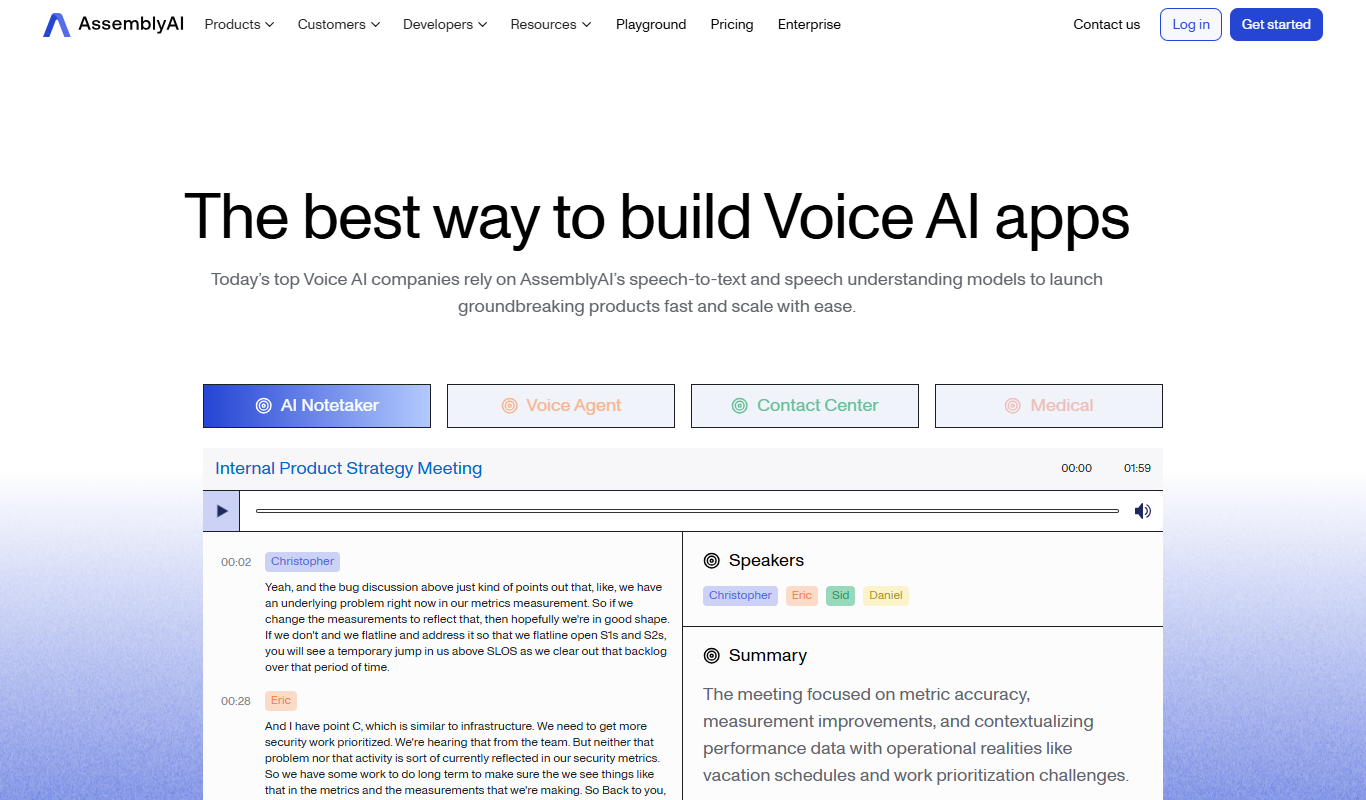

What is AssemblyAI?
AssemblyAI is a developer-focused AI platform providing advanced speech-to-text transcription and audio intelligence APIs. It leverages deep learning models to convert spoken language into text with high accuracy and speed. Beyond transcription, AssemblyAI offers features like content moderation, topic detection, sentiment analysis, and entity recognition to extract meaningful insights from audio data.
Key features of AssemblyAI
AssemblyAI’s main features include real-time and batch transcription, speaker diarization, punctuation and formatting, content safety detection, topic detection, and customizable models. Its easy-to-use REST API allows developers to integrate speech recognition and audio analysis into applications seamlessly.
High Accuracy Speech Recognition
Utilizes state-of-the-art deep learning models to deliver precise transcriptions even in challenging audio conditions.
Content Moderation and Safety
Automatically detects profanity, hate speech, and other sensitive content within audio.
Speaker Diarization
Identifies and separates different speakers in multi-person conversations.
Topic and Sentiment Detection
Extracts topics discussed and the sentiment expressed in the audio content.
Easy API Integration
Simple RESTful API design with comprehensive documentation and SDKs for multiple programming languages.
Pros and cons of AssemblyAI
Pros
- High transcription accuracy with advanced AI models
- Comprehensive audio analysis features beyond transcription
- Developer-friendly API with clear documentation
- Flexible pricing including a free tier
- Fast processing times suitable for real-time applications
Cons
- Limited language support primarily to English
- No native desktop or mobile apps; API only
- Advanced features may require technical integration effort
Key use cases for AssemblyAI
Automated Transcription
Convert audio and video files into accurate text transcripts quickly using AI-powered speech recognition.
Audio Content Analysis
Extract insights such as sentiment, topics, and content moderation from audio using advanced AI models.
Voice Search and Commands
Integrate speech-to-text capabilities into applications for voice-enabled user interfaces and commands.
Media Captioning and Subtitling
Generate captions and subtitles for videos automatically to improve accessibility and engagement.
Call Center Analytics
Analyze customer service calls for quality assurance, sentiment analysis, and compliance monitoring.
How AssemblyAI works
- 1
Sign Up and Get API Key
Create an account on AssemblyAI’s website and obtain your unique API key for authentication.
- 2
Upload Audio or Video
Send your audio or video files to AssemblyAI via the API for processing.
- 3
Request Transcription
Initiate a transcription job through the API, specifying any additional features like speaker labels or content moderation.
- 4
Receive and Use Results
Retrieve the transcription and analysis results from the API and integrate them into your application or workflow.
Who is using AssemblyAI
AssemblyAI pricing
Free
Free
Free tier with up to 185 hours of pre-recorded transcription and up to 333 hours of streaming transcription; no credit card required.
Pay as you go
Pre-recorded speech-to-text from $0.15/hr (Universal-2) or $0.21/hr (Universal-3.5 Pro)
Pay-as-you-go after the free start, with no commitments required.
Custom
Custom pricing
Custom rate limits, enhanced concurrency and enterprise-grade flexibility tailored to AI workloads; contact sales.
Plans and prices are as published by the vendor and can change. Check the official site before you buy. Open the pricing page (opens in a new tab)
Compare similar tools
How AssemblyAI lines up against the tools people weigh it against.
AssemblyAI Whisper AI
Assemblyai vs Whisper AI: Voice Quality, Cloning & Pricing Compared
AssemblyAI Deepgram
Assemblyai vs Deepgram: Enterprise Features & Compliance
Frequently asked questions about AssemblyAI
AssemblyAI supports common audio and video formats including MP3, WAV, MP4, M4A, and more.
Yes, it offers speaker diarization to identify and label different speakers in a conversation.
There is no strict limit, but very long files may require chunking or batch processing.
Yes. Universal-2 supports 99 languages, and Universal-3.5 Pro works across 18 languages with native code switching.
It depends on your specific needs and how you plan to use the tool. The official website and documentation are the best sources for the latest details.
Yes, it can help with that use case depending on how you configure it and what features are available. You’ll get the best results with clear inputs and a defined goal.
Yes, it can help with that use case depending on how you configure it and what features are available. You’ll get the best results with clear inputs and a defined goal.
Conclusion
Audio reaches AssemblyAI through its APIs, with separate pre-recorded, realtime and sync speech-to-text endpoints. Pre-recorded transcripts are available in 99 languages, and speaker diarization segments a conversation to show what each speaker said. A Speech Understanding API extracts speaker ID, sentiment, chapters and summaries in one call, while guardrails redact PII and moderate content.
The service targets developers building voice into products, with voice agents, AI notetakers, call analytics and medical transcription among its use cases. Before writing code, users can test the models in a no-code playground. Billing starts free with no credit card, then moves to hourly pay-as-you-go rates that differ by model, with add-ons such as speaker diarization charged on top. Realtime transcription on Universal-Streaming covers English only, while its multilingual variant supports Spanish, German, French, Portuguese and Italian as well.
Sources
Sign in to review this tool.
Sign In to ReviewNo reviews yet
Be the first to share how this tool worked for you.
Ask about pricing, limits, or how it compares — or answer someone else.
Sign In to AskNo questions yet
Have a question about using or paying for this tool? Be the first to ask.
Featured on TiorAI



Alternative Tools
Explore similar AI tools that might fit your needs

ChatGPT
ChatGPT is an AI chatbot by OpenAI powered by GPT-4o. It handles writing, coding, research, data analysis, and natural conversation. Free tier available, Plus at $20/month.

Claude
Claude is an AI assistant by Anthropic with a 200K token context window built on Constitutional AI for safer responses. Free tier available, Pro at $20/month.

Gemini & Gemini Advanced
Gemini and Gemini Advanced are Google’s advanced AI language models designed for conversational AI, content generation, and coding assistance, supporting multiple languages and accessible via web and API.

Canva
Canva is an online design platform with Magic Design, Magic Write, and Text to Image AI tools. Offers 1M+ templates for graphics, presentations, and videos. Free plan available, Canva Pro at $15/month.

Notion AI
Notion AI is an AI-powered assistant embedded in the Notion workspace that helps users generate, edit, and summarize content to boost productivity and collaboration.

Grammarly
Grammarly is an AI-based writing assistant that provides real-time grammar, spelling, punctuation, style, and tone suggestions to improve written communication across web, desktop, and mobile platforms.

Midjourney
Midjourney is an AI image generation tool creating high-quality artwork from text prompts via Discord. Plans start at $10/month. Known for exceptional visual quality with Midjourney V6.

ElevenLabs
ElevenLabs is an AI platform that converts text into natural-sounding speech and allows voice cloning from audio samples, supporting multiple languages and offering an API for integration.

Perplexity AI
Perplexity AI is an AI search engine delivering real-time cited answers using GPT-4o and Claude 3.5. Free tier available, Pro at $20/month.

Runway
Runway is a cloud-based AI platform that enables creators and developers to edit videos, generate images from text, and apply advanced AI effects through an intuitive interface and API access.
More AI Audio Editing tools
Other tools in the same category, for when this one is not quite the fit.

Krisp AI
Krisp AI is a noise cancelling application that removes background noise from audio calls and recordings in real-time using AI, improving voice clarity across multiple platforms.

Descript
Descript is an AI-driven audio and video editing platform that allows users to edit media by editing transcripts, includes AI transcription and AI Speech voice clones, and supports collaboration.