

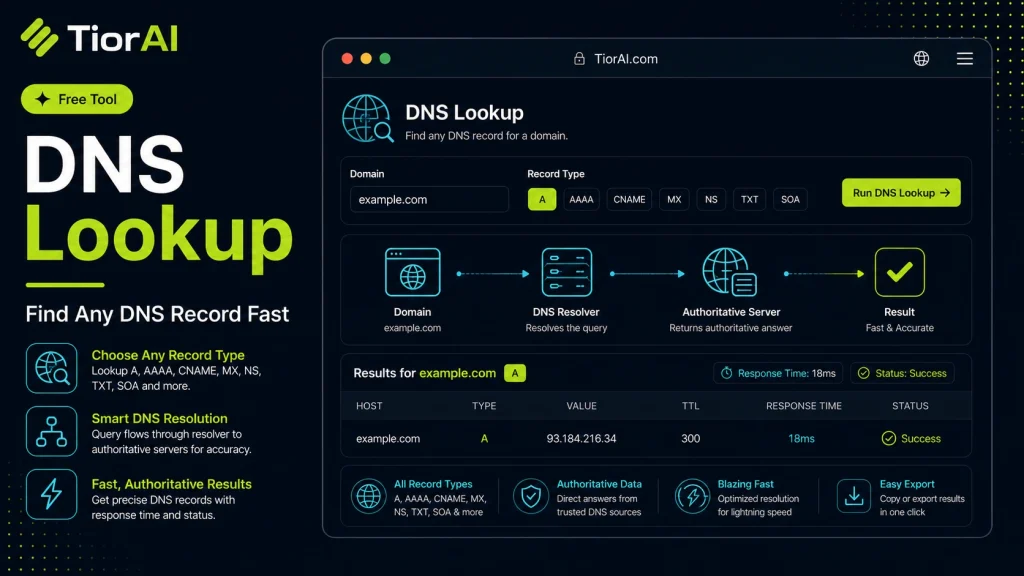
What Each Record Type Does
- A
- IPv4 address the name points to.
- AAAA
- IPv6 address the name points to.
- CNAME
- Alias pointing this name at another name.
- MX
- Mail servers that accept email for the domain, lowest priority first.
- NS
- Authoritative name servers for the zone.
- TXT
- Free-form text records — SPF, DMARC, and domain-verification strings.
- SOA
- Start of authority: the zone master, its contact, and the cache timers.
- SRV
- Host and port for a named service.
- CAA
- Certificate authorities allowed to issue certificates for the domain.
TTL is how long resolvers may cache a record. After you change DNS, expect the old value to keep answering for up to one TTL.
How to use it
- Enter Domain or IP Enter the domain name, IP address, or URL into the Dns Lookup to start the lookup or analysis.
- Run the Check Click the check button to query the relevant databases. Results are retrieved and displayed in seconds.
- Analyze the Results Review the detailed results including status, records, and diagnostics to troubleshoot or verify your query.
Tip The Dns Lookup checks multiple databases simultaneously, saving you the time of querying each one individually.
Understanding DNS and DNS Lookup
The Domain Name System (DNS) is a fundamental component of the internet that translates human-readable domain names (like example.com) into IP addresses (like 93.184.216.34) that computers use to identify each other on the network. Without DNS, users would need to remember complex numeric IP addresses to visit websites.
A DNS lookup is the process of querying DNS servers to retrieve information about a domain name. This information can include the IP address associated with the domain, mail server details, name server records, and other DNS record types.
Why DNS Lookups Are Needed
- To resolve domain names into IP addresses so browsers can load websites.
- To verify DNS configurations when setting up websites, email servers, or other internet services.
- To troubleshoot connectivity issues related to domain name resolution.
DNS lookups are performed automatically by your device when you visit a website, but manual DNS lookups are useful for diagnostics and configuration verification. They help network administrators, developers, and IT professionals ensure that DNS records are correctly set and that domains resolve as intended.
What is DNS Lookup?
DNS lookup is the process of querying the Domain Name System to obtain information about a domain name, such as its IP address or other DNS records. This process is essential because it translates user-friendly domain names into machine-readable IP addresses, enabling devices to locate and communicate with each other on the internet.
When to Use a DNS Lookup Tool
- Verifying that a domain’s IP address has propagated correctly after DNS changes.
- Checking mail exchange (MX) records when setting up or troubleshooting email servers.
- Confirming name server (NS) records during domain registration or transfer.
- Troubleshooting domain resolution problems to ensure DNS records are properly configured.
- Investigating potential DNS-related security issues like spoofing.
Common Mistakes with DNS Lookup Tools
- Assuming a successful DNS lookup means the website is accessible; DNS resolution is only one part of connectivity.
- Not specifying the correct DNS record type, which can lead to incomplete or confusing results.
Technical Context
DNS records come in various types, each serving a distinct role. For example, A records map domain names to IPv4 addresses, while MX records specify mail servers. DNS lookups query these records from authoritative servers or caches. Because DNS information is cached to improve performance, changes to DNS records may not appear immediately due to the configured TTL (Time To Live) values.
Using a DNS lookup tool helps network administrators and developers verify that DNS settings are correct, diagnose issues, and ensure reliable internet connectivity.
Frequently asked questions
Reviews and questions
Whether this tool gave people the answer they needed, and what they asked about it.
Sign in to review this tool.
Sign In to ReviewNo reviews yet
Be the first to say whether this tool gave you what you needed.
Ask how to read the result, or what the tool does with an edge case — or answer someone else.
Sign In to AskNo questions yet
Not sure how to read a result? Be the first to ask.
AI tools related to this topic
Tools from the TiorAI directory that work on the same kind of job.

Action Network
Action Network is a free digital organizing platform designed for progressive activists and nonprofits to manage petitions, fundraising, email and SMS outreach, and events.

Layla Network AI
Layla Network AI is an AI-driven platform that automates network monitoring, anomaly detection, and troubleshooting to improve network reliability and operational efficiency.