

Whatfix Digital Adoption Platform for User Onboarding and Training Solutions
Whatfix is a digital adoption platform that helps businesses create interactive in-app guidance and walkthroughs to improve user onboarding, training, and software adoption.
- Best for
- User Onboarding
- Key capability
- Interactive Walkthroughs
Save Whatfix, follow its updates and vote on it — everything stays in your account.
Sign in or create a free account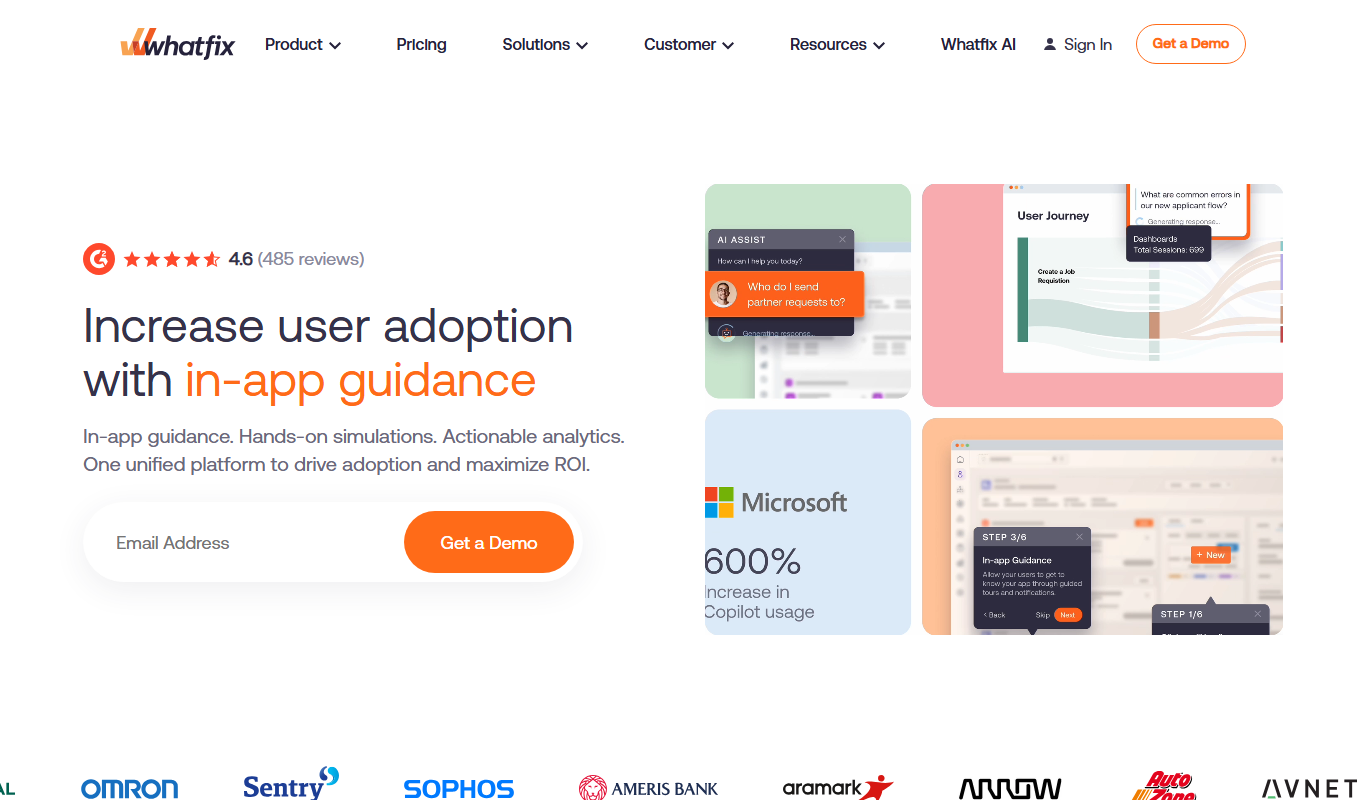
What is Whatfix?
Whatfix is a digital adoption platform designed to simplify software onboarding and training by providing interactive, in-app guidance and walkthroughs. It helps organizations improve user engagement, reduce support costs, and accelerate software adoption through contextual, step-by-step assistance embedded directly within applications.
Key features of Whatfix
Whatfix offers features such as customizable interactive walkthroughs, tooltips, self-help widgets, analytics dashboards, and multi-language support to enhance user learning and engagement across web and desktop platforms.
Interactive Walkthroughs
Create step-by-step guides that walk users through complex workflows within your software.
Self-Help Widgets
Provide users with on-demand help and FAQs accessible directly inside the application.
Multi-Language Support
Deliver content in multiple languages to support global user bases.
Analytics Dashboard
Gain insights into user engagement and content performance to optimize training materials.
No-Code Editor
Build and customize guidance content without requiring programming skills.
Pros and cons of Whatfix
Pros
- Intuitive no-code content creation
- Supports multiple platforms and languages
- Robust analytics for user engagement
- Reduces training and support costs
- Highly customizable interactive guides
Cons
- Pricing is custom and may be expensive for small businesses
- Steep learning curve for advanced customization
- Limited offline support capabilities
Key use cases for Whatfix
User Onboarding
Create interactive walkthroughs and guides to help new users learn software applications quickly and effectively.
Employee Training
Deliver in-app training content to employees to improve productivity and reduce training time.
Product Adoption
Increase adoption rates of new software features by providing contextual help and step-by-step guidance.
Customer Support
Reduce support tickets by enabling users to self-serve with interactive help and FAQs integrated within the application.
Change Management
Facilitate smooth transitions during software updates or migrations with targeted user assistance.
How Whatfix works
- 1
Integration
Integrate Whatfix with your web or desktop application using their SDK or browser extension.
- 2
Content Creation
Use Whatfix’s no-code editor to create interactive guides, tooltips, and walkthroughs tailored to your users.
- 3
Deployment
Deploy the created content within your application to provide real-time, contextual assistance.
- 4
User Engagement
Users interact with the guides to learn features, complete tasks, or resolve issues without leaving the app.
- 5
Analytics & Optimization
Track user behavior and content effectiveness to continuously improve the onboarding experience.
Who is using Whatfix
Whatfix pricing
Free Trial
$0 for 14 days
Access core features to evaluate the platform with limited usage.
Enterprise
Custom pricing
Tailored plans with advanced features, integrations, and dedicated support.
Plans and prices are as published by the vendor and can change. Check the official site before you buy. Open the pricing page (opens in a new tab)
Frequently asked questions about Whatfix
Whatfix supports web applications, desktop software, and mobile platforms through its SDKs and browser extensions.
No, Whatfix provides a no-code editor that allows users to create interactive guides without programming knowledge.
Yes, Whatfix supports multi-language content to cater to users in different regions.
Yes, it offers analytics dashboards to track user engagement and the effectiveness of guidance content.
It depends on your specific needs and how you plan to use the tool. The official website and documentation are the best sources for the latest details.
It depends on your specific needs and how you plan to use the tool. The official website and documentation are the best sources for the latest details.
It depends on your specific needs and how you plan to use the tool. The official website and documentation are the best sources for the latest details.
Conclusion
Whatfix delivers guidance inside an application itself, where users learn features, complete tasks or resolve issues without leaving the app. Setup begins by integrating it with a web or desktop application through an SDK or browser extension. Guides, tooltips and walkthroughs are then created in a no-code editor, so programming knowledge is not required. Self-help widgets put FAQs and on-demand help inside the product, and an analytics dashboard shows user engagement and content performance.
The platform serves enterprise software companies, customer success teams and HR and training departments. Content can be delivered in multiple languages to support global user bases. Pricing is custom, with tailored enterprise plans, and a free trial with limited usage is available for evaluating the platform first.
Sources
Sign in to review this tool.
Sign In to ReviewNo reviews yet
Be the first to share how this tool worked for you.
Ask about pricing, limits, or how it compares — or answer someone else.
Sign In to AskNo questions yet
Have a question about using or paying for this tool? Be the first to ask.
Featured on TiorAI



Alternative Tools
Explore similar AI tools that might fit your needs
WalkMe
WalkMe is a digital adoption platform that provides interactive walkthroughs, task automation, and analytics to help organizations improve software adoption and user engagement.

Userpilot
Userpilot is a no-code SaaS platform that enables companies to create personalized user onboarding experiences, feature adoption flows, and in-app messaging to boost engagement and retention.

Pendo
Pendo is a product experience platform that provides product analytics, in-app guidance, and user feedback tools to help SaaS companies improve user onboarding, feature adoption, and customer retention.
More AI Workflow tools
Other tools in the same category, for when this one is not quite the fit.

Intuit ProConnect
Intuit ProConnect is a cloud-based tax software designed for professional accountants and tax firms to prepare, review, and electronically file federal and state tax returns efficiently.

LogicManager
LogicManager is a cloud-based governance, risk, and compliance software platform designed to help organizations identify, assess, and mitigate risks while ensuring regulatory compliance through audit, policy, and incident management tools.
Clinked
Clinked is a secure client portal platform that enables businesses to collaborate with clients and teams through file sharing, task management, messaging, and workflow automation in a branded environment.

Unacademy
Unacademy is an Indian online education platform providing live classes, recorded lectures, and test series for competitive exams and skill development.

ScriptRunner
ScriptRunner is an automation platform that centralizes management, security, and execution of PowerShell scripts to streamline IT workflows and enable self-service automation.

RELEX Solutions
RELEX Solutions is an AI-powered supply chain management platform that helps retailers and wholesalers optimize demand forecasting, inventory, and workforce planning to improve efficiency and reduce costs.
Things 3
Things 3 is a premium task management app designed exclusively for Apple devices, offering intuitive task creation, project organization, and seamless iCloud syncing to boost productivity.

Ziflow
Ziflow is an online proofing software that helps creative teams review, annotate, and approve digital assets efficiently through automated workflows and real-time collaboration.