

From my experience with OurFamilyWizard, I found it excels at providing a structured and neutral platform for co-parents to communicate and manage shared responsibilities. The clear documentation and shared calendar features help reduce misunderstandings and conflicts, which is crucial in sensitive family situations. While the subscription cost and English-only support may limit accessibility for some, the tool’s focus on security and court-admissible records makes it particularly valuable for parents navigating custody arrangements. Overall, if you need a reliable way to organize co-parenting logistics and communication, OurFamilyWizard delivers practical and effective solutions.
OurFamilyWizard Co-Parenting App for Family Communication and Scheduling
OurFamilyWizard is a co-parenting communication platform designed to help separated parents coordinate schedules, share information, track expenses, and communicate securely to reduce conflict.
- Best for
- Co-Parent Communication
- Key capability
- Shared Parenting Calendar
Do you recommend this tool?
What is OurFamilyWizard?
OurFamilyWizard is a specialized co-parenting communication platform designed to help separated or divorced parents manage their shared responsibilities. It offers tools to facilitate communication, scheduling, expense tracking, and information sharing in a secure, neutral environment. The platform aims to reduce conflict and improve cooperation by providing clear documentation and easy access to shared family information.
Key features of OurFamilyWizard
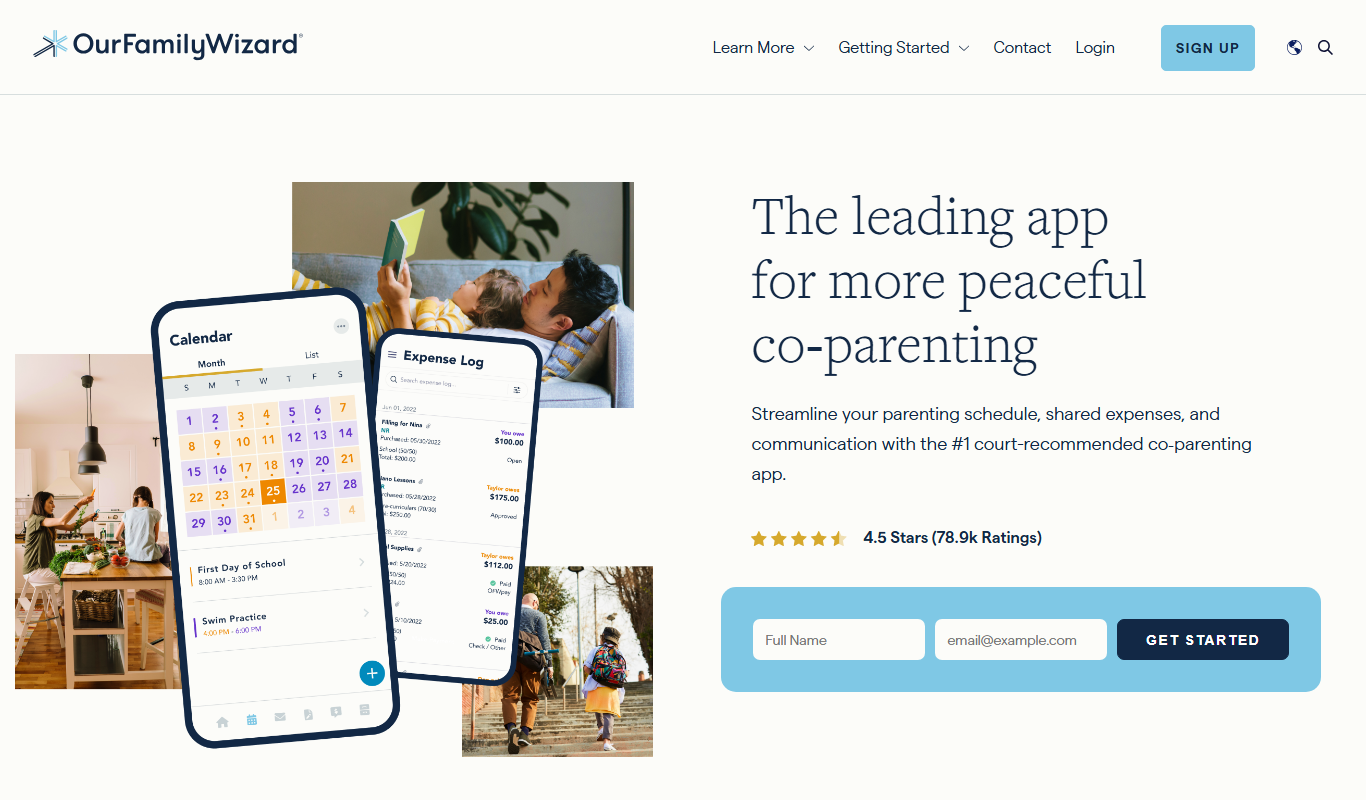
The main features include a shared parenting calendar, messaging system with read receipts, expense log and reimbursement requests, information vault for important documents, and a journal for recording events or concerns. These features help parents stay organized and maintain transparent communication.
Shared Parenting Calendar
Coordinate custody schedules, appointments, and events with real-time updates.
Secure Messaging System
Communicate with read receipts and message archiving to reduce misunderstandings.
Expense Log and Reimbursement Requests
Track child-related expenses and request reimbursements with clear documentation.
Information Vault
Store and share important documents like medical records and school information securely.
Journal Feature
Record observations, concerns, or notes related to parenting and child welfare.
Pros and cons of OurFamilyWizard
Pros
- Reduces conflict by providing a neutral communication platform
- Comprehensive tools tailored for co-parenting needs
- Secure and court-admissible documentation
- User-friendly interface on multiple platforms
Cons
- Subscription cost may be a barrier for some families
- Limited language support (English only)
- No free tier available
Key use cases for OurFamilyWizard
Co-Parent Communication
Facilitates clear and documented communication between separated or divorced parents to reduce conflict.
Shared Parenting Calendar
Allows parents to coordinate and manage custody schedules, appointments, and events in a shared calendar.
Expense Tracking and Reimbursement
Enables parents to log and track child-related expenses and request reimbursements through the platform.
Information Sharing
Provides a secure place to share important information such as medical records, school reports, and emergency contacts.
Journal and Message Logging
Keeps a record of messages and journal entries to provide documentation for legal or personal reference.
How OurFamilyWizard works
- 1
Create an Account
Parents sign up individually or together to create their OurFamilyWizard accounts.
- 2
Set Up Family Details
Enter family members, custody schedules, and important contacts to personalize the platform.
- 3
Use Shared Tools
Utilize the calendar, messaging, expense tracking, and information vault to manage co-parenting tasks.
- 4
Maintain Documentation
All communications and transactions are logged automatically for easy reference and legal use.
Who is using OurFamilyWizard
Separated or divorced parents
Family law professionals
Mediators and counselors
Child custody case managers
Parents seeking organized co-parenting solutions
OurFamilyWizard pricing
Monthly Subscription
$19.95/month
Access to all features with monthly billing.
Annual Subscription
$199.95/year
Discounted rate for yearly commitment with full feature access.
Plans and prices are as published by the vendor and can change. Check the official site before you buy. Open the pricing page (opens in a new tab)
Frequently asked questions about OurFamilyWizard
Yes, many courts accept OurFamilyWizard records as evidence in custody and family law cases.
Yes, both parents have individual accounts linked to the same family profile for shared access.
OurFamilyWizard uses encryption and secure servers to protect user data and privacy.
Yes, OurFamilyWizard is available on iOS and Android devices as well as through web browsers.
It depends on your specific needs and how you plan to use the tool. The official website and documentation are the best sources for the latest details.
Some tools offer a free plan or trial with limited features. Availability can vary, so confirm on the official website.
Yes, it can help with that use case depending on how you configure it and what features are available. You’ll get the best results with clear inputs and a defined goal.
Sign in to review this tool.
Sign In to ReviewNo reviews yet
Be the first to share how this tool worked for you.
Ask about pricing, limits, or how it compares — or answer someone else.
Sign In to AskNo questions yet
Have a question about using or paying for this tool? Be the first to ask.
Featured on TiorAI



Alternative Tools
Explore similar AI tools that might fit your needs

Free
2Houses
2Houses is a co-parenting app that helps separated parents manage custody schedules, expenses, and communication in one secure platform.
More AI Parenting tools
Other tools in the same category, for when this one is not quite the fit.
Freemium
Toca Boca
Toca Boca offers a suite of safe, creative mobile apps for children that encourage open-ended play and learning without ads or in-app purchases.

Free
Articulation Station
Articulation Station is a mobile app by Little Bee Speech that helps children practice and improve their speech articulation through interactive exercises and audio modeling.

Subscription
Accountable2You
Accountable2You is a parental control and accountability software that helps families and individuals monitor device usage, receive alerts on risky content, and manage screen time across multiple platforms.

One-time purchase
SneakPeek Early Gender DNA Test
SneakPeek Early Gender DNA Test is an at-home prenatal DNA test that accurately predicts your baby's gender from 8 weeks into pregnancy using a simple blood sample.

Free
MyTherapy
MyTherapy is a free medication reminder and health tracking app designed to help people manage chronic illnesses by providing timely medication alerts, symptom tracking, and health report generation.

Free
Medisafe
Medisafe is a medication management app that provides personalized reminders, drug interaction warnings, and health tracking to help users take medications safely and on time.
Free
AsthmaMD
AsthmaMD is a mobile and web app designed to help individuals with asthma track symptoms, manage medications, and create personalized asthma action plans to improve respiratory health.

Free
TeacherKit
TeacherKit is a classroom management software that helps teachers organize student data, track attendance, manage grades, and monitor behavior through web and mobile apps.