

From my experience with GeneratePress, I found it excels at delivering a fast and lightweight foundation for WordPress websites without sacrificing customization. Its modular design allows users to enable only the features they need, which keeps sites lean and performant. After spending time with the theme, I can say it’s particularly well-suited for developers and small business owners who want a reliable, SEO-friendly theme that integrates smoothly with WooCommerce and popular page builders. However, the free version is quite basic, so unlocking advanced customization requires purchasing the premium plan. Overall, if you need a flexible and performance-optimized WordPress theme, GeneratePress delivers solid results.
GeneratePress WordPress Theme for Fast, Lightweight Website Design
GeneratePress is a lightweight and highly customizable WordPress theme designed for fast, responsive websites with WooCommerce support.
- Best for
- Website Development
- Key capability
- Lightweight and Fast
Your actions
Save GeneratePress, follow its updates and vote on it — everything stays in your account.
Sign in or create a free account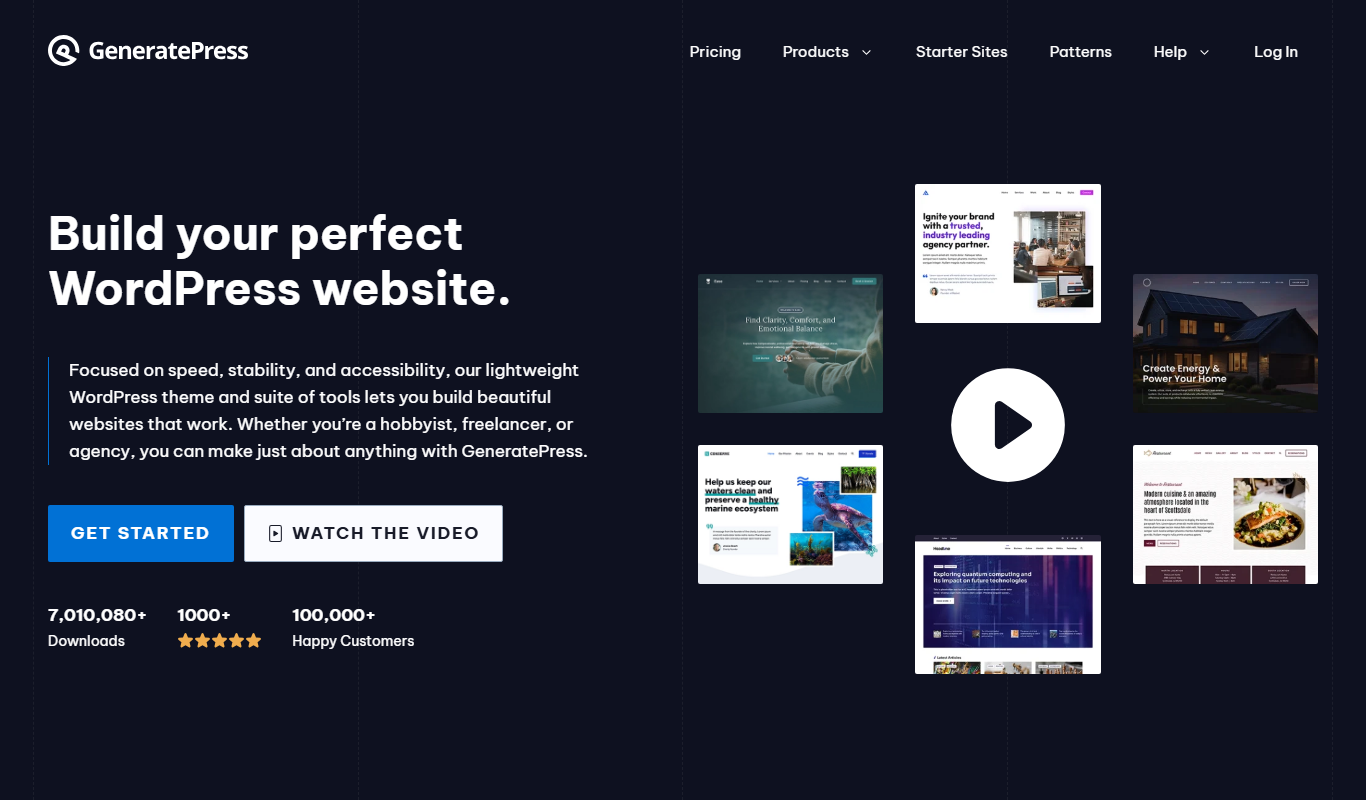
What is GeneratePress?
GeneratePress is a lightweight, fast, and highly customizable WordPress theme designed to help users build professional websites with ease. It focuses on performance and usability, offering a modular approach that allows users to enable only the features they need. Suitable for beginners and developers alike, GeneratePress supports responsive design, accessibility standards, and compatibility with popular page builders.
Key features of GeneratePress
GeneratePress offers a modular design system, extensive customization options via the WordPress Customizer, compatibility with major page builders like Elementor and Beaver Builder, WooCommerce integration, and a focus on speed and SEO best practices.
Lightweight and Fast
Minimal codebase ensures quick loading times and better performance.
Modular Design
Enable or disable features as needed to keep the site lean.
Responsive Layout
Automatically adapts to all screen sizes for mobile-friendly websites.
WooCommerce Support
Seamless integration with WooCommerce for building online stores.
Accessibility Ready
Built to meet WCAG 2.0 standards for accessible web content.
Developer Friendly
Clean code, hooks, and filters for easy customization and extension.
Pros and cons of GeneratePress
Pros
- Extremely lightweight and fast loading
- Highly customizable without coding
- Strong WooCommerce support
- Regular updates and active support
- Accessibility and SEO optimized
Cons
- Advanced customization requires premium purchase
- Limited built-in design elements in free version
- No built-in page builder (relies on third-party plugins)
Key use cases for GeneratePress
Website Development
Build fast, lightweight, and responsive websites using a flexible WordPress theme.
Customizable Design
Create unique website layouts with extensive customization options without coding.
Performance Optimization
Improve website speed and SEO rankings by using a theme optimized for performance.
E-commerce Sites
Develop WooCommerce-compatible online stores with seamless integration.
Blogging
Set up clean and readable blogs with various typography and layout options.
How GeneratePress works
- 1
Install the Theme
Download and install the free GeneratePress theme from the WordPress repository.
- 2
Activate the Theme
Activate GeneratePress on your WordPress site to start customizing.
- 3
Customize Settings
Use the WordPress Customizer to adjust colors, typography, layout, and enable modules.
- 4
Add Plugins or Page Builders
Enhance your site with compatible plugins or page builders for advanced layouts.
- 5
Publish Your Site
Once satisfied with the design and content, publish your website for visitors.
Who is using GeneratePress
WordPress developers
Small business owners
Bloggers and content creators
E-commerce entrepreneurs
Marketing agencies
GeneratePress pricing
Free
$0
Basic theme with core features available from the WordPress repository.
Premium
$59/year
Access to all premium modules, site library, updates, and support for one year.
Lifetime
$249 one-time
Lifetime access to premium features, updates, and support.
Plans and prices are as published by the vendor and can change. Check the official site before you buy. Open the pricing page (opens in a new tab)
Frequently asked questions about GeneratePress
Yes, the core GeneratePress theme is free and available on the WordPress repository.
Premium includes modules for advanced customization, a site library with pre-built templates, and premium support.
Yes, GeneratePress is compatible with popular page builders like Elementor and Beaver Builder.
Yes, it offers full WooCommerce integration for building online stores.
It depends on your specific needs and how you plan to use the tool. The official website and documentation are the best sources for the latest details.
Yes, it can help with that use case depending on how you configure it and what features are available. You’ll get the best results with clear inputs and a defined goal.
It depends on your specific needs and how you plan to use the tool. The official website and documentation are the best sources for the latest details.
Sign in to review this tool.
Sign In to ReviewNo reviews yet
Be the first to share how this tool worked for you.
Ask about pricing, limits, or how it compares — or answer someone else.
Sign In to AskNo questions yet
Have a question about using or paying for this tool? Be the first to ask.
Featured on TiorAI



Alternative Tools
Explore similar AI tools that might fit your needs

Freemium
Astra
Astra is an AI-driven cybersecurity platform that automates vulnerability scanning, penetration testing, and cloud security monitoring to help businesses detect and remediate security threats efficiently.
More Coding & Development tools
Other tools in the same category, for when this one is not quite the fit.

Enterprise
Dataiku
Dataiku is a collaborative AI and data science platform that enables organizations to prepare data, build machine learning models, and deploy AI solutions at scale.
Free
Favicon.cc
Favicon.cc is a free web-based pixel editor that allows users to create and animate favicons easily without installing software.
Enterprise
Rescale
Rescale is a cloud HPC platform that provides scalable computing resources and software for engineering simulations and scientific computing, enabling faster and more cost-effective workflows.

Free
Locust
Locust is an open source Python-based load testing tool that allows developers to simulate millions of users to test web application and API performance with real-time monitoring and distributed scalability.

Free
k6
k6 is an open-source load testing tool that uses JavaScript to script performance tests for web applications and APIs, supporting local and cloud execution with integrations for CI/CD pipelines.

Free
ShareX
ShareX is a free, open-source Windows application that enables advanced screen capturing, screen recording, image editing, and automated file sharing.

Free
Twingate
Twingate is a zero trust network access solution that provides secure, direct remote access to private resources without traditional VPNs, improving security and user experience.

Free
VGG Image Annotator
VGG Image Annotator is a free, browser-based tool for manual image and video annotation supporting multiple shapes and export formats, developed by the University of Oxford.