

YouTube Embed Code Generator
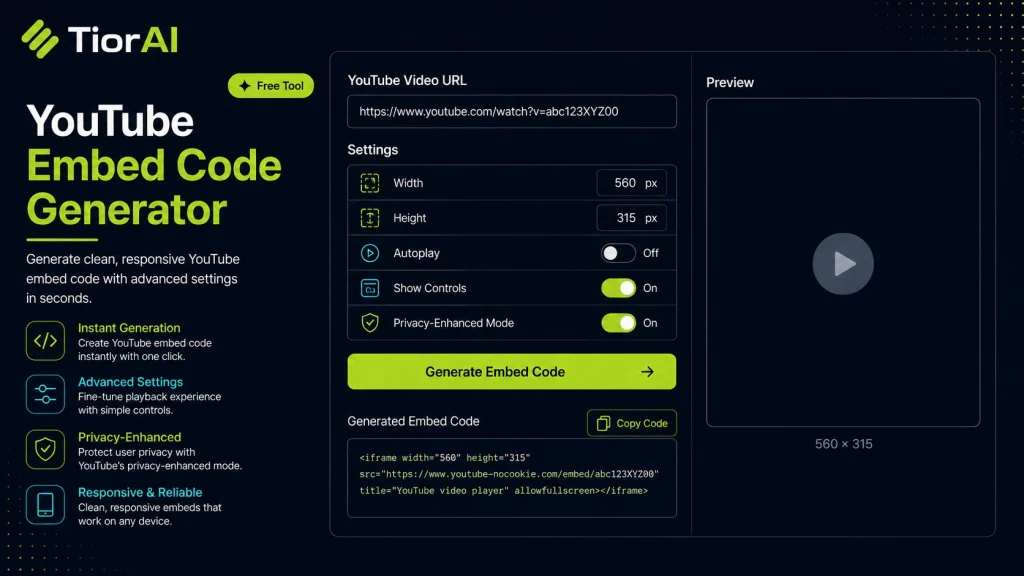
Understanding YouTube Embed Codes Embedding YouTube videos involves inserting an HTML <iframe> element that loads the video player directly on your webpage. This allows visitors to watch videos without leaving your site. The embed code contains the video URL and optional parameters controlling size, autoplay,…
How to use it
- Paste Your Input Paste your code or data into the Youtube Embed Code Generator. The tool accepts standard input formats and validates your entry.
- Process and Transform Click the action button to process your input. Results are generated instantly with proper formatting.
- Export the Output Copy the processed output to your clipboard or download it for use in your development workflow.
Tip The Youtube Embed Code Generator validates your input on the fly, catching syntax errors before they become bugs in production.
About YouTube Embed Code Generator
Embedding a YouTube video on a website involves inserting a snippet of HTML code that displays the video player directly within a webpage. This is typically done using an <iframe> element, which loads the video from YouTube’s servers while allowing visitors to watch it without leaving the site.
Generating an embed code means creating this HTML snippet with the correct video URL and optional parameters such as size, autoplay, or controls. This process is essential because it ensures the video is displayed properly and responsively on different devices and browsers.
Why generate embed codes?
- Ease of integration: Instead of manually writing HTML, a generator produces the correct code instantly.
- Customization: You can adjust video dimensions, enable autoplay, or hide controls to fit your site’s design.
- Compatibility: Embed codes follow YouTube’s standards, ensuring videos load securely and reliably.
Common scenarios include embedding tutorial videos in blog posts, showcasing product demos on e-commerce sites, or adding video testimonials on landing pages. Using a generator simplifies the process, especially for users unfamiliar with HTML or YouTube’s embed parameters.
Understanding YouTube Embed Codes
Embedding YouTube videos involves inserting an HTML <iframe> element that loads the video player directly on your webpage. This allows visitors to watch videos without leaving your site. The embed code contains the video URL and optional parameters controlling size, autoplay, and controls.
Generating this code ensures the video is displayed correctly and responsively across devices. It also simplifies integration, especially for users unfamiliar with HTML or YouTube’s embed options.
When to Use a YouTube Embed Code Generator
- To display videos inline on blogs, tutorials, or product pages without redirecting users.
- When you need to customize the video player’s size or behavior, such as enabling autoplay or hiding controls.
- To ensure the embed code is formatted correctly and compatible with modern browsers.
- When embedding playlists or using privacy-enhanced mode for better user data protection.
Common Mistakes to Avoid
- Copying the video URL instead of the embed code, which results in a link rather than an embedded player.
- Not adjusting width and height, causing display issues on your site.
- Omitting privacy or security parameters like HTTPS or privacy-enhanced mode.
- Using autoplay without considering browser restrictions and user experience.
Frequently asked questions
autoplay=1 in the embed URL within the iframe code, but be aware that some browsers restrict autoplay with sound.rel=0 to the embed URL parameters to limit related videos to those from the same channel, but completely disabling them is no longer supported by YouTube.Reviews and questions
Whether this tool gave people the answer they needed, and what they asked about it.
Sign in to review this tool.
Sign In to ReviewNo reviews yet
Be the first to say whether this tool gave you what you needed.
Ask how to read the result, or what the tool does with an edge case — or answer someone else.
Sign In to AskNo questions yet
Not sure how to read a result? Be the first to ask.