

Unicode to ASCII Converter
Understanding Unicode to ASCII Conversion Unicode and ASCII are character encoding standards that computers use to represent text. ASCII is limited to 128 characters, mainly English letters and basic symbols, while Unicode covers a vast range of characters from many languages and symbol sets. A…
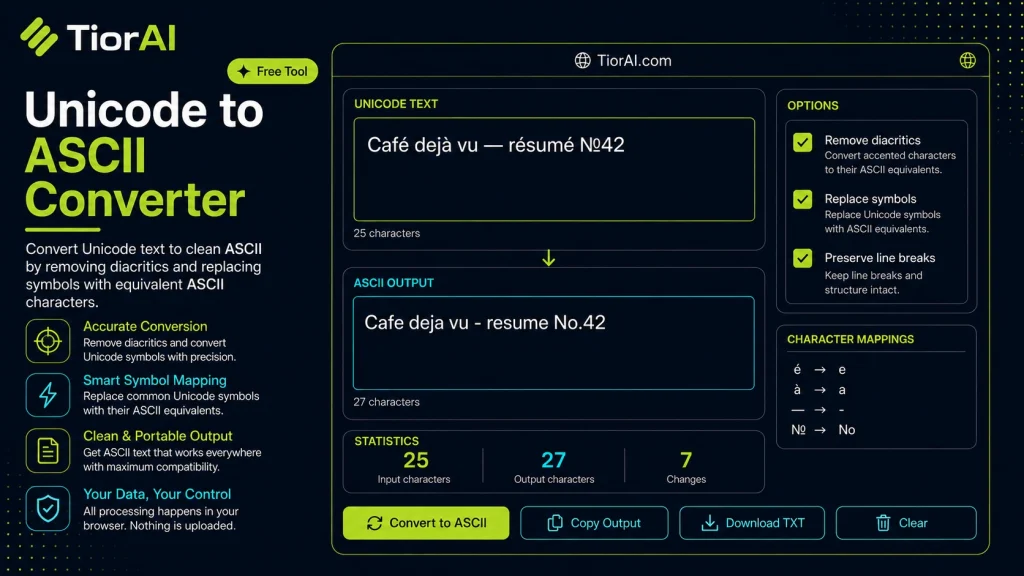
| Input | Code Point | Result | Note |
|---|
How to use it
- Enter Your Input Value Type or paste the value you want to convert into the input field. The tool accepts any numeric value.
- Select Units and Convert Choose your source and target units from the dropdown menus. The converted result appears instantly.
- Copy or Use the Result Click copy to grab the converted value for use in your project, document, or calculation.
Tip Chain multiple conversions by copying the output and pasting it as the next input - works seamlessly.
About Unicode to ASCII Converter
Unicode and ASCII are both character encoding standards used to represent text in computers, but they serve different purposes and scopes. ASCII (American Standard Code for Information Interchange) is a 7-bit encoding scheme that represents 128 characters, including English letters, digits, and basic punctuation. It is limited to the English alphabet and lacks support for accented characters, symbols, or characters from other languages.
Unicode, on the other hand, is a comprehensive encoding system designed to cover virtually all characters and symbols used worldwide, including emojis, mathematical symbols, and scripts from many languages. It uses multiple bytes per character, allowing for over a million possible code points.
A Unicode to ASCII converter transforms Unicode text into ASCII by replacing or approximating characters that cannot be directly represented in ASCII. This process is necessary because some systems, legacy software, or protocols only support ASCII characters. For example, when sending emails through older servers, working with plain text files, or interfacing with systems that do not support Unicode, converting to ASCII ensures compatibility.
Common scenarios include:
- Removing accents and diacritics from letters (e.g., converting “é” to “e”).
- Replacing special symbols with ASCII equivalents or placeholders.
- Preparing text for environments that only accept ASCII input.
While this conversion can result in some loss of information, it enables broader interoperability and avoids errors caused by unsupported characters.
Understanding Unicode to ASCII Conversion
Unicode and ASCII are character encoding standards that computers use to represent text. ASCII is limited to 128 characters, mainly English letters and basic symbols, while Unicode covers a vast range of characters from many languages and symbol sets. A Unicode to ASCII converter transforms Unicode text into ASCII by approximating or removing characters that ASCII cannot represent.
This conversion is essential when working with legacy systems, older software, or protocols that only support ASCII. For example, if you need to send plain text emails through servers that do not handle Unicode, converting your text to ASCII ensures it will be displayed correctly.
When to Use a Unicode to ASCII Converter
- Preparing text for legacy systems that only accept ASCII characters.
- Cleaning data inputs to remove unsupported Unicode characters before processing.
- Converting filenames or URLs to ASCII for compatibility.
- Sending plain text emails where Unicode is unsupported.
- Generating ASCII-only logs or reports from Unicode sources.
Common Mistakes to Avoid
- Expecting the converter to preserve all characters exactly, including emojis and non-Latin scripts, which is not possible.
- Failing to check the output encoding, which can lead to corrupted or misinterpreted text in the target system.
Understanding these points helps you use Unicode to ASCII converters effectively, ensuring your text remains compatible with systems that require ASCII while being aware of the limitations involved.
Frequently asked questions
Reviews and questions
Whether this tool gave people the answer they needed, and what they asked about it.
Sign in to review this tool.
Sign In to ReviewNo reviews yet
Be the first to say whether this tool gave you what you needed.
Ask how to read the result, or what the tool does with an edge case — or answer someone else.
Sign In to AskNo questions yet
Not sure how to read a result? Be the first to ask.
AI tools related to this topic
Tools from the TiorAI directory that work on the same kind of job.

Wolfram Alpha
Wolfram Alpha is a computational knowledge engine that answers factual queries by performing computations on curated data, offering detailed solutions, visualizations, and an API for developers.

ChatGPT
ChatGPT is an AI chatbot by OpenAI powered by GPT-4o. It handles writing, coding, research, data analysis, and natural conversation. Free tier available, Plus at $20/month.