

PromptShow: beautiful shareable images of LLM prompts
PromptShow is the easiest way to create and share beautiful images of your LLM prompts, with themes, backgrounds and PNG or SVG export.
- Best for
- Sharing prompts on social media
- Key capability
- Several ways to import prompts
Save PromptShow, follow its updates and vote on it — everything stays in your account.
Sign in or create a free account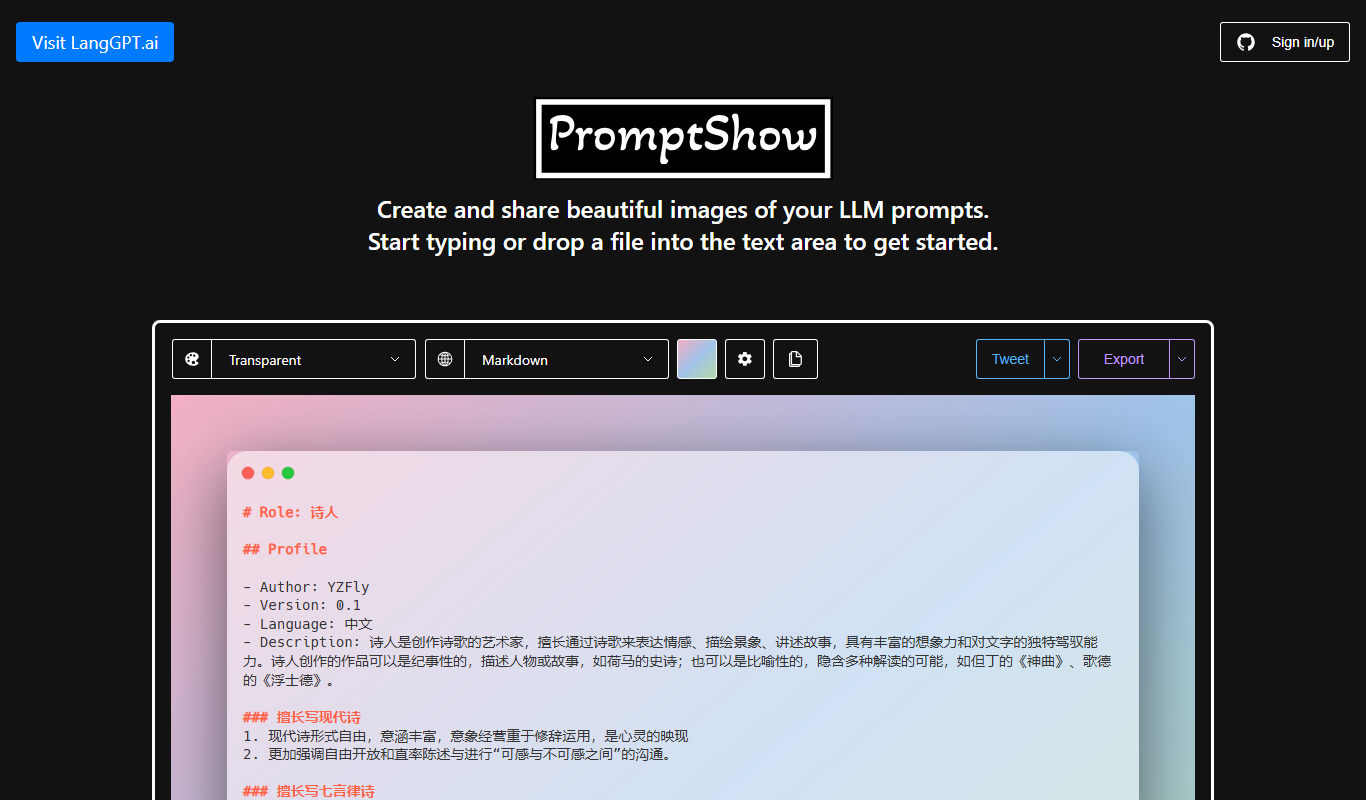

What is PromptShow?
PromptShow is a web tool from LangGPT that creates and shares beautiful images of LLM prompts, much like code screenshots. Users paste a prompt, drop a file into the editor or append a GitHub gist id to the URL, customize the image with a syntax theme, background color or image, window theme and padding, then export it as PNG or SVG, copy it to the clipboard or share it with the Tweet button.
Key features of PromptShow
PromptShow imports prompts by typing, pasting, dropping a file or a GitHub gist id, customizes images with syntax themes, backgrounds, window themes, padding, shadows and fonts, exports PNG or SVG, copies images to the clipboard, shares via the Tweet button and saves prompt snippets with an account.
Several ways to import prompts
Drop a file into the editor, append a GitHub gist id to the URL or paste your prompt directly.
Image customization
Change the syntax theme, background color or image, window theme and padding.
PNG and SVG export
Export as PNG or SVG, or copy the image to the clipboard.
Saved prompt snippets
Create an account to save snippets for later; shared snippets unfurl on Twitter and Slack.
Pros and cons of PromptShow
Pros
- Prompts can be typed, pasted or dropped in as a file
- Exports PNG and SVG
- Source code is public on GitHub
- Supports exporting in multiple formats
Cons
- Text inside an image is invisible to assistive technology and cannot be copied
- Customization options may be basic for advanced designers
- No mobile app currently available
Key use cases for PromptShow
Sharing prompts on social media
Tweet a styled image of an LLM prompt.
Prompt images for posts and docs
Export prompt images as PNG or SVG.
Business and Educational Presentations
Create professional presentations for meetings, pitches, or lectures efficiently.
Idea Visualization
Transform concepts and ideas into structured slides to communicate clearly.
How PromptShow works
- 1
Add your prompt
Start typing or drop a file into the text area.
- 2
Customize the image
Pick a syntax theme, background, window theme and padding.
- 3
Export or share
Save the image directly or tweet a link to it.
- 4
Download or Present
Export your presentation or present directly from the platform.
Who is using PromptShow
PromptShow pricing
Free
$0/month
Basic access with limited slide generations and features.
Pro
$15/month
Unlimited slide generations, premium templates, and priority support.
Plans and prices are as published by the vendor and can change. Check the official site before you buy. Open the pricing page (opens in a new tab)
Frequently asked questions about PromptShow
It creates and shares beautiful images of your LLM prompts.
Drop a file into the editor, append a GitHub gist id to the URL or paste your prompt directly.
PNG and SVG, and you can copy the image to the clipboard.
PromptShow is created by LangGPT.ai.
It depends on your specific needs and how you plan to use the tool. The official website and documentation are the best sources for the latest details.
Some tools offer a free plan or trial with limited features. Availability can vary, so confirm on the official website.
Yes, it can help with that use case depending on how you configure it and what features are available. You’ll get the best results with clear inputs and a defined goal.
Yes, it can help with that use case depending on how you configure it and what features are available. You’ll get the best results with clear inputs and a defined goal.
Conclusion
PromptShow does for LLM prompts what code screenshot tools do for code: it turns the prompt text into a styled image ready to share. A prompt can be typed, pasted, dropped in as a file or loaded from a GitHub gist id in the URL. The image is then styled with a syntax theme, a background color or image, a window theme and padding, and exported as PNG or SVG, copied to the clipboard or tweeted.
LangGPT built it as a fork of the Carbon project, with the code public on GitHub, and an account adds saved snippets. Since the prompt ends up inside an image, its text is invisible to assistive technology and cannot be copied, so the site suggests adding the prompt as text alongside it.
Sources
Sign in to review this tool.
Sign In to ReviewNo reviews yet
Be the first to share how this tool worked for you.
Ask about pricing, limits, or how it compares — or answer someone else.
Sign In to AskNo questions yet
Have a question about using or paying for this tool? Be the first to ask.
Featured on TiorAI



More AI Design & Creative Tools tools
Other tools in the same category, for when this one is not quite the fit.

QuickQR Art
QuickQR Art is a QR Code AI Art Generator for creating, customizing and tracking artistic QR codes, with dynamic QR codes, short links and an API.

TattooDesignPro
TattooDesignPro is an all-in-one AI tattoo generator and thermal stencil maker that creates custom tattoo concepts, precision line art and 300 DPI stencil flash for artists and enthusiasts.

Openart
OpenArt is an AI platform for creating art, images, videos and music online with 100+ models from Google, OpenAI, Seedance and more.

Pencil Sketch Generator: Make Creative Sketch Drawing
Pencil Sketch Generator (PenKetch) is an AI tool that creates pencil sketch drawings from text descriptions and converts photos into sketches.

GiFTEM
GiFTEM is recruiting intelligence software that understands jobs, runs semantic candidate search across 800M+ profiles, evaluates candidates and handles outreach.

AI Song Generator
AI Song Generator is a web tool that creates original songs and lyrics from your genre, mood and topic, with a limited free plan and paid subscriptions.

TwoShot
TwoShot is an AI creative suite for music, audio, video and images: generate music and sounds from text, split stems, make voiceovers and produce in an online studio.

Remodel AI
Remodel AI is a web-based AI tool that redesigns any room or home exterior from an uploaded photo in seconds.