

Perfect Memory AI - screen and meeting search on Mac and PC
Perfect Memory reads your screen and transcribes meetings on your Mac or PC, so you can search anything you've seen or heard, or ask Claude and ChatGPT.
- Best for
- Find lost screens
- Key capability
- Screen reading with OCR
Save Perfect Memory AI, follow its updates and vote on it — everything stays in your account.
Sign in or create a free account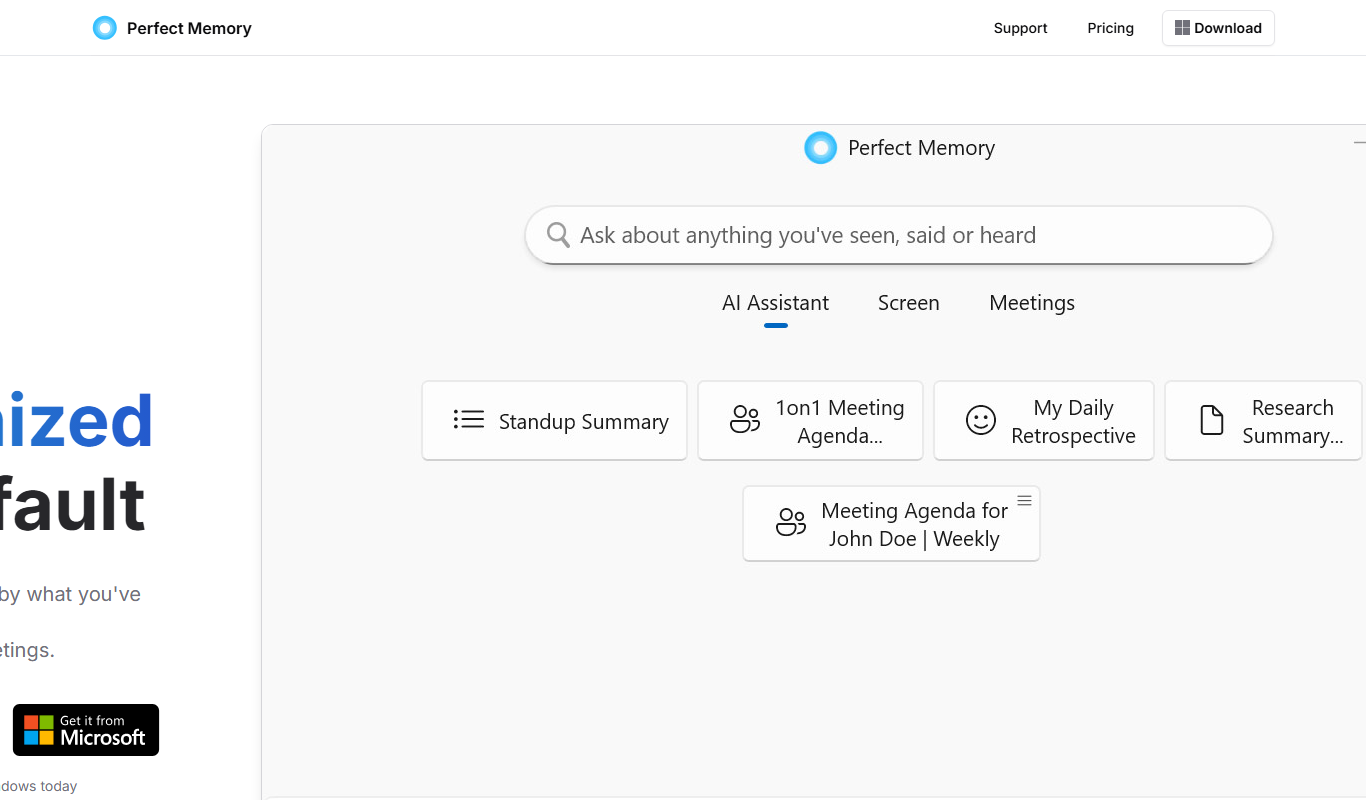
What is Perfect Memory AI?
Perfect Memory AI is a desktop app for Mac and Windows that reads your screen and transcribes meetings, keeps everything on your own Mac or PC, and lets you, Claude or ChatGPT search what you have seen or heard.
Key features of Perfect Memory AI
Perfect Memory reads screen text in the background, detects and transcribes meetings without bots, searches across all your applications, answers questions through its AI Assistant and connects Claude, ChatGPT or any MCP client to your memories.
Screen reading with OCR
Runs in the background and uses OCR to read your screen and store your activity on your device.
Meeting transcription without bots
Detects all major meeting platforms and transcribes what you say or hear locally, with no bots joining the meeting.
Personal search engine
Search for text across all your applications and get back to presentations and web pages you have lost.
AI Assistant
Ask it to summarize your day, write an email or remember a conversation.
Connect Claude and ChatGPT
Connect Claude, ChatGPT or any MCP client to everything you've seen and heard.
Pros and cons of Perfect Memory AI
Pros
- Everything is stored on your own Mac or PC
- No bots joining your meetings
- Works with Claude, ChatGPT or any MCP client
- Can run offline with Ollama
- Free plan with no credit card or account needed
Cons
- The Free plan is limited to 10 AI assists and 30 AI meetings per month
- The Pro Offline version requires you to provide your own AI
- Limited publicly available technical details on tech stack
Key use cases for Perfect Memory AI
Find lost screens
Get back to presentations and web pages you have lost by searching text across all your applications.
Meeting notes
Automatically detect and transcribe meetings so you never forget what was said.
Standup updates
Report everything you have worked on in the last day.
One-on-One meeting agendas
Get topic suggestions based on where the person's name came up in the last week.
Research summaries
Summarize the key points of a topic you have researched.
How Perfect Memory AI works
- 1
Download the app
Install Perfect Memory on your Mac or PC; no credit card or account is required.
- 2
Go about your day
The app runs in the background, remembering what you see on your screen and hear in meetings.
- 3
Search and ask
Search scans all screen text and meeting transcripts, and the AI Assistant compiles the results to fulfill your request.
- 4
Use it from Claude or ChatGPT
Connect Claude, ChatGPT or any MCP client and ask in plain language about what you’ve seen and heard.
Who is using Perfect Memory AI
Perfect Memory AI pricing
Free
$0 per month
Unlimited search, recordings, meeting transcripts and MCP calls; limited AI Assistant with 10 AI assists/month and 30 AI meetings/month. No credit card or account needed.
Pro
$15 per month billed yearly
Unlimited everything with GPT-5.6, including unlimited AI meetings and AI Assistant, standup updates, One-on-One agenda suggestions, Daily Brief and research summarization.
Pro Offline
$79 one time payment
Unlimited everything with your own AI, with absolute privacy and a lifetime of updates.
Plans and prices are as published by the vendor and can change. Check the official site before you buy. Open the pricing page (opens in a new tab)
Frequently asked questions about Perfect Memory AI
It remembers what you’ve seen on your screen and heard in meetings, keeps it on your own Mac or PC, and lets you, Claude or ChatGPT search it.
Perfect Memory is available on Mac as well as Windows.
No. It detects all major meeting platforms and transcribes what you say or hear without bots joining your meeting.
Everything is recorded and stored on your own Mac or PC, screenshots are encrypted with AES-256, and recording pauses in private and incognito browser windows.
You can pick a popular AI provider such as ChatGPT, go offline with Ollama, or use your own API token.
Yes. The Free plan needs no credit card or account and includes unlimited search, recordings and meeting transcripts with a limited AI Assistant.
Yes. Pro Offline is a one-time payment version that uses your own AI and includes lifetime updates.
Students can message the team for a 50% discount.
Conclusion
Running quietly in the background, the app reads screen text with OCR and transcribes meetings it detects, so anything seen or heard on a Mac or PC becomes searchable later. No bot joins the call: it recognises all major meeting platforms and transcribes locally. Searches cover every application, and an AI Assistant can summarize the day, draft an email or recall a conversation.
Everything is recorded and stored on the user’s own computer, screenshots are encrypted with AES-256, and recording pauses in private browser windows. The AI provider is a choice, from ChatGPT to Ollama for offline use, and Claude or any MCP client can be connected to the stored history. Perfect Memory AI has a Free plan that needs no account but caps AI assists and AI meetings each month, a Pro subscription billed yearly, and a one-time Pro Offline version that requires bringing your own AI.
Sources
Sign in to review this tool.
Sign In to ReviewNo reviews yet
Be the first to share how this tool worked for you.
Ask about pricing, limits, or how it compares — or answer someone else.
Sign In to AskNo questions yet
Have a question about using or paying for this tool? Be the first to ask.
Featured on TiorAI



Alternative Tools
Explore similar AI tools that might fit your needs
Sinequa
Sinequa by ChapsVision is an enterprise AI search and analytics platform for large volumes of structured and unstructured data, with pricing on request.
Coveo
Coveo is an AI-driven enterprise search and personalization platform that improves content discovery and customer experience by delivering relevant search results and recommendations.

Lucidworks
Lucidworks is an AI-driven enterprise search platform that helps organizations build intelligent search applications to discover insights from complex data using machine learning and natural language processing.
More AI Artificial Intelligence Tools tools
Other tools in the same category, for when this one is not quite the fit.
Dog Breed AI
Dog Breed AI uses artificial intelligence to identify dog breeds from photos, providing breed details and care information on web and mobile platforms.
RecetasIA
RecetasIA is an AI-based web tool with a free plan that generates personalized recipes from your tastes, dietary restrictions and intolerances, in English or Spanish.

Newmoney.AI
Newmoney.AI is an AI-powered crypto and cash wallet: buy, trade, swap and send crypto across SUI, Solana, Ethereum and Bitcoin with the AI agent Newton, including via WhatsApp and Telegram.

TwoShot
TwoShot is an AI creative suite for music, audio, video and images: generate music and sounds from text, split stems, make voiceovers and produce in an online studio.

Kuakua – Psychology & AI Tools for Well-Being
Kuakua is a free website of psychology games, tests, screenings and cognitive experiments that turns psychology research into small tools for well-being.

MixPeek
MixPeek is an AI-driven multimedia search engine that indexes videos, images, audio, and documents to enable fast, accurate search through a web interface and developer API.

Musicfy
Musicfy is an AI voice song generator for creating covers in any voice, with 100,000+ voices or a clone of your own.

MusicGen AI
MusicGen is a free AI music generation tool developed by Meta that uses a single Language Model (LM) to create music based on a prompt.