

PassGenZ Secure Password Generator Tool for Strong Password Creation
PassGenZ is a free online tool that generates strong, random passwords with customizable length and character options to enhance your account security.
- Best for
- Generate Strong Passwords
- Key capability
- Customizable Password Length
Save PassGenZ, follow its updates and vote on it — everything stays in your account.
Sign in or create a free account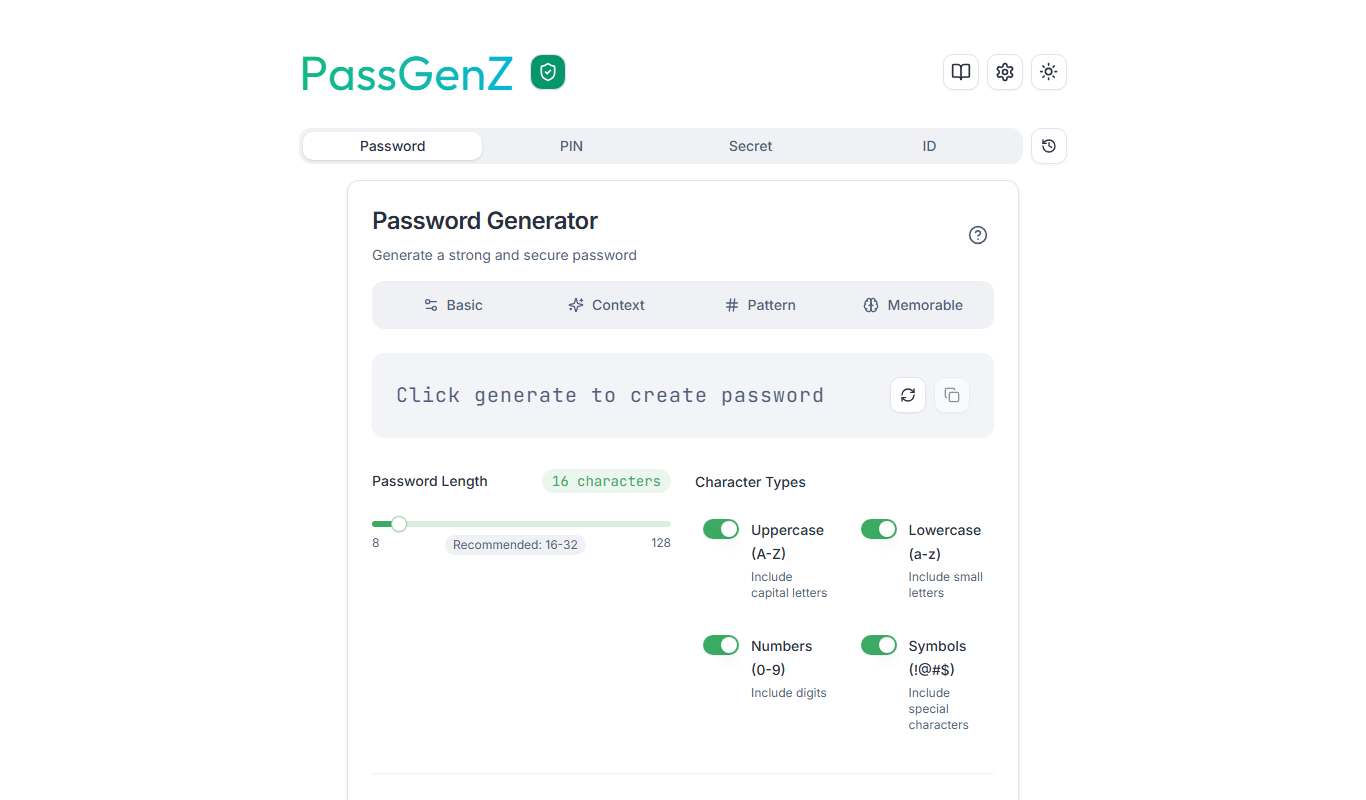
What is PassGenZ?
PassGenZ is a free online password generator designed to help users create strong, random passwords easily. It provides customizable options such as password length and character types to ensure high security for user accounts.
Key features of PassGenZ
PassGenZ offers a simple interface to generate secure passwords with options to include uppercase, lowercase, numbers, and symbols. It allows users to specify password length and instantly copy generated passwords for use.
Customizable Password Length
Users can select password length from short to very long for enhanced security.
Character Type Selection
Options to include uppercase letters, lowercase letters, numbers, and symbols.
Instant Password Generation
Generates passwords quickly without delay.
Copy to Clipboard
One-click copy feature for easy password use.
No Account Required
Fully functional without registration or login.
Pros and cons of PassGenZ
Pros
- Simple and intuitive interface
- Completely free with no registration
- Customizable password options
- Instant password generation
- No data storage for privacy
Cons
- Limited to password generation only
- No mobile app or offline version
Key use cases for PassGenZ
Generate Strong Passwords
Create complex and secure passwords to protect online accounts from unauthorized access.
Improve Account Security
Use randomly generated passwords to reduce the risk of hacking and password guessing.
Password Customization
Customize password length and character types to meet specific security requirements.
Quick Password Creation
Generate passwords instantly without the need to think of complex combinations manually.
How PassGenZ works
- 1
Access the Website
Open the PassGenZ website on any web browser.
- 2
Set Password Preferences
Choose desired password length and select character types to include.
- 3
Generate Password
Click the generate button to create a strong random password.
- 4
Copy and Use
Copy the generated password and use it to secure your accounts.
Who is using PassGenZ
PassGenZ pricing
Free
$0
Full access to password generation features at no cost.
Plans and prices are as published by the vendor and can change. Check the official site before you buy. Open the pricing page (opens in a new tab)
Frequently asked questions about PassGenZ
Yes, PassGenZ is completely free with no hidden charges.
No, you can generate passwords instantly without signing up.
Yes, you can choose the length of the password according to your needs.
No, PassGenZ does not store or save any generated passwords.
It depends on your specific needs and how you plan to use the tool. The official website and documentation are the best sources for the latest details.
It depends on your specific needs and how you plan to use the tool. The official website and documentation are the best sources for the latest details.
Yes, it can help with that use case depending on how you configure it and what features are available. You’ll get the best results with clear inputs and a defined goal.
Conclusion
PassGenZ does not store or save any generated passwords, and it is fully functional without registration or login. Generating one takes a few choices: users open the website on any web browser, choose the desired password length, select the character types to include and click the generate button. Character options cover uppercase letters, lowercase letters, numbers and symbols, and length can run from short to very long. A one-click copy feature puts the result on the clipboard for immediate use. The copied password can then be used to secure accounts. Generation is instant, without the need to think of complex combinations manually.
Those options let users customize passwords to meet specific security requirements, and randomly generated passwords are meant to reduce the risk of hacking and password guessing. It is aimed at individuals seeking strong passwords, IT security beginners and small business owners, as well as anyone needing quick password creation. The generator is completely free with no hidden charges. Its scope is limited to password generation only, and there is no mobile app or offline version outside the web platform.
Sources
Sign in to review this tool.
Sign In to ReviewNo reviews yet
Be the first to share how this tool worked for you.
Ask about pricing, limits, or how it compares — or answer someone else.
Sign In to AskNo questions yet
Have a question about using or paying for this tool? Be the first to ask.
Featured on TiorAI


More Business Management tools
Other tools in the same category, for when this one is not quite the fit.

Digits — Accounting, reimagined.
Digits is AI-native accounting software with 24/7 automated bookkeeping, real-time financials, AI Bill Pay and invoicing for business owners and accountants.

Linkly AI
Linkly AI is a local document search engine for AI agents that indexes the files on your computer and lets any AI tool search and read them through MCP, a CLI or Skills.

BirdseyePost
BirdseyePost by Birdseye makes personalized direct mail simple: create targeted postcards, reach the right audience and track results with QR code scans.

Beacon
Beacon helps marketers create professional lead magnets in minutes without hiring a designer, plus opt-in forms and libraries of gated content.

Lens Protocol
Lens Protocol is a blockchain stack built for SocialFi, made up of Lens Chain, the Social Protocol and Storage Nodes, where one Lens account works across many apps.

Botkeeper
Botkeeper is an AI accounting solution purpose-built for accounting firms that automates the most manual and time-consuming bookkeeping work.

Monday.com AI
monday.com AI is a work operating system that uses AI to automate workflows, enhance project management, and improve team collaboration across platforms.

Asana AI
Asana AI is an AI-powered extension of the Asana platform that automates task creation, workflow management, and provides predictive analytics to improve project efficiency.