

TimeBloc App Review – AI-Powered Time Blocking and Productivity Planner
TimeBloc is a mobile app that uses time blocking to help users organize tasks and improve productivity by visually scheduling activities on a calendar with reminders and customization.
- Best for
- Personal Productivity
- Key capability
- Visual Time Blocking Interface
Save TimeBloc, follow its updates and vote on it — everything stays in your account.
Sign in or create a free account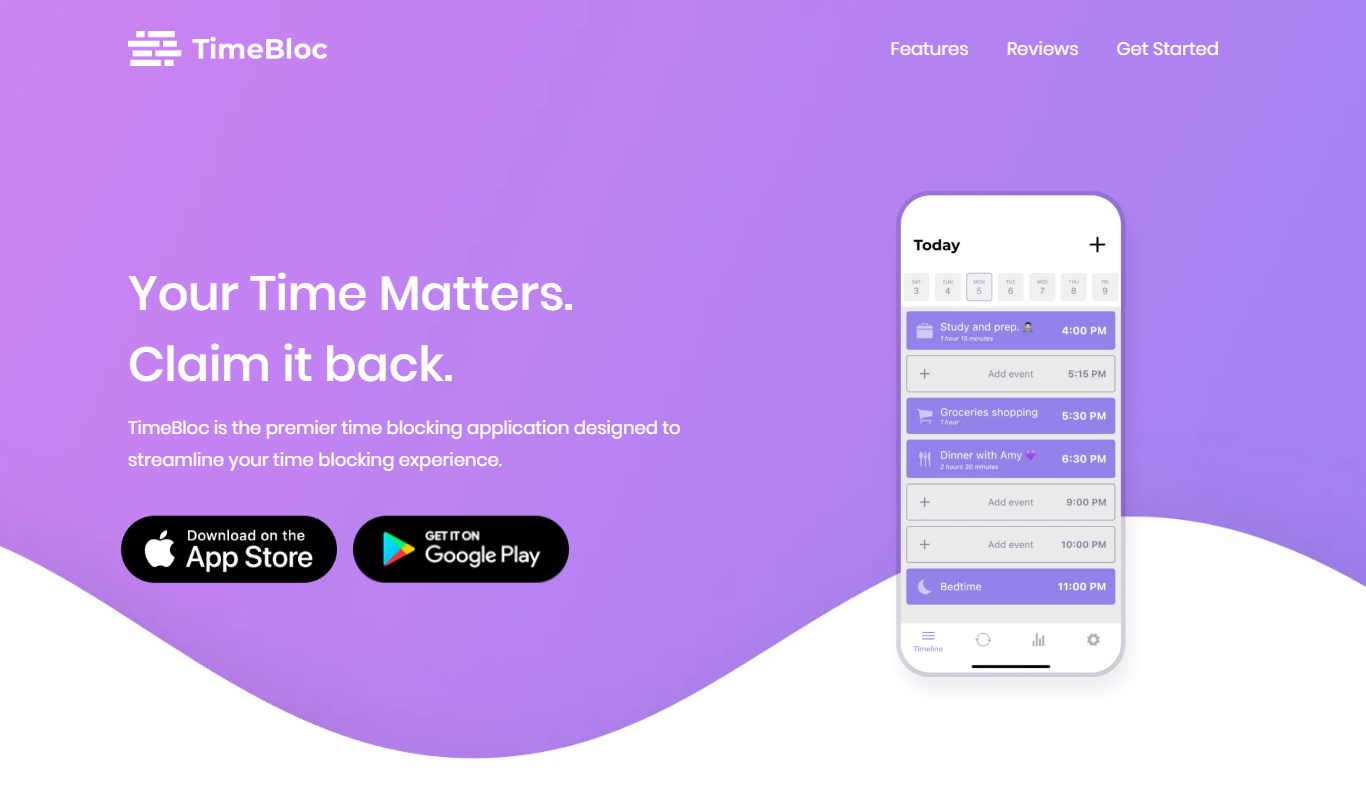
What is TimeBloc?
TimeBloc is a mobile app designed to enhance productivity through the time blocking technique. It allows users to visually organize their day by allocating specific time slots to tasks and activities, helping to reduce distractions and improve focus. The app integrates calendar views with task management features, enabling efficient planning of work, study, and personal time.
Key features of TimeBloc
TimeBloc offers intuitive drag-and-drop time blocks, customizable task categories, reminders, and synchronization with device calendars. It provides a clear visual layout of daily schedules, making it easier to manage time and stay on track with priorities.
Visual Time Blocking Interface
Drag-and-drop calendar blocks to allocate time for tasks and activities easily.
Task Categorization and Color Coding
Organize tasks by categories with customizable colors for quick identification.
Calendar Sync
Sync with device calendars to consolidate schedules in one place.
Reminders and Notifications
Set alerts to stay on track with your planned time blocks.
Statistics and Progress Tracking
View reports on how your time is spent to improve future planning.
Pros and cons of TimeBloc
Pros
- User-friendly visual time blocking interface
- Supports calendar synchronization
- Customizable task categories and colors
- Effective for improving focus and productivity
Cons
- Limited features in free version
- No desktop or web app available
- Lacks integration with third-party productivity tools
Key use cases for TimeBloc
Personal Productivity
Helps individuals organize their day by blocking time for tasks, improving focus and time management.
Task Scheduling
Allows users to schedule and visualize tasks on a calendar with flexible time blocks.
Work-Life Balance
Supports balancing professional and personal activities by allocating dedicated time slots.
Goal Tracking
Enables users to set goals and track progress through structured time allocation.
Routine Planning
Facilitates creating daily routines and habits by consistent time blocking.
How TimeBloc works
- 1
Download and Install
Get the TimeBloc app from the iOS App Store or Google Play Store and install it on your device.
- 2
Create an Account
Sign up using your email or social login to start organizing your schedule.
- 3
Add Tasks and Events
Input your tasks or events and assign them to specific time blocks on your calendar.
- 4
Customize Time Blocks
Adjust the duration, color, and category of each time block to suit your preferences.
- 5
Set Reminders
Enable notifications to remind you when a time block starts or ends.
- 6
Review and Adjust
Regularly review your schedule and make adjustments to optimize productivity.
Who is using TimeBloc
TimeBloc pricing
Free
$0/month
Basic time blocking features with limited task categories and blocks.
Premium
$4.99/month
Unlock unlimited time blocks, advanced customization, and calendar sync.
Annual Premium
$49.99/year
Annual subscription with full features at a discounted rate.
Plans and prices are as published by the vendor and can change. Check the official site before you buy. Open the pricing page (opens in a new tab)
Frequently asked questions about TimeBloc
Yes, TimeBloc is available for download on both the iOS App Store and Google Play Store.
Yes, TimeBloc supports synchronization with your device’s native calendar apps.
Yes, you can set customizable reminders and notifications for your time blocks.
Yes, TimeBloc offers a free plan with basic features and limited time blocks.
This tool is designed to help users accomplish its core tasks more efficiently. It is typically used by individuals or teams looking to improve productivity and workflow.
It depends on your specific needs and how you plan to use the tool. The official website and documentation are the best sources for the latest details.
Some tools offer a free plan or trial with limited features. Availability can vary, so confirm on the official website.
It depends on your specific needs and how you plan to use the tool. The official website and documentation are the best sources for the latest details.
Conclusion
Time blocking here means placing tasks and events into specific slots on a calendar, using drag-and-drop blocks whose duration, color and category can be adjusted. Notifications remind the user when a block starts or ends, and TimeBloc syncs with the device’s native calendar apps. Reports show how time was spent to improve future planning.
Students managing study schedules, freelancers organizing work tasks and professionals focused on time management are the people it is built around. The app runs on iPhone and Android. A free plan covers basic features with limited time blocks. Premium is listed on the App Store as a one-year plan at $26.49 or a lifetime membership at $19.99.
Sources
Sign in to review this tool.
Sign In to ReviewNo reviews yet
Be the first to share how this tool worked for you.
Ask about pricing, limits, or how it compares — or answer someone else.
Sign In to AskNo questions yet
Have a question about using or paying for this tool? Be the first to ask.
Featured on TiorAI



Alternative Tools
Explore similar AI tools that might fit your needs

Clockify
Clockify is a free and easy-to-use time tracking software that helps teams and freelancers track work hours, manage projects, and generate reports across multiple platforms.
More AI Workflow tools
Other tools in the same category, for when this one is not quite the fit.

Lens Protocol
Lens Protocol is a blockchain stack built for SocialFi, made up of Lens Chain, the Social Protocol and Storage Nodes, where one Lens account works across many apps.

Botkeeper
Botkeeper is an AI accounting solution purpose-built for accounting firms that automates the most manual and time-consuming bookkeeping work.

Furkot
Furkot is a web-based trip planner that helps users create multi-stop routes, optimize travel paths, schedule accommodations and activities, and share itineraries for efficient road trip planning.

Trials.ai
Trials.ai is an AI-driven platform that helps medical researchers design optimized clinical trial protocols, improve patient recruitment, and ensure regulatory compliance to accelerate trial success.

ZipBooks
ZipBooks is a cloud-based accounting software designed for small businesses and freelancers to manage invoicing, expenses, payments, and financial reporting with ease.

Lookeen
Lookeen is a Windows desktop search software that enables fast and comprehensive searching of emails, files, and documents, integrating deeply with Microsoft Outlook and supporting network drives.
Ataccama
Ataccama is an AI-driven data management platform that integrates data governance, master data management, and data quality automation to help enterprises manage and improve their data assets efficiently.

FloQast
FloQast is a cloud software designed to streamline and automate the accounting month-end close process, improving accuracy and collaboration for finance teams.