

From my experience with SVGStud.io, I found it excels at providing a straightforward, no-frills SVG editing experience accessible directly in the browser. It’s particularly well-suited for users who need quick edits or want to design simple icons without installing complex software. However, the trade-off is that it lacks advanced vector editing features and collaboration tools found in professional desktop applications. Overall, if you need a free, lightweight SVG editor for basic vector graphic tasks, SVGStud.io delivers solid and reliable results.
SVGStud.io Online SVG Editor for Vector Graphics and Icon Design
SVGStud.io is a free, browser-based SVG editor that allows users to create, edit, and export scalable vector graphics without installing software.
- Best for
- Vector Graphic Creation
- Key capability
- Browser-Based Editor
Your actions
Save SVGStud.io, follow its updates and vote on it — everything stays in your account.
Sign in or create a free account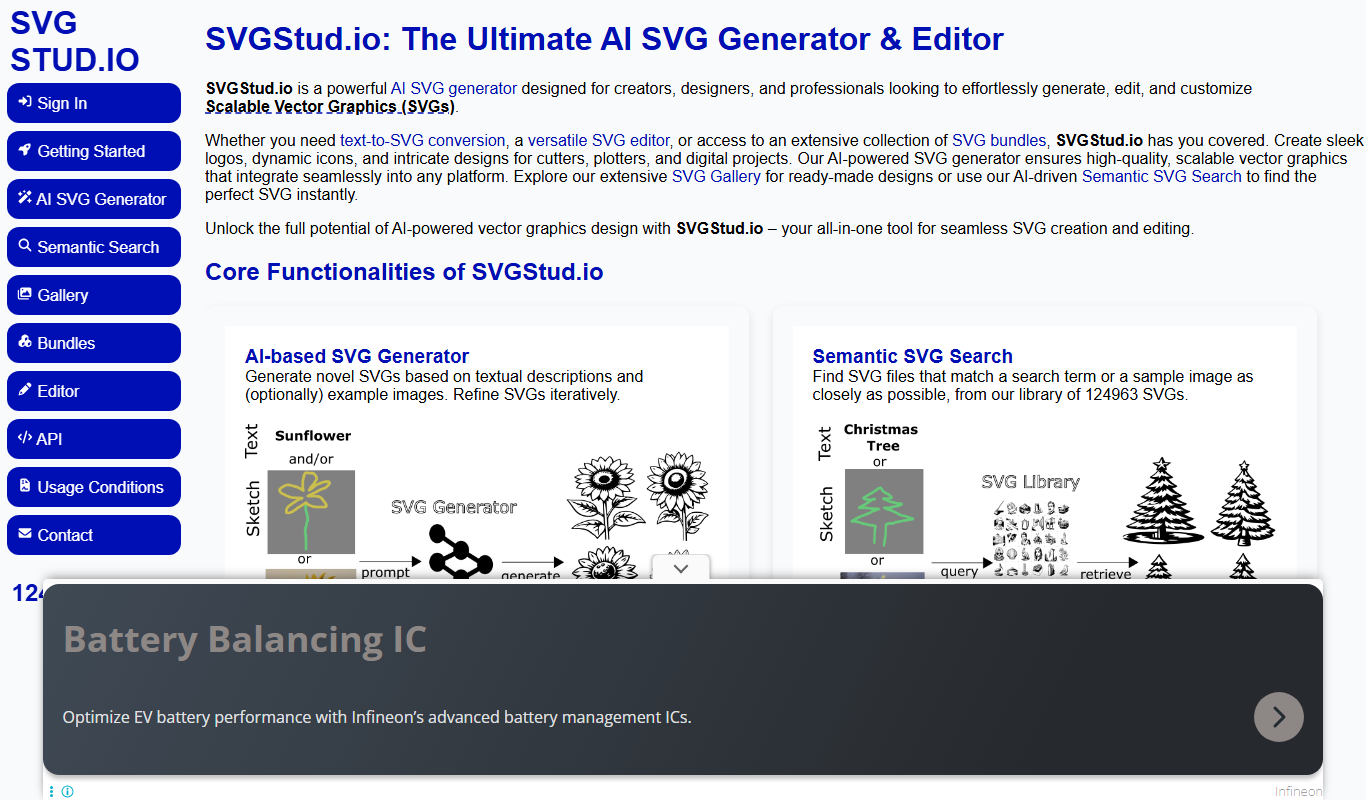

What is SVGStud.io?
SVGStud.io is a free, web-based SVG editor designed for creating and editing scalable vector graphics directly in the browser. It offers a clean, intuitive interface that allows users to draw, manipulate shapes, and customize SVG files without needing to install software. The tool is ideal for designers, developers, and hobbyists who want a lightweight yet capable vector graphic editor accessible from any device with internet access.
Key features of SVGStud.io
SVGStud.io provides essential vector editing features such as shape drawing, path editing, layering, color fills, gradients, and text insertion. It supports importing and exporting SVG files, enabling seamless integration with other design workflows. The platform emphasizes simplicity and speed, making it suitable for quick edits and icon design tasks.
Browser-Based Editor
No installation required; works entirely online for instant access.
Comprehensive Vector Tools
Includes shape creation, path manipulation, layering, and text support.
SVG Import and Export
Seamlessly import existing SVGs and export your work in standard SVG format.
Lightweight and Fast
Optimized for quick loading and responsive editing even on modest hardware.
Pros and cons of SVGStud.io
Pros
- Completely free and no sign-up required
- Accessible from any device with a web browser
- Simple and clean user interface
- Supports standard SVG import/export
Cons
- Limited advanced vector editing features
- No offline or desktop application
- Lacks collaboration or cloud saving features
Key use cases for SVGStud.io
Vector Graphic Creation
Create and edit scalable vector graphics for web and print projects.
Icon Design
Design custom icons with precise control over shapes and colors.
SVG File Editing
Import and modify existing SVG files for customization or optimization.
Web Graphics Preparation
Prepare lightweight SVG graphics optimized for websites and applications.
How SVGStud.io works
- 1
Access the Website
Open SVGStud.io in any modern web browser without registration.
- 2
Create or Import SVG
Start a new design from scratch or upload an existing SVG file to edit.
- 3
Edit Vector Elements
Use the drawing tools to add shapes, paths, text, and customize colors.
- 4
Save or Export
Download your finished SVG file or save it locally for future use.
Who is using SVGStud.io
Graphic designers needing quick SVG edits
Web developers preparing icons and graphics
Students and hobbyists learning vector design
Content creators requiring simple vector tools
SVGStud.io pricing
Free
$0
Full access to all features without any cost or subscription.
Plans and prices are as published by the vendor and can change. Check the official site before you buy. Open the pricing page (opens in a new tab)
Frequently asked questions about SVGStud.io
No, SVGStud.io can be used immediately without registration.
Yes, SVGStud.io supports importing standard SVG files for editing.
It is ideal for simple to moderate vector editing tasks but may lack advanced features found in desktop software.
This tool is designed to help users accomplish its core tasks more efficiently. It is typically used by individuals or teams looking to improve productivity and workflow.
Some tools offer a free plan or trial with limited features. Availability can vary, so confirm on the official website.
Yes, it can help with that use case depending on how you configure it and what features are available. You’ll get the best results with clear inputs and a defined goal.
Sign in to review this tool.
Sign In to ReviewNo reviews yet
Be the first to share how this tool worked for you.
Ask about pricing, limits, or how it compares — or answer someone else.
Sign In to AskNo questions yet
Have a question about using or paying for this tool? Be the first to ask.
Featured on TiorAI



Alternative Tools
Explore similar AI tools that might fit your needs

Subscription
Vectr
Vectr is a cloud-based AI vector editor and logo maker with real-time collaboration, image to vector conversion and background removal.

Free Trial
Boxy SVG
Boxy SVG is a cross-platform vector graphics editor focused on SVG creation and editing, available as a web app, desktop app, and Chrome extension.

Free
Method Draw
Method Draw is a free, open source online SVG editor that allows users to create and edit vector graphics directly in the browser without installation.
More AI Design & Creative Tools tools
Other tools in the same category, for when this one is not quite the fit.
Free
FreePlanTour
FreePlanTour is a free, browser-based floor plan design tool that allows users to create and save detailed home and office layouts without any software installation.

Freemium
Morphlin
Morphlin is an AI-powered art generation tool that enables users to create unique digital images through image morphing and style transfer techniques on a user-friendly web platform.

Freemium
Sloyd
Sloyd is a web-based AI-assisted 3D modeling tool designed to help game developers and designers quickly create customizable low-poly 3D assets with ease.

Free Trial
Tattoo Canvas
Tattoo Canvas is a web-based digital tattoo design software that provides tattoo artists with vector-based tools, customizable brushes, and stencil creation features to create and present professional tattoo artwork.

Free
Tattoo Cook
Tattoo Cook is a web-based AI tool that generates custom tattoo designs from user text prompts, helping users create unique ink ideas quickly and easily.

Freemium
MolyPix.AI
MolyPix.AI is a web-based AI tool that generates images from text prompts, offering style customization and high-resolution downloads for creative projects.

Free
Pikzels
Pikzels is an AI-powered image generation tool that transforms text prompts into unique digital artworks, ideal for content creators and marketers seeking custom visuals.

Freemium
Pikzels AI
Pikzels AI is a web platform that uses artificial intelligence to generate images from user text prompts, enabling easy creation of unique visuals for various creative uses.