

RapiLearn AI Course Creation and Learning Tool
RapiLearn AI turns questions or uploaded PDF, slide, video and audio files into structured mini-courses with notes, mind maps, audio summaries, quizzes and an AI tutor.
- Best for
- Personalized Learning
- Key capability
- AI-Generated Mini-Courses
Save RapiLearn AI, follow its updates and vote on it — everything stays in your account.
Sign in or create a free account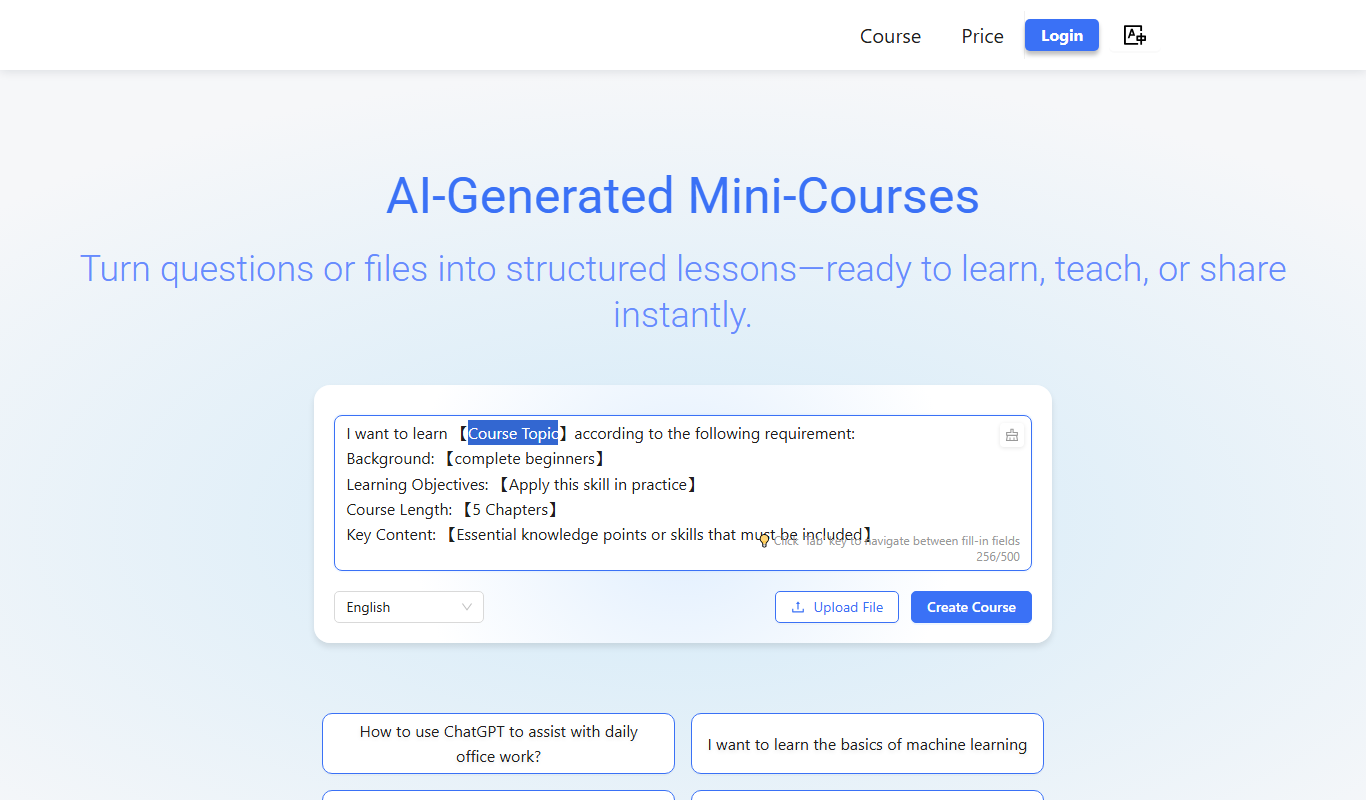

What is RapiLearn AI?
RapiLearn AI is an AI course creation and learning tool that turns questions or uploaded files into structured mini-courses. It extracts key ideas, generates study notes, mind maps, audio summaries and quiz questions, and offers an AI tutor for follow-up questions.
Key features of RapiLearn AI
RapiLearn AI analyzes typed questions and uploaded files, slices the content by topic into mini-courses, generates study notes, mind maps, audio summaries and quiz questions, and offers an AI tutor and a pre-test to skip what you already know.
AI-Generated Mini-Courses
Turn questions or files into structured lessons, ready to learn, teach or share.
Study Notes, Mind Maps and Quizzes
Automatically generates study notes, mind maps, audio summaries and quiz questions from your material.
24/7 AI Tutor
Ask questions anytime; the AI explains concepts, clarifies doubts and suggests related topics.
Community Courses
Explore quality courses from the community and start learning.
Multi-Device Access
Users can learn seamlessly across web and mobile browsers.
Pros and cons of RapiLearn AI
Pros
- Highly personalized learning experience
- Generates study notes, mind maps and quiz questions automatically
- Detailed progress tracking and analytics
- Accessible on multiple devices
- Suitable for both individuals and enterprises
Cons
- Limited language support (English only)
- Mobile app not yet available, only mobile web
- Pricing details for enterprise plans require direct contact
Key use cases for RapiLearn AI
Personalized Learning
RapiLearn AI adapts course content and pace based on individual learner’s strengths and weaknesses.
Skill Development
Users can develop specific skills through targeted modules powered by AI-driven recommendations.
Corporate Training
Organizations can use RapiLearn AI to deliver customized training programs to employees.
Exam Preparation
Students preparing for competitive exams benefit from adaptive quizzes and progress tracking.
Continuous Learning
Professionals can engage in lifelong learning with curated content suited to their career goals.
How RapiLearn AI works
- 1
Create an Account
Sign up on the RapiLearn platform using email or social login.
- 2
Ask a Question or Upload Files
Ask a question or upload files in formats such as .mp4, .mp3, .pptx, .ppt and .pdf.
- 3
AI-Driven Analysis
The AI analyzes the content, then slices and plans it by topic so you learn only what you don’t know.
- 4
Effective Reading and Learning
Take a pre-test to skip what you already know, then generate notes, podcasts and quizzes to review quickly.
- 5
Track Progress
Monitor your learning journey with detailed analytics and adjust goals as needed.
Who is using RapiLearn AI
RapiLearn AI pricing
Free
$0/month
Access to basic courses and limited personalized features.
Starter plan
$9 for 500 credits (1-year validity)
For individual users with periodic knowledge organization needs, such as personal learning or work research.
Learner plan
$19 for 1200 credits (1-year validity)
For students or small teams who need to complete course requirements or improve personal skills.
Team plan
$39 for 3000 credits (1-year validity)
For students, organizations or enterprises that frequently need to organize large amounts of knowledge.
Annual plan
$299 per year ($25/month), 3500 credits per month
For teachers or training institutions engaged in curriculum design related work.
Plans and prices are as published by the vendor and can change. Check the official site before you buy. Open the pricing page (opens in a new tab)
Frequently asked questions about RapiLearn AI
Yes, the platform is designed to adapt content for learners ranging from students to professionals.
Yes, RapiLearn AI supports mobile web access for learning on the go.
Yes, there are enterprise plans tailored for organizations to train their employees.
The pricing page offers a 100% risk-free trial, and credit packages unlock more credits and features.
This tool is designed to help users accomplish its core tasks more efficiently. It is typically used by individuals or teams looking to improve productivity and workflow.
Integration support depends on the tool and its available connectors or API. Check the official documentation or integrations page to confirm what is supported.
Integration support depends on the tool and its available connectors or API. Check the official documentation or integrations page to confirm what is supported.
Pricing depends on the plan and included features. For the most accurate and up-to-date details, check the official pricing page.
Conclusion
Course material in RapiLearn AI starts from whatever the learner brings, either a typed question or uploaded PDFs, PPTs, videos and audio. The AI breaks that content down, extracts key ideas and slices it by topic into a structured mini-course. A pre-test can skip what is already known, so the lessons focus on what the learner does not know yet. From the same material it generates study notes, mind maps, audio summaries and quiz questions, while an AI tutor answers follow-up questions at any hour.
Each mini-course is ready to learn, teach or share, and a community section lets users explore quality courses from others. The tool is pitched at students, educators and self-learners. Usage runs on credits bought in packages, and each operation such as file analysis or course creation consumes some of them. The service is still in beta, which limits each user to 2 courses of no more than 10 files each.
Sources
Sign in to review this tool.
Sign In to ReviewNo reviews yet
Be the first to share how this tool worked for you.
Ask about pricing, limits, or how it compares — or answer someone else.
Sign In to AskNo questions yet
Have a question about using or paying for this tool? Be the first to ask.
Featured on TiorAI



Alternative Tools
Explore similar AI tools that might fit your needs


More AI Artificial Intelligence Tools tools
Other tools in the same category, for when this one is not quite the fit.

Newmoney.AI
Newmoney.AI is an AI-powered crypto and cash wallet: buy, trade, swap and send crypto across SUI, Solana, Ethereum and Bitcoin with the AI agent Newton, including via WhatsApp and Telegram.

TwoShot
TwoShot is an AI creative suite for music, audio, video and images: generate music and sounds from text, split stems, make voiceovers and produce in an online studio.

Kuakua – Psychology & AI Tools for Well-Being
Kuakua is a free website of psychology games, tests, screenings and cognitive experiments that turns psychology research into small tools for well-being.

MixPeek
MixPeek is an AI-driven multimedia search engine that indexes videos, images, audio, and documents to enable fast, accurate search through a web interface and developer API.

Musicfy
Musicfy is an AI voice song generator for creating covers in any voice, with 100,000+ voices or a clone of your own.

MusicGen AI
MusicGen is a free AI music generation tool developed by Meta that uses a single Language Model (LM) to create music based on a prompt.

Musick AI
Musick AI is an AI-powered platform that generates original music tracks based on user-selected genres and moods, enabling easy composition for creators without musical expertise.

Ai Musician – AI Music Generator
AI Musician is an all-in-one AI music platform to generate music from text or images, remove vocals, split stems, create lyrics and sound effects, and design album covers.