

From my experience with Paprika Recipe Manager, I found it excels at simplifying the organization and planning of recipes for everyday cooking. The intuitive interface and seamless syncing across devices make it a reliable tool for home cooks and busy families who want to streamline meal preparation. However, the one-time purchase per platform can add up if you use multiple devices, and the app currently supports only English, which may limit accessibility for some users. Overall, if you need a robust recipe organizer with integrated meal planning and grocery list features, Paprika delivers solid, user-friendly performance.
Paprika Recipe Manager App for Organizing and Planning Recipes Efficiently
Paprika Recipe Manager is a multi-platform app that helps users collect, organize, and plan recipes and meals, featuring recipe importing, meal planning calendar, grocery list automation, and cross-device syncing.
- Best for
- Recipe Organization
- Key capability
- Recipe Importing
Your actions
Save Paprika Recipe Manager, follow its updates and vote on it — everything stays in your account.
Sign in or create a free account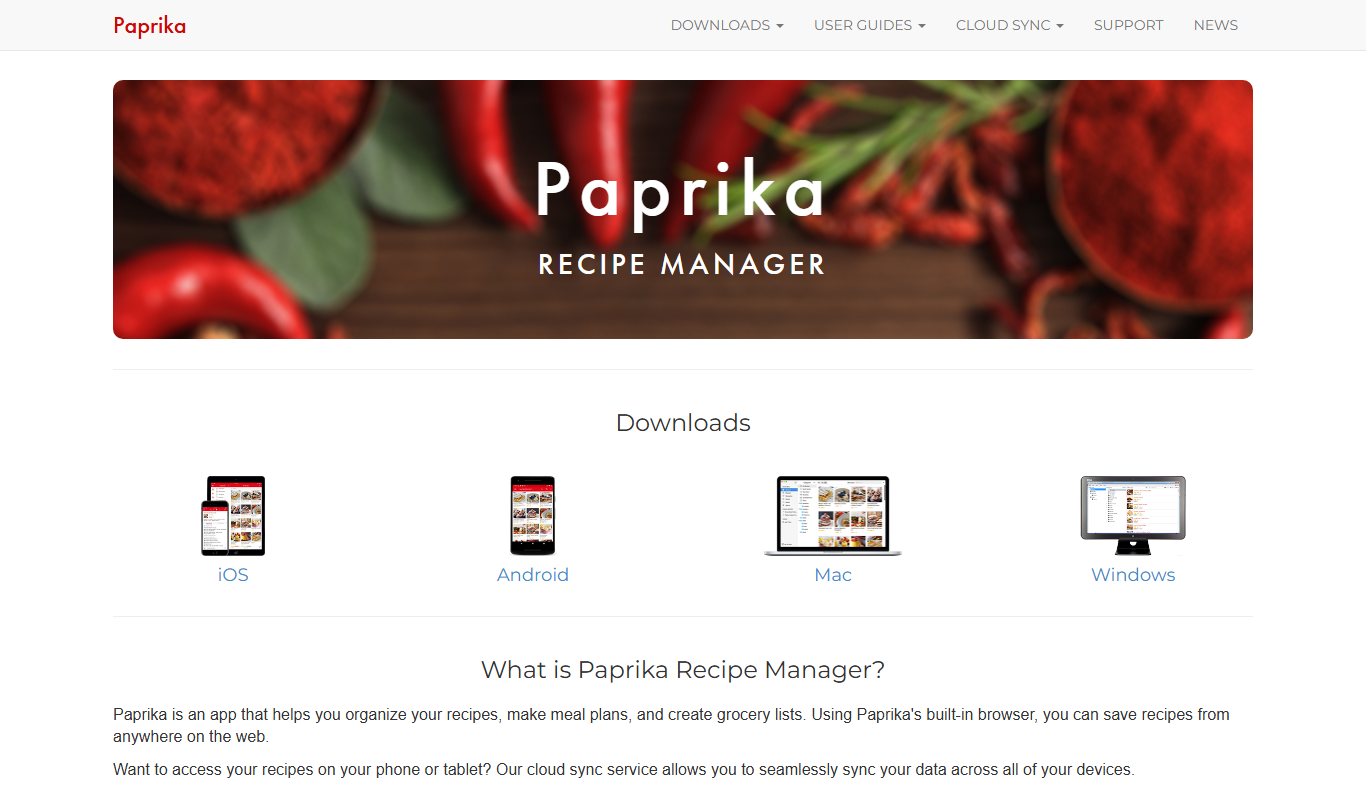
What is Paprika Recipe Manager?
Paprika Recipe Manager is a comprehensive cooking app designed to help users collect, organize, and manage recipes from various sources. It simplifies meal planning and grocery shopping by integrating recipe storage with calendar scheduling and shopping list generation. Available on multiple platforms, it syncs data across devices to keep your cooking plans accessible wherever you go.
Key features of Paprika Recipe Manager
Key features include recipe importing and editing, meal planning calendar, grocery list creation, recipe scaling, and cross-device synchronization. The app supports saving recipes from websites with a built-in browser and allows customization of categories and tags for easy organization.
Recipe Importing
Save recipes directly from websites with a built-in browser and automatic formatting.
Meal Planning Calendar
Visual calendar to schedule meals and organize cooking plans.
Grocery List Automation
Automatically compiles ingredient lists from selected recipes and meal plans.
Recipe Scaling
Adjust ingredient amounts to suit different serving sizes easily.
Cross-Platform Sync
Sync your data across iOS, Android, macOS, Windows, and web platforms.
Pros and cons of Paprika Recipe Manager
Pros
- Intuitive recipe importing and editing
- Comprehensive meal planning calendar
- Automatic grocery list generation
- Cross-device synchronization
- One-time purchase without subscription
Cons
- No free version available
- Separate purchase required for each platform
- Limited language support (English only)
Key use cases for Paprika Recipe Manager
Recipe Organization
Store, categorize, and manage your personal and online recipes in one place.
Meal Planning
Plan weekly meals with an integrated calendar to streamline cooking schedules.
Grocery List Management
Automatically generate grocery lists from recipes and meal plans for efficient shopping.
Recipe Scaling
Adjust ingredient quantities easily to fit different serving sizes.
Cross-Device Syncing
Access your recipes and meal plans seamlessly across multiple devices.
How Paprika Recipe Manager works
- 1
Import Recipes
Use the built-in browser or manual entry to add recipes from websites or personal collections.
- 2
Organize Recipes
Categorize recipes with tags and folders for quick retrieval.
- 3
Plan Meals
Schedule meals on the calendar to organize your cooking week.
- 4
Generate Grocery Lists
Create shopping lists automatically based on planned meals and recipes.
- 5
Sync Across Devices
Keep your recipe collection and plans updated on all your devices.
Who is using Paprika Recipe Manager
Home cooks
Meal planners
Busy families
Cooking enthusiasts
Small food bloggers
Paprika Recipe Manager pricing
Paprika 3
$29.99 one-time purchase per platform
Full access to all features with no subscription fees.
Plans and prices are as published by the vendor and can change. Check the official site before you buy. Open the pricing page (opens in a new tab)
Frequently asked questions about Paprika Recipe Manager
Paprika supports importing recipes from most popular cooking websites using its built-in browser.
No, Paprika uses a one-time purchase model per platform without recurring subscription fees.
Yes, it offers cloud syncing to keep your recipes and meal plans updated on all your devices.
Yes, Paprika allows you to easily adjust ingredient quantities to match your desired servings.
It depends on your specific needs and how you plan to use the tool. The official website and documentation are the best sources for the latest details.
Some tools offer a free plan or trial with limited features. Availability can vary, so confirm on the official website.
Yes, it can help with that use case depending on how you configure it and what features are available. You’ll get the best results with clear inputs and a defined goal.
Yes, it can help with that use case depending on how you configure it and what features are available. You’ll get the best results with clear inputs and a defined goal.
Sign in to review this tool.
Sign In to ReviewNo reviews yet
Be the first to share how this tool worked for you.
Ask about pricing, limits, or how it compares — or answer someone else.
Sign In to AskNo questions yet
Have a question about using or paying for this tool? Be the first to ask.
Featured on TiorAI



Alternative Tools
Explore similar AI tools that might fit your needs

Free
Cookpad
Cookpad is a global recipe sharing platform where home cooks can discover, share, and organize recipes while engaging with a cooking community.
More AI Workflow tools
Other tools in the same category, for when this one is not quite the fit.

Custom Pricing
MentorcliQ
MentorcliQ is a mentoring software platform that helps organizations create, manage, and scale mentoring programs to improve employee development, engagement, and retention.
Custom Pricing
CoachHub
CoachHub is a digital coaching platform that enables organizations to provide personalized, remote coaching to employees for leadership development and skill enhancement.
Subscription
Greenlight Guru
Greenlight Guru is a specialized cloud-based quality management system that helps medical device companies comply with FDA and ISO 13485 standards by managing document control, risk, design controls, and audits.

Custom Pricing
Assent Compliance
Assent Compliance is a cloud-based platform that helps companies automate supply chain regulatory compliance and ESG data management by centralizing supplier information, automating data collection, and providing analytics for risk mitigation and reporting.

Free Trial
Ghost Inspector
Ghost Inspector is a cloud-based tool that automates browser testing by recording user interactions or scripting tests to ensure websites function correctly and look consistent across browsers. It integrates with CI/CD pipelines and supports scheduled monitoring.

Subscription
TransactionDesk
TransactionDesk is a real estate transaction management software that streamlines document handling, e-signatures, compliance, and communication for agents and brokers.
Subscription
SkySlope
SkySlope is a cloud-based software designed to manage real estate transactions, ensuring compliance, document management, and broker oversight through a centralized platform accessible via web and mobile apps.

Free Trial
Dotloop
Dotloop is a cloud-based real estate transaction management software that streamlines document handling, e-signatures, compliance, and collaboration for agents and brokers.