

Collaborative Online Brainstorming and Retrospective Tool for Teams
IdeaBoardz is a free web-based tool that enables teams to brainstorm, organize ideas, and conduct retrospectives collaboratively in real-time or asynchronously.
- Best for
- Team Brainstorming
- Key capability
- Multiple Board Templates
Save IdeaBoardz, follow its updates and vote on it — everything stays in your account.
Sign in or create a free account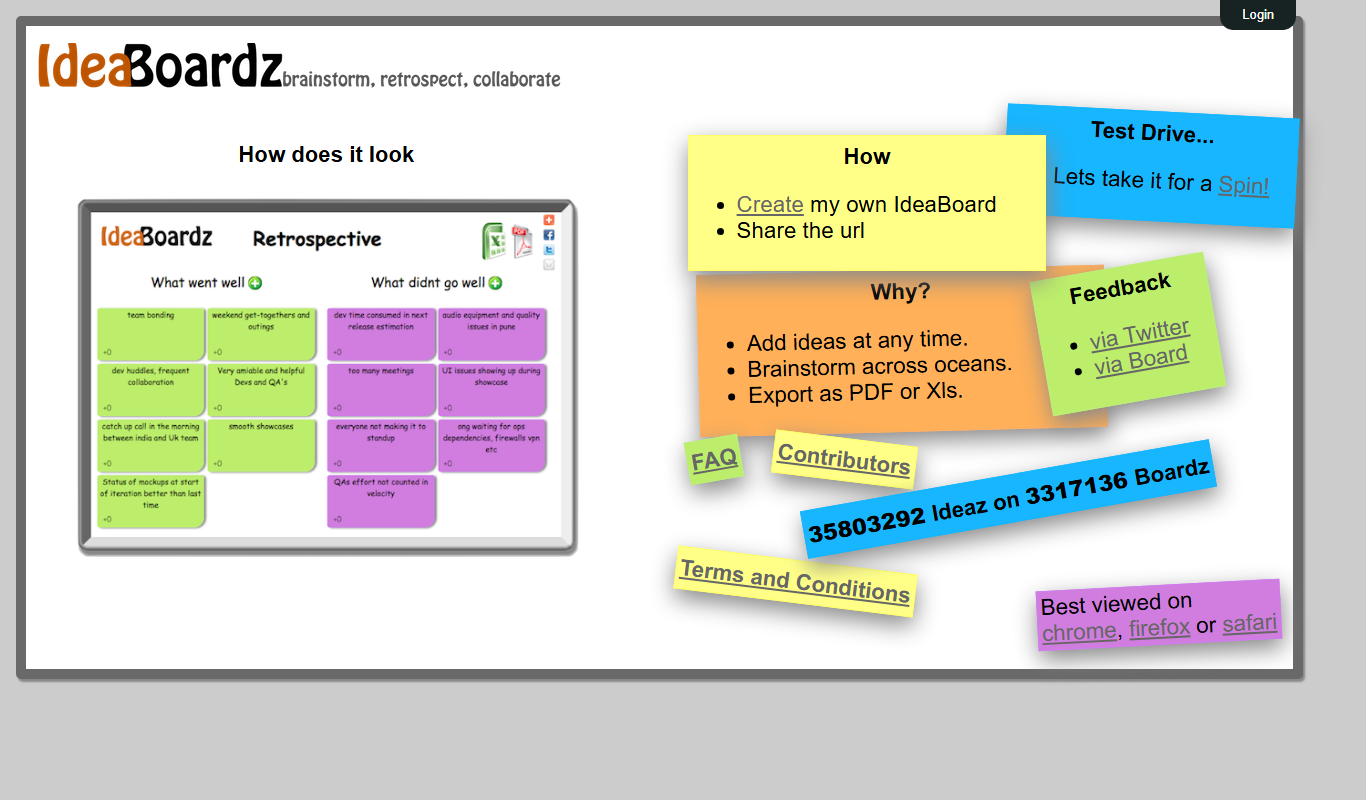
What is IdeaBoardz?
IdeaBoardz is a free, web-based collaborative tool designed to help teams brainstorm, organize ideas, and conduct retrospectives effectively. It provides a simple, intuitive interface where users can create boards, add sticky notes, and categorize ideas in real-time or asynchronously. The platform is especially popular among agile teams for running retrospectives and capturing feedback.
Key features of IdeaBoardz
IdeaBoardz offers features such as multiple board templates, real-time collaboration, anonymous input options, export capabilities, and easy sharing via URLs. Its minimalist design focuses on usability and quick setup without requiring user accounts.
Multiple Board Templates
Includes templates for retrospectives, brainstorming, and project planning to suit different team needs.
Real-Time Collaboration
Allows multiple users to add and edit notes simultaneously with instant updates.
Anonymous Input
Supports anonymous contributions to encourage honest feedback during retrospectives.
Easy Sharing
Boards can be shared via simple URLs without requiring user registration.
Export Options
Export boards as images or PDFs for offline review and record keeping.
Pros and cons of IdeaBoardz
Pros
- Simple and intuitive interface requiring no sign-up
- Supports anonymous feedback for honest retrospectives
- Completely free with unlimited usage
- Real-time collaboration with easy sharing
- Multiple templates tailored for team workflows
Cons
- Limited to web platform only
- No advanced integrations with other tools
- Basic visual customization options
Key use cases for IdeaBoardz
Team Brainstorming
Facilitates real-time idea sharing and organization among team members during brainstorming sessions.
Agile Retrospectives
Supports agile teams in conducting retrospectives by collecting feedback and organizing action items.
Project Planning
Helps teams visually map out project ideas, tasks, and priorities collaboratively.
Remote Collaboration
Enables distributed teams to collaborate asynchronously or synchronously on idea boards.
Meeting Facilitation
Acts as a digital whiteboard to capture meeting notes, ideas, and decisions in an organized manner.
How IdeaBoardz works
- 1
Create a Board
Start by creating a new board using predefined templates or a blank canvas.
- 2
Invite Participants
Share the board link with team members to join and contribute ideas.
- 3
Add and Organize Ideas
Participants add sticky notes with ideas, comments, or feedback and organize them into columns.
- 4
Review and Export
Once complete, review the collected ideas and export the board as needed for documentation.
Who is using IdeaBoardz
IdeaBoardz pricing
Free
$0
Full access to all features with unlimited boards and participants.
Plans and prices are as published by the vendor and can change. Check the official site before you buy. Open the pricing page (opens in a new tab)
Frequently asked questions about IdeaBoardz
No, you can create and share boards without registering an account.
Yes, IdeaBoardz supports real-time collaboration with multiple participants.
Absolutely, it is designed to facilitate collaboration for distributed teams.
No, the free version allows unlimited boards and participants.
It depends on your specific needs and how you plan to use the tool. The official website and documentation are the best sources for the latest details.
Some tools offer a free plan or trial with limited features. Availability can vary, so confirm on the official website.
Yes, it can help with that use case depending on how you configure it and what features are available. You’ll get the best results with clear inputs and a defined goal.
It depends on your specific needs and how you plan to use the tool. The official website and documentation are the best sources for the latest details.
Conclusion
No registration is needed to use IdeaBoardz: a board is created from predefined templates or a blank canvas, and its link is shared with team members so they can join and contribute ideas. Participants add sticky notes with ideas, comments or feedback, organize them into columns and see notes from multiple users with instant updates. Templates cover retrospectives, brainstorming and project planning.
For agile retrospectives, anonymous contributions are supported to encourage honest feedback, and teams can collect feedback and organize action items. It can also act as a digital whiteboard to capture meeting notes, ideas and decisions in an organized manner. Boards support both synchronous and asynchronous work, and the tool is designed to facilitate collaboration for distributed teams. Beyond agile software development teams, it is aimed at project managers and at facilitators and workshop leaders.
When a session is complete, the board can be exported as images or PDFs for offline review and record keeping. All features are free, with unlimited boards and participants. It is limited to the web platform with no advanced integrations with other tools, and visual customization options are basic.
Sources
Sign in to review this tool.
Sign In to ReviewNo reviews yet
Be the first to share how this tool worked for you.
Ask about pricing, limits, or how it compares — or answer someone else.
Sign In to AskNo questions yet
Have a question about using or paying for this tool? Be the first to ask.
Featured on TiorAI



Alternative Tools
Explore similar AI tools that might fit your needs
Stormboard
Stormboard is a cloud-based online whiteboard platform that enables teams to brainstorm, plan projects, and collaborate in real-time using sticky notes, drawings, and templates accessible via web and mobile apps.
More Business Management tools
Other tools in the same category, for when this one is not quite the fit.

Mixo.io
Mixo is an AI website builder for small businesses that creates a professional website from a short business description, with a free plan available.

Vanna AI
Vanna is an open source SQL agent that answers natural language questions about your data with AI-powered SQL generation, self-hosted or in the cloud.

hiroscope.ai
Hiroscope.ai is an AI-powered platform that analyzes video interviews to provide behavioral and sentiment insights, helping recruiters make data-driven hiring decisions.

Cognitiev
Cognitiev offers Cognitiev Studio, which builds voice AI agents from your website and runs prospecting, calls and email outreach, and Cognitiev CRM, which keeps the pipeline up to date.

Adaapt
Adaapt.AI is an enterprise AI super assistant platform for workflow automation, voice AI, predictive analytics and enterprise integrations, available by demo.

NextBrain AI
NextBrain AI is a no-code machine learning and AI workflow automation platform with AutoML, a Knowledge Repository (RAG), Document Extraction and Document Comparison.

dbnix.ai
dbnix.ai is an AI-powered IT support automation platform that resolves L1 and L2 issues instantly, available 24/7.

Athenic AI
Athenic is an agentic AI data analyst: connect your business data, ask questions in plain English and build live dashboards and automated reports with no SQL required.