

AI PDF Redaction Tool App for Secure Document Editing and Privacy
AI PDF Redaction Tool App is a web-based solution that uses AI to identify and permanently remove sensitive data from PDF documents, ensuring privacy and compliance.
- Best for
- Legal Document Redaction
- Key capability
- AI-Powered Sensitive Data Detection
Save AI PDF redaction tool App, follow its updates and vote on it — everything stays in your account.
Sign in or create a free account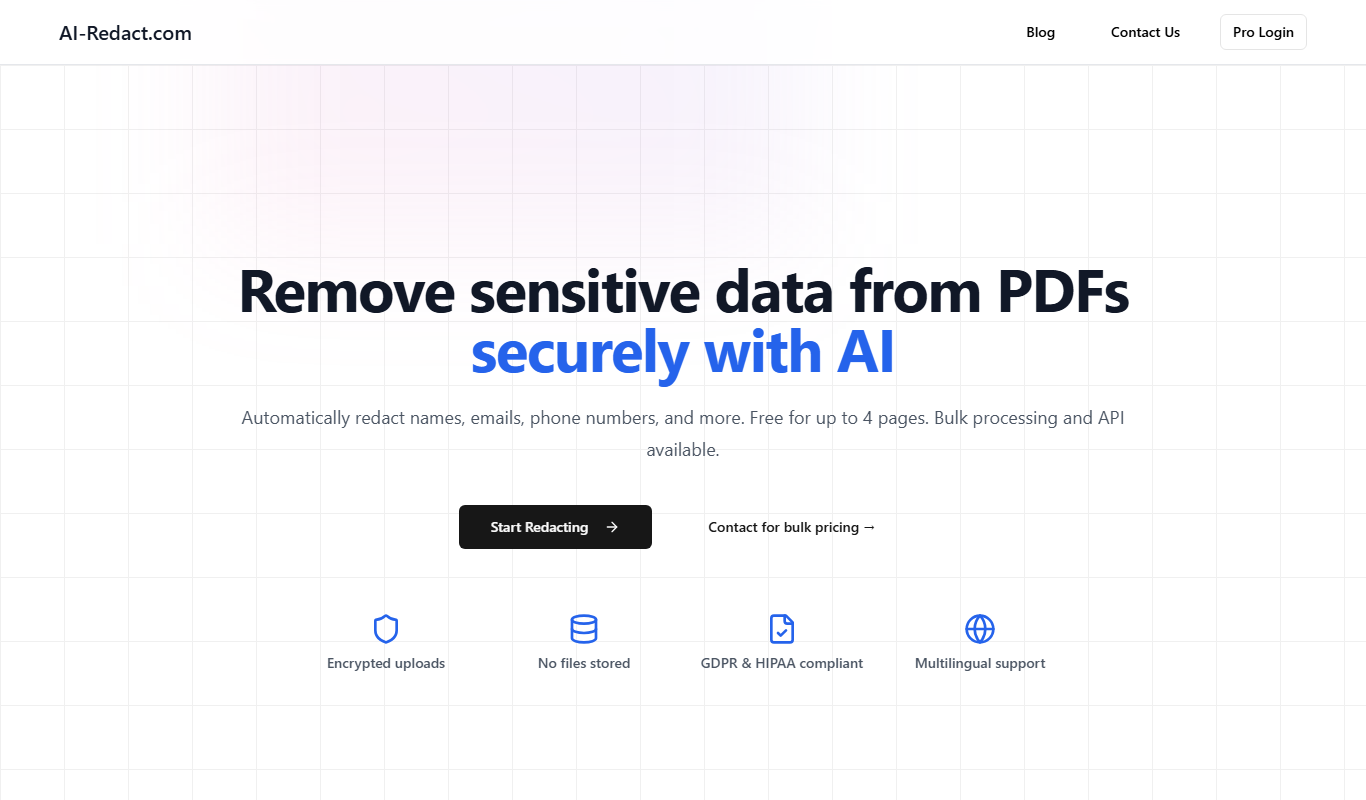
What is AI PDF redaction tool App?
AI PDF Redaction Tool App is a web-based application designed to securely redact sensitive information from PDF documents using artificial intelligence. It automates the identification and removal of private data such as names, addresses, social security numbers, and other confidential content to ensure privacy compliance and secure document sharing.
Key features of AI PDF redaction tool App
The tool offers AI-powered detection of sensitive data, manual redaction options, batch processing capabilities, and export of fully redacted PDFs. It focuses on accuracy and ease of use to streamline the redaction process for professionals across industries.
AI-Powered Sensitive Data Detection
Automatically identifies various types of sensitive information within PDFs to speed up redaction.
Manual Redaction Tools
Allows users to manually select and redact content missed by AI or add custom redactions.
Batch Processing
Supports redacting multiple PDF documents simultaneously to improve efficiency.
Secure Export
Exports redacted PDFs with permanent removal of sensitive data, ensuring privacy compliance.
User-Friendly Web Interface
Intuitive design that requires no software installation and is accessible from any browser.
Pros and cons of AI PDF redaction tool App
Pros
- Automates sensitive data detection to save time
- Easy-to-use web interface with no installation
- Supports batch redaction for multiple files
- Permanent and secure redaction output
Cons
- Free tier is limited to 4 pages per PDF and includes a watermark
- No dedicated desktop or mobile apps
- OCR support for scanned documents is limited
Key use cases for AI PDF redaction tool App
Legal Document Redaction
Securely redact sensitive information from legal documents to comply with privacy regulations.
Corporate Data Privacy
Protect confidential corporate data by removing or masking private details in shared PDFs.
Government Document Handling
Ensure sensitive government documents are properly redacted before public release.
Healthcare Record Protection
Safeguard patient information by redacting personal health details in medical PDFs.
Academic Research Privacy
Remove identifying information from research papers and datasets for ethical compliance.
How AI PDF redaction tool App works
- 1
Upload PDF Document
Users upload the PDF file they want to redact through the web interface.
- 2
Automatic Sensitive Data Detection
The AI scans the document to identify sensitive information such as personal identifiers and confidential data.
- 3
Review and Adjust Redactions
Users can review the suggested redactions and manually add or remove redaction marks as needed.
- 4
Export Redacted PDF
Once finalized, users export the fully redacted PDF, safe for sharing or publication.
Who is using AI PDF redaction tool App
AI PDF redaction tool App pricing
Free
$0 forever
Up to 4 pages per PDF, single file processing, AI-powered detection and no signup required; output includes a watermark.
Pay-as-you-go
Starting at $0.13 per page, as low as $0.08 per page with volume discounts
Unlimited pages per PDF, bulk file processing, no watermarks, volume discounts and credits that never expire.
Enterprise
Custom contract
Everything in Pay-as-you-go, plus custom API access, dedicated support and SLA, and on-premise deployment.
Plans and prices are as published by the vendor and can change. Check the official site before you buy. Open the pricing page (opens in a new tab)
Frequently asked questions about AI PDF redaction tool App
Yes, once exported, the redacted information is permanently removed and cannot be recovered.
Yes. Scanned documents and images can be redacted with built-in optical character recognition.
Uploaded documents are processed securely and deleted after redaction to protect your privacy.
Yes. Bulk file processing is available on the pay-as-you-go and Enterprise plans.
It depends on your specific needs and how you plan to use the tool. The official website and documentation are the best sources for the latest details.
It depends on your specific needs and how you plan to use the tool. The official website and documentation are the best sources for the latest details.
Yes, it can help with that use case depending on how you configure it and what features are available. You’ll get the best results with clear inputs and a defined goal.
Conclusion
Redaction starts with a PDF upload, after which the AI scans for names, emails, phone numbers, SSNs and other PII. The user reviews the detected items, confirms which data to redact and downloads a permanently redacted PDF, where data is removed rather than just visually hidden. Scanned documents and images can be redacted too, through built-in optical character recognition.
Legal discovery documents, patient records, public records and financial reports such as bank statements are the kinds of files the site addresses. A free tier needs no signup and handles up to 4 pages per PDF with a watermark, while pay-as-you-go pricing per page removes the watermark and adds bulk file processing, with credits that never expire. An Enterprise contract adds custom API access and on-premise deployment. Files are encrypted in transit and never stored after processing.
Sources
Sign in to review this tool.
Sign In to ReviewNo reviews yet
Be the first to share how this tool worked for you.
Ask about pricing, limits, or how it compares — or answer someone else.
Sign In to AskNo questions yet
Have a question about using or paying for this tool? Be the first to ask.
Featured on TiorAI



More AI Productivity Tools tools
Other tools in the same category, for when this one is not quite the fit.
BiRead
BiRead is a Chrome extension that translates any website into bilingual text with one click, for reading and learning in 100+ languages.

16x Prompt
16x Prompt is a desktop tool for AI coding that manages code context, customizes prompts and works with multiple LLM API integrations.

Keysha
Keysha is a voice-first AI planner built for ADHD brains on iOS and iPad: you talk, Keysha plans and prioritizes your day.

Progr.io
Progr.io is an AI-powered tool that tracks your ideas and projects, helps you collaborate and gives insights on a project's potential, including competitor analysis.

WappGPT
WappGPT is an AI personal assistant on WhatsApp that remembers what you tell it, sends reminders and can follow up by SMS or phone.

EvalPro.ai
EvalPro is an AI feedback and performance evaluation tool that delivers fast employee feedback, automates KPIs and simplifies feedback composition.

Prompting Sheets
Prompting Sheets is an AI-powered spreadsheet add-on for Google Sheets that creates tailored project plans and to-do lists.

Chippy
Chippy is a ChatGPT Chrome extension that lets you summarize, research, translate and answer questions on any web page without switching tabs.