Best List
Best Online Design Tools (Tested & Ranked)
Searching for the right online design tools? We've ranked the top options by real performance so you can choose confidently.
- Tools
- 10
- Free to start
- 10 of 10
At a glance
| Tool | Best for | Pricing | Profile |
|---|---|---|---|
 Beautiful.ai
|
Business Presentations |
|
View |
 Uizard
|
Rapid UI Prototyping |
|
View |
 Framer AI
|
Website Design |
|
View |
 Brandmark
|
Logo Creation |
|
View |
 Durable AI
|
Small Business Website Creation |
|
View |
 Gamma.ai
|
Business Presentations |
|
View |
| Visily | Rapid UI Prototyping |
|
View |
| 10Web | Managed WordPress Hosting |
|
View |
| Mixo.io | Startup Landing Pages |
|
View |
 Stable Diffusion
|
Creative Visual Content Generation |
|
View |
All 10 tools on this list
Number 1: Beautiful.ai
AI Presentation Generator Lite Free Subscription

- Best for
- Business Presentations
Beautiful.ai is an AI-powered presentation software that automates slide design using smart templates and data visualization tools, enabling users to create professional presentations quickly without design skills.
Key features of Beautiful.ai
-
Smart Templates
Pre-designed templates that adapt dynamically to your content for professional layouts.
-
Automated Design
AI-driven formatting ensures slides are visually balanced and consistent.
-
Data Visualization
Built-in charts and graphs that update automatically with your data.
-
Collaboration Tools
Real-time collaboration with team members for seamless presentation development.
-
Cloud-Based Platform
Access and edit presentations from any device with internet connectivity.
Pros and cons of Beautiful.ai
Pros
- Easy-to-use interface with AI-powered design assistance
- Professional-looking slides without design expertise
- Strong data visualization capabilities
- Cloud-based access from anywhere
Cons
- Limited offline functionality
- No direct PowerPoint import feature
- Primarily English language support
Best use cases for Beautiful.ai
-
Marketing Content
Design engaging marketing decks and sales presentations that communicate brand messages effectively.
-
Educational Materials
Develop clear and attractive slides for teaching, training, and workshops.
-
Startup Pitch Decks
Build compelling investor pitch decks with data visualization and storytelling features.
Pricing
| Plan | Price |
|---|---|
| Pro | $12/month |
| Team | $40/user/month |
| Enterprise | Custom pricing |
Number 2: Uizard
AI API Design Free Freemium

- Best for
- Rapid UI Prototyping
Uizard is an AI-driven design tool that converts sketches and screenshots into editable UI prototypes, enabling rapid app and website design without coding.
Key features of Uizard
-
AI-Powered Design Conversion
Automatically convert sketches and screenshots into editable UI designs.
-
Drag-and-Drop Editor
Intuitive interface for customizing layouts, components, and styles without coding.
-
Real-Time Collaboration
Multiple users can work on the same project simultaneously with live updates.
-
Template Library
Access a variety of pre-built templates for apps, websites, and dashboards.
-
Export Options
Export designs as images, PDFs, or code snippets for development handoff.
Pros and cons of Uizard
Pros
- Speeds up UI/UX prototyping with AI automation
- User-friendly drag-and-drop interface
- Supports collaboration in real-time
- No coding skills required
Cons
- Limited export of production-ready code
- Primarily web-based, no desktop app
- Some advanced features require paid plans
Best use cases for Uizard
-
Wireframing and Mockups
Generate wireframes and mockups from sketches or text descriptions to visualize app concepts.
-
Collaborative Design
Work with teams in real-time to iterate on designs and gather feedback efficiently.
-
No-Code App Design
Build app interfaces and export design assets without needing programming skills.
Pricing
| Plan | Price |
|---|---|
| Free | $0/month |
| Pro | $19/month |
| Business | $49/month |
Number 3: Framer AI
AI API Design Free Freemium

- Best for
- Website Design
Framer AI is an AI-powered web design and prototyping platform that helps users create responsive websites and export React code, suitable for designers and developers seeking faster workflows.
Key features of Framer AI
-
AI-Powered Design Assistance
Generate design suggestions and layouts automatically to speed up the creative process.
-
Interactive Prototyping
Build clickable, animated prototypes to visualize user flows and interactions.
-
Automatic React Code Generation
Convert designs into production-ready React code with minimal manual coding.
-
Real-Time Collaboration
Work simultaneously with team members on projects within the platform.
-
No-Code Website Building
Create fully functional websites without writing code using AI-driven tools.
Pros and cons of Framer AI
Pros
- Intuitive AI-assisted design and prototyping tools
- Generates clean React code to speed up development
- Supports no-code users and professional developers
- Real-time collaboration enhances team workflows
Cons
- Primarily web-based; no desktop or mobile apps
- Limited language support (English only)
- Advanced features require paid subscription
Best use cases for Framer AI
-
Prototyping
Build interactive prototypes quickly to test and iterate on website concepts before development.
-
Code Generation
Automatically generate clean React code from designs to streamline development workflows.
-
Collaboration
Enable teams to collaborate on design and development projects in real-time within the platform.
Pricing
| Plan | Price |
|---|---|
| Free | $0/month |
| Mini | $5/month |
| Basic | $15/month |
Number 4: Brandmark
AI API Design Free Freemium

- Best for
- Logo Creation
Brandmark is an AI-driven logo maker and brand design tool that generates unique logos and brand kits to help businesses establish a professional visual identity quickly and easily.
Key features of Brandmark
-
AI Logo Generation
Automatically create diverse logo concepts using AI algorithms.
-
Brand Kit Creation
Generate cohesive brand kits including color palettes, fonts, and business cards.
-
Customization Tools
Adjust logo elements such as colors, fonts, and layouts easily.
-
High-Resolution Downloads
Download logos and brand assets in multiple formats suitable for print and digital use.
-
User-Friendly Interface
Intuitive design platform accessible to users without graphic design experience.
Pros and cons of Brandmark
Pros
- Quick and easy logo generation
- Comprehensive brand kit creation
- No design skills required
- High-quality downloadable assets
Cons
- Limited free plan features
- Customization options may be basic for advanced designers
Best use cases for Brandmark
-
Brand Identity Design
Develop cohesive brand assets including color palettes, fonts, and business cards.
-
Marketing Material Generation
Create marketing collateral such as social media graphics and presentations aligned with brand style.
-
Startup Branding
Assist startups and small businesses in establishing a visual brand identity without hiring designers.
Pricing
| Plan | Price |
|---|---|
| Basic | $25 one-time |
| Designer | $65 one-time |
| Enterprise | $175 one-time |
Number 5: Durable AI
AI Website Builder Free Trial Subscription

- Best for
- Small Business Website Creation
Durable AI is an AI-driven website builder designed for small businesses and entrepreneurs to quickly create and maintain professional websites without coding skills.
Key features of Durable AI
-
AI-Powered Website Creation
Automatically generate a complete website based on your business details.
-
Content Generation
AI writes website copy, including service descriptions and marketing text.
-
Lead Capture Forms
Built-in forms to collect customer inquiries and grow your contact list.
-
SEO Optimization
AI optimizes website structure and content for better search engine rankings.
-
Easy Editing Interface
User-friendly editor to customize design and content without coding.
Pros and cons of Durable AI
Pros
- Fast website creation with minimal input
- No coding required
- AI-generated content tailored to business
- Built-in lead capture and SEO tools
Cons
- Limited design customization compared to traditional builders
- Pricing may be high for very small budgets
- Currently supports only English language
Best use cases for Durable AI
-
Automated Website Updates
Use AI to automatically update website content and keep it fresh.
-
Lead Generation
Build websites optimized to capture leads and grow customer base.
-
Local Business Marketing
Generate marketing content and SEO-friendly pages tailored for local businesses.
Pricing
| Plan | Price |
|---|---|
| Free Trial | $0 (7-day trial) |
| Starter | $12/month |
| Business | $20/month |
Number 6: Gamma.ai
AI Ai Tools Free Subscription

- Best for
- Business Presentations
Gamma.ai is an AI-powered web-based presentation tool that automates slide deck creation by generating structured, visually appealing presentations from user input, ideal for business, education, and marketing use.
Key features of Gamma.ai
-
AI-Powered Slide Generation
Automatically creates slide decks based on your input, saving time on design and content arrangement.
-
Visual Storytelling Tools
Includes charts, images, and layouts that enhance narrative flow and audience engagement.
-
Customizable Templates
Offers a variety of templates that can be tailored to different presentation styles and industries.
-
Collaboration and Sharing
Enables easy sharing with stakeholders and collaborative editing through web links.
-
Export Options
Supports exporting presentations in multiple formats for offline use or integration with other tools.
Pros and cons of Gamma.ai
Pros
- Speeds up presentation creation with AI automation
- Produces visually appealing and well-structured slides
- User-friendly interface suitable for all experience levels
- Supports easy sharing and collaboration
Cons
- Limited language support (English only)
- Web-only platform with no desktop or mobile apps yet
- Some advanced features require paid subscription
Best use cases for Gamma.ai
-
Startup Pitch Decks
Build compelling investor pitch decks with AI assistance to structure ideas and visualize data effectively.
-
Educational Content
Design engaging presentations for teaching or training sessions with minimal manual effort.
-
Marketing Storytelling
Develop visually appealing marketing presentations that communicate brand messages clearly and creatively.
Pricing
| Plan | Price |
|---|---|
| Free | $0/month |
| Pro | $29/month |
Number 7: Visily
AI Design & Creative Tools Freemium Subscription

- Best for
- Rapid UI Prototyping
Visily is a web-based AI design tool that helps users rapidly create wireframes and interactive UI prototypes with AI assistance and real-time collaboration.
Key features of Visily
-
AI-Powered Wireframing
Automatically generate wireframe layouts from sketches or text inputs to speed up design.
-
Drag-and-Drop UI Components
Easily add and customize UI elements with a user-friendly interface.
-
Real-Time Collaboration
Multiple users can work simultaneously on projects with instant updates.
-
Design to Code Handoff
Provide developers with detailed specs and assets for efficient implementation.
-
Template Library
Access pre-built templates to jumpstart common UI patterns and workflows.
Pros and cons of Visily
Pros
- Intuitive AI-assisted design accelerates prototyping
- Real-time collaboration enhances team workflows
- No coding required to create interactive prototypes
- Accessible for non-designers with templates and AI help
Cons
- Limited offline capabilities due to web-only platform
- Some advanced features require paid subscription
- Smaller template library compared to established design tools
Best use cases for Visily
-
Wireframing
Design wireframes with AI assistance to visualize app or website layouts before development.
-
Collaboration
Work with team members in real-time to share feedback and co-design interfaces seamlessly.
-
Design to Code Handoff
Generate developer-friendly specifications and assets to streamline the handoff process.
Pricing
| Plan | Price |
|---|---|
| Free | $0/month |
| Pro | $15/month |
| Team | $30/month per user |
Number 8: 10Web
AI Shopify Store Builder Lite Freemium Subscription
- Best for
- Managed WordPress Hosting
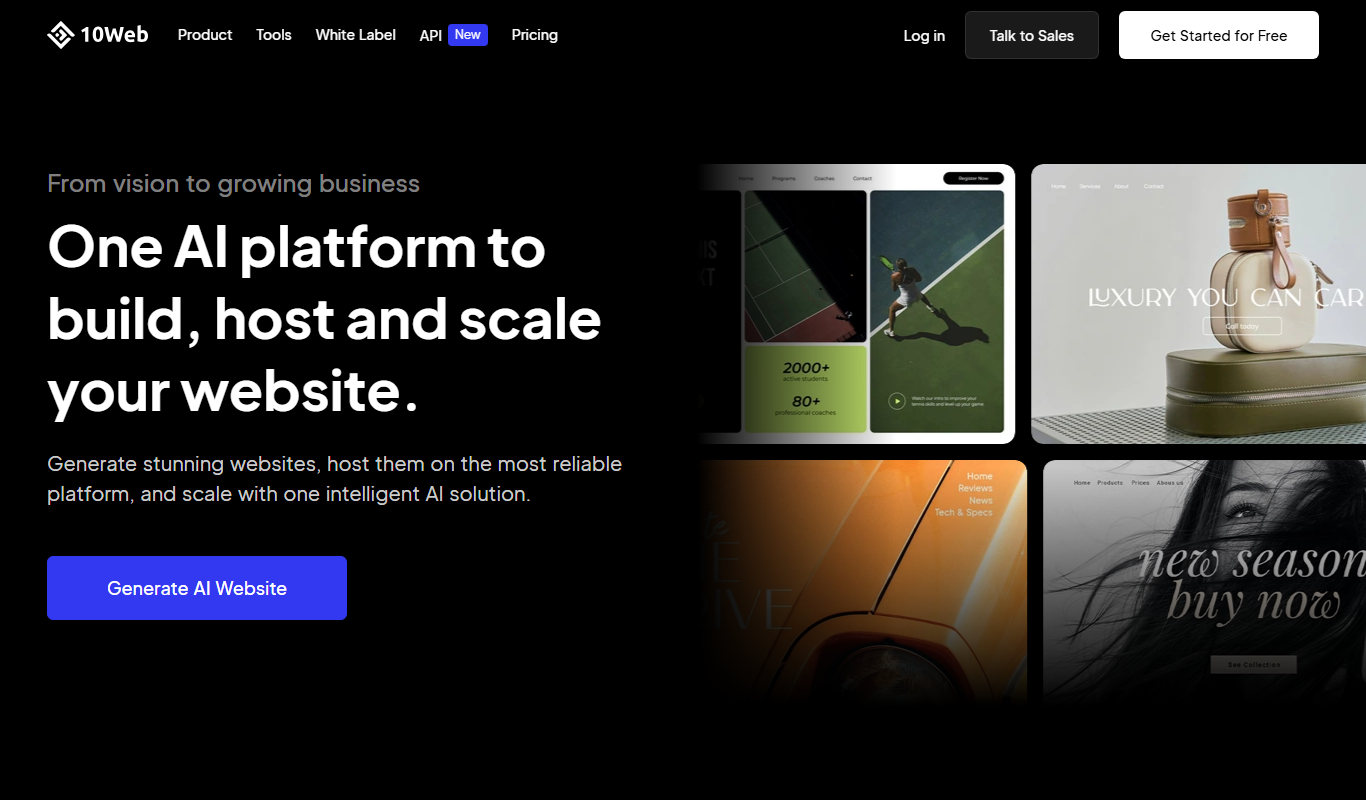
10Web is an AI-powered platform that provides managed WordPress hosting combined with an AI-assisted website builder, automated backups, security, and performance optimization on Google Cloud infrastructure.
Key features of 10Web
-
AI Website Builder
Create WordPress websites quickly using AI-generated templates and content suggestions.
-
Managed Hosting on Google Cloud
Reliable and scalable hosting infrastructure with automated backups and security.
-
Automated Performance Optimization
Includes image optimization, caching, and speed enhancements to improve user experience.
-
One-Click Website Migration
Easily transfer existing WordPress sites to 10Web without downtime.
-
SEO and Security Tools
Built-in tools to monitor SEO health and protect websites from vulnerabilities.
Pros and cons of 10Web
Pros
- AI-powered website builder simplifies site creation
- Managed hosting on fast, reliable Google Cloud infrastructure
- Automated backups and security features included
- One-click migration reduces technical barriers
Cons
- Free plan has limited features and bandwidth
- Pricing can be high for agencies managing multiple sites
- Primarily English language support
Best use cases for 10Web
-
AI-Powered Website Building
Enables users to create WordPress websites quickly using AI-assisted tools and pre-built templates.
-
Website Performance Optimization
Offers automated image optimization, caching, and speed improvements to enhance website loading times.
-
Automated Website Migration
Simplifies moving existing WordPress sites to 10Web’s platform with automated migration tools.
Pricing
| Plan | Price |
|---|---|
| Free | $0/month |
| Starter | $10/month |
| Pro | $35/month |
Number 9: Mixo.io
AI Ai Tools Free Subscription

- Best for
- Startup Landing Pages
Mixo.io is an AI-driven website builder that helps startups quickly create landing pages and MVP websites without coding, featuring AI-generated content, customizable templates, and analytics.
Key features of Mixo.io
-
AI-Powered Content Generation
Automatically creates startup-focused website copy and headlines based on your input.
-
Customizable Templates
Offers a variety of design templates optimized for startup landing pages.
-
No-Code Editing Interface
User-friendly drag-and-drop editor for easy customization without technical skills.
-
Domain Integration
Supports connecting custom domains for professional branding.
-
Analytics and Visitor Tracking
Built-in tools to monitor website traffic and user engagement.
Pros and cons of Mixo.io
Pros
- Fast AI-driven website creation tailored for startups
- No coding required with intuitive editor
- Affordable pricing with a free tier
- Custom domain support on paid plans
Cons
- Limited language support (English only)
- Customization options may be basic for advanced users
- Primarily focused on startup landing pages, less suited for complex websites
Best use cases for Mixo.io
-
MVP Website Creation
Build minimum viable product websites with AI assistance to showcase product concepts without coding.
-
No-Code Website Building
Enable non-technical founders and entrepreneurs to create websites easily using AI-driven templates and content.
-
Investor and Customer Presentations
Create polished web presentations to demonstrate startup ideas to investors or customers.
Pricing
| Plan | Price |
|---|---|
| Free | $0/month |
| Pro | $15/month |
Number 10: Stable Diffusion
AI Stable Diffusion Tools Free Freemium

- Best for
- Creative Visual Content Generation
Stable Diffusion is an open-source AI model by Stability AI that generates high-quality images from text prompts, used widely for creative and commercial visual content creation.
Key features of Stable Diffusion
-
Open-Source Model
Stable Diffusion is freely available for modification and deployment, encouraging community innovation.
-
High-Quality Image Generation
Produces detailed and diverse images from simple text prompts with photorealistic or artistic styles.
-
API Access
Provides developers with API endpoints to integrate image generation into apps and services.
-
Customizable Parameters
Users can control style, resolution, and other generation settings for tailored outputs.
-
Multi-Platform Availability
Accessible via web, desktop apps, and APIs for flexible usage scenarios.
Pros and cons of Stable Diffusion
Pros
- Open-source with strong community support
- Generates high-quality, diverse images
- Flexible usage via web, desktop, and API
- Customizable generation parameters
Cons
- Requires some technical knowledge for advanced features
- Output quality depends on prompt quality
- May produce unexpected or biased results without careful prompt design
Best use cases for Stable Diffusion
-
Concept Art and Design Prototyping
Assist artists and designers in quickly visualizing concepts and ideas through AI-generated imagery.
-
Marketing and Advertising
Create custom visuals for campaigns, social media, and promotional materials without the need for traditional graphic design.
-
Educational and Research Applications
Use AI-generated images to support teaching, presentations, and research in creative fields.
Pricing
| Plan | Price |
|---|---|
| Free (self-hosted) | $0 (open-source) |
| Stable Diffusion API | Pay-as-you-go |
| Enterprise | Custom pricing |
How we chose these tools
- Hand-picked, then orderedThe 10 tools on this page were selected by a TiorAI editor from the directory and placed in the positions you see them in. Nothing on this list is generated automatically or ordered by an algorithm.
- Facts come from each tool's profilePricing, categories, features and the pros and cons below are read from the tool's own TiorAI profile rather than retyped here, so one page is never out of step with the other. Follow any tool name to read the full profile.
- What we do not publishYou will not find star ratings or review scores on this page. TiorAI does not hold verified user reviews for these tools, and printing a number without them behind it would tell you nothing.
Related AI tool lists
Other round-ups that recommend some of the same tools, most overlapping first.
-
Best AI Tools for Designers — Free & Paid Options
Find the best AI Tools for Designers for 2026 — tested, compared, and ranked by features, pricing, and ease of use.
Beautiful.ai, Uizard, Framer AI and 7 more -
Best AI Presentation Tools (Tested & Ranked)
Our team evaluated every major ai presentation tools option in 2026 — these are the tools that are actually worth it.
Beautiful.ai, Uizard, Framer AI and 7 more -
Best AI Design Tools For Non-Designers (Tested & Ranked)
Looking for the best ai design tools for non-designers? Our hands-on comparison reveals the top picks for every use case.
Beautiful.ai, Uizard, Framer AI and 7 more -
Best AI Graphic Design Tools for 2026 (Full Breakdown)
Compare the best AI Graphic Design Tools in 2026 — features, pricing, and which delivers the most value.
Stable Diffusion, Leonardo AI, Playground AI and 7 more -
The Best AI Image Tools for Marketing in 2026 (Reviewed)
We tested the top AI Image Tools for Marketing and ranked them by quality, pricing, and workflow fit.
Stable Diffusion, Leonardo AI, Playground AI and 7 more -
Best Text-to-Image AI Tools — Compared & Ranked
Explore the best Text-to-Image AI Tools — ranked by performance, pricing, and features to help you choose right.
Stable Diffusion, Leonardo AI, Playground AI and 7 more


More tools in this area
Tools that share more than one category with the ones on this list, and are not already on it.
-
 Free
FreeVisily AI
Visily AI is a web-based no-code design tool that uses AI to help users quickly create UI wireframes and interactive prototypes without coding skills.
-
 Free
FreeZapier AI
Zapier AI is an AI-powered automation tool that connects apps and automates workflows using natural language processing and intelligent triggers to improve productivity.
-
Free
IconFinder
IconFinder is an online platform that allows users to search, customize, and download millions of free and premium icons in various formats for design and development projects.
-
 Freemium
3DF Zephyr
3DF Zephyr is a Windows-based photogrammetry software that automatically reconstructs 3D models from photos, supporting drone mapping and detailed 3D mesh creation.
-
Paid
Artec Studio
Artec Studio is a professional 3D scanning software by Artec 3D that enables users to capture, process, and edit detailed 3D models using Artec scanners, widely used in industries like manufacturing, healthcare, and cultural heritage.
-
Perpetual License
SpeedTree
SpeedTree is a 3D modeling software specialized in creating realistic vegetation models for games, films, and visualization, featuring procedural generation, animation, and engine integration.
-
 Free Trial
Houdini
Houdini is a professional 3D animation and visual effects software by SideFX, known for its procedural node-based workflow and advanced simulation capabilities used in film, TV, and game development.
-
 Free
FreeFavicon.io
Favicon.io is a free online tool that lets you create favicons from text, emojis, or images quickly without registration, producing browser-compatible icon files.
Compare these tools head to head
Published pages that put tools from this list against one other tool, side by side on pricing, features and use cases.
-
Durable AI vs Framer AI: Free Plan, Export & Commercial License
Durable AI vs Framer AI — compare free tier features, export quality, commercial licensing terms, and pricing.
-
Framer AI vs Durable AI: Ease of Use, Speed & Output Quality
Compare Framer AI and Durable AI on design speed, AI quality, ease of use, and which delivers better results.
-
Uizard vs Framer AI: Free Plan, Export & Commercial License
Uizard vs Framer AI — compare free tier features, export quality, commercial licensing terms, and pricing.
-

10Web AI vs Durable AI: For Beginners vs Professional Designers
10Web AI or Durable AI? Compare learning curve, feature depth, output quality, and pricing for designers.
-
10Web AI vs Framer AI: Free Plan, Export & Commercial License
10Web AI vs Framer AI — compare free tier features, export quality, commercial licensing terms, and pricing.
-
Adobe Firefly vs Stable Diffusion: Which AI Image Generator Wins in 2026?
Adobe Firefly or Stable Diffusion? We tested both on image quality, style range, and pricing to find the best option.
-

Artbreeder vs Stable Diffusion: Image Quality, Style Control & Pricing
Artbreeder vs Stable Diffusion — compare image quality, style range, prompt accuracy, pricing plans, and creative control.
-
Automatic1111 vs ComfyUI: Full Side-by-Side Comparison
Side-by-side: Automatic1111 vs ComfyUI. Compare features, pricing, strengths, and real use cases to choose right.
Looking to switch?
Alternatives guides written about tools on this list, for readers already using one of them.
-
Alternatives to Beautiful.ai
10 Best Beautiful.ai Alternatives & Competitors in 2026
Explore the top Beautiful.ai alternatives in 2026 — compare features, pricing, and real-world performance to find the right ai presentation tools tool.
Gamma App, Canva, Plus AI for Google Slides and 4 more -
Alternatives to Stable Diffusion
10 Best Stable Diffusion Alternatives in 2026 (Free & Paid)
Looking for the best Stable Diffusion alternatives in 2026? We compared the top options to find the right ai image generation tool for your needs.
Midjourney, DALL-E 3, Adobe Firefly and 7 more -
Alternatives to Brandmark
9 Best Brandmark Alternatives You Should Try in 2026
Switching from Brandmark? Compare the top alternatives by features, pricing, and use case to find the best logo design tool for you.
Canva, Adobe Firefly, Midjourney and 5 more -
Alternatives to Durable AI
Durable AI Alternatives: Free & Paid Options Compared
Looking to replace Durable AI? We compared the top free and paid alternatives by features, pricing, and ai website builder use cases for 2026.
ChatGPT, Claude, Gemini & Gemini Advanced and 7 more -
Alternatives to Framer AI
Top Framer AI Alternatives Tested & Ranked (2026)
We tested the best Framer AI alternatives and ranked them by features, pricing, and use case — find the right ai web design tools tool for your needs.
Canva, Adobe Firefly, Midjourney and 5 more -
Alternatives to Uizard
Uizard Alternatives: Best Ai Design Generator Tools in 2026
Not happy with Uizard? Discover the best alternatives — compare pricing, features, and what each does better for your ai design generator workflow.
Canva, Adobe Firefly, Midjourney and 5 more