

TemplateAI: NextJS boilerplate for full-stack AI apps
TemplateAI is a NextJS template for AI apps, pre-built with Supabase auth, Stripe payments, OpenAI/Claude integration and production-ready AI components.
- Best for
- Launching an AI app
- Key capability
- NextJS frontend
Save TemplateAI, follow its updates and vote on it — everything stays in your account.
Sign in or create a free account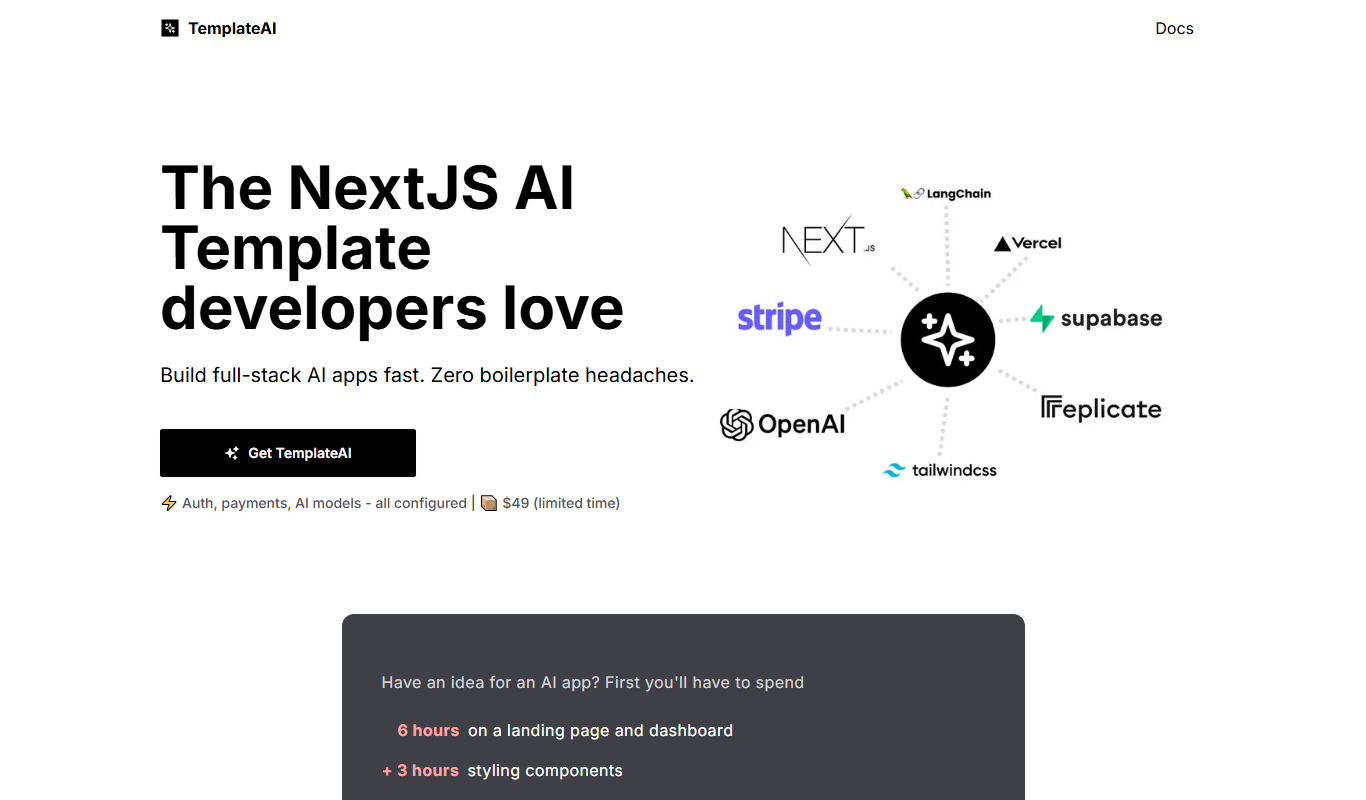

What is TemplateAI?
TemplateAI is a NextJS template for building AI apps. It comes pre-built with Supabase auth, Stripe payments, OpenAI/Claude integration and production-ready AI components such as an LLM chat bubble, image generation and vector search, so developers can skip the boilerplate and focus on their AI features. It is sold as lifetime access to a GitHub repository for a one-time payment.
Key features of TemplateAI
NextJS 13, landing page and dashboard components, Magic Link and Google OAuth authentication, Supabase database and storage, Stripe payments and webhook, an LLM chat bubble, image generation with Replicate, vector search with LangChain and Supabase pgvector, and text generation with OpenAI, Groq and Claude models.
NextJS frontend
NextJS 13 (App Router) styled with Tailwind CSS, with landing page components, dashboard pages and API routes.
Auth and payments
Magic Link and Google OAuth authentication, Supabase database and storage, and Stripe payments with webhook.
AI text generation
Generate text with OpenAI, Groq and Claude models, plus an LLM chat bubble.
Image generation
Image generation with Replicate.
Vector search
Vector search with LangChain and Supabase pgvector.
Pros and cons of TemplateAI
Pros
- One-time payment for lifetime access
- Auth, payments and AI models come pre-configured
- Dark mode plus 30 other themes
Cons
- Aimed at developers: it is source code, not a no-code tool
- Built on NextJS 13, so it suits teams working in that stack
- Free plan has restricted features
Key use cases for TemplateAI
Launching an AI app
Build, launch and monetize a full-stack AI app with Stripe payments.
Chat apps
Add LLM chat with OpenAI, Groq or Claude models.
Document search
Build docs search features with LangChain and Supabase pgvector.
Image generation apps
Generate images with Replicate.
How TemplateAI works
- 1
Buy lifetime access
Get access to the GitHub repository for a one-time payment.
- 2
Set up the stack
Configure Supabase auth, Stripe payments and OpenAI or Claude keys.
- 3
Build your AI features
Use the ready-made components and focus on the AI features of your app.
- 4
Launch
Ship the landing page and dashboard and start charging with Stripe.
- 5
Customize and Export
Edit the generated template as needed and export it for use in your marketing or design projects.
Who is using TemplateAI
TemplateAI pricing
Lifetime Access (GitHub repository)
$49 one-time (shown reduced from $119, limited time)
Lifetime access to the GitHub repository with the full template.
Pro
$25/month
Full access to all templates, advanced customization, brand alignment features, and priority support.
Plans and prices are as published by the vendor and can change. Check the official site before you buy. Open the pricing page (opens in a new tab)
Frequently asked questions about TemplateAI
Lifetime access to the GitHub repository: a NextJS landing page and dashboard, authentication, Supabase database and storage, Stripe payments and AI components.
NextJS 13 with the App Router, styled with Tailwind CSS.
Text generation with OpenAI, Groq and Claude models, and image generation with Replicate.
No. TemplateAI is a one-time payment for lifetime access.
This tool is designed to help users accomplish its core tasks more efficiently. It is typically used by individuals or teams looking to improve productivity and workflow.
It depends on your specific needs and how you plan to use the tool. The official website and documentation are the best sources for the latest details.
Some tools offer a free plan or trial with limited features. Availability can vary, so confirm on the official website.
Conclusion
Developers who want to ship an AI app without writing the plumbing get a NextJS 13 codebase with Supabase auth, Stripe payments and OpenAI or Claude already wired in. The repository includes a landing page and dashboard, an LLM chat bubble, image generation through Replicate and vector search with LangChain and Supabase pgvector. The site counts 31 hours of boilerplate before the fun part, and TemplateAI takes care of the basics so developers can focus on the AI features instead.
Because it is source code, it may suit developers and founders comfortable with NextJS rather than anyone looking for a hosted app. TemplateAI is sold as lifetime access to its GitHub repository for a one-time payment, with the current price marked as a limited-time offer.
Sources
Sign in to review this tool.
Sign In to ReviewNo reviews yet
Be the first to share how this tool worked for you.
Ask about pricing, limits, or how it compares — or answer someone else.
Sign In to AskNo questions yet
Have a question about using or paying for this tool? Be the first to ask.
Featured on TiorAI



Alternative Tools
Explore similar AI tools that might fit your needs

RelayThat
RelayThat is a web-based design automation tool that helps marketers create consistent branded graphics across multiple platforms by automating resizing and formatting.
More AI Developer Tools tools
Other tools in the same category, for when this one is not quite the fit.

CrayEye
CrayEye is a free, open-source mobile app for crafting and sharing multimodal LLM vision prompts that use your camera plus sensor data such as location and weather.

TestLabs
TestLabs tests your app on 20 real devices for 14 days to meet the Google Play testing policy, with daily reports, device logs and screenshots.

Modly
Modly.ai trains, fine-tunes and hosts custom large language models on your business data, delivered as a managed service with API access.

modl.ai
modl.ai automates game testing and QA with AI agents that play your build and analysts that report bugs, glitches and performance issues, with no SDKs or code needed.

Mirascope
Mirascope is The LLM Anti-Framework: open-source Python and TypeScript SDKs with one API for OpenAI, Anthropic and Google, plus tools, tracing and versioning.

Myple
Myple is a developer platform to build, deploy and secure AI applications such as AI agents and RAG chatbots, with SDKs, a CLI and a free Hacker plan.

Momentic
Momentic is an AI testing platform where agents run and maintain plain-English end-to-end tests for web, iOS and Android apps, locally or in CI.

Intuition Machines
Intuition Machines builds privacy-preserving AI/ML platforms: the hCaptcha Security Suite against fraud and abuse, and the IM Perception Platform for training, deploying and improving ML models.