

Old English Text Generator
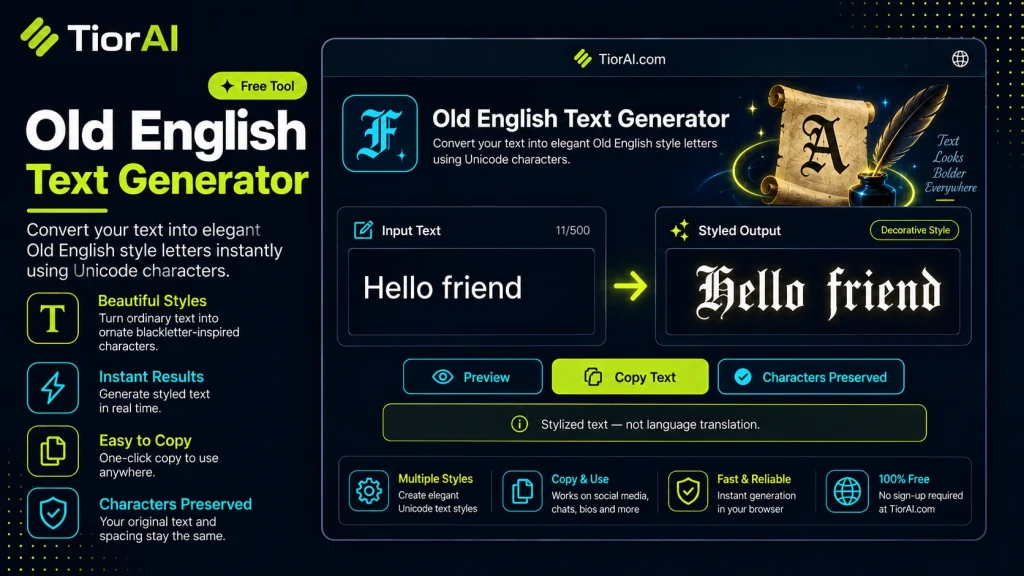
Turn plain text into blackletter (Old English) Unicode characters.
How to use it
- Paste Your Text Paste or type your text into the Old English Text Generator. The tool handles content of any length with no character limits.
- Apply the Tool Click the action button to process your text. The transformation is applied instantly to your content.
- Copy the Result Review the transformed text and copy it to your clipboard for use in documents, emails, or projects.
Tip Process entire documents through the Old English Text Generator — it handles large text blocks without truncation.
Understanding Old English Text and Its Modern Representation
Old English, also known as Anglo-Saxon, is the earliest form of the English language spoken and written in parts of what are now England and southern Scotland between the mid-5th century and the mid-12th century. It is linguistically distinct from Modern English, with a different vocabulary, grammar, and alphabet. However, when people refer to “Old English text generators” today, they usually mean tools that convert modern text into a stylized font or script that mimics the visual style of Old English or Gothic script, rather than producing actual Old English language.
Why does this stylized text exist? The Old English or Gothic style font is popular for decorative purposes, evoking a medieval or historical aesthetic. It is commonly used in graphic design, tattoos, logos, and social media to give text an archaic or formal appearance.
How Old English Text Generators Work Technically
Technically, these generators do not translate language but rather transform the appearance of characters. They use Unicode characters that resemble Old English or Gothic script letters. Unicode is a universal character encoding standard that assigns a unique code to every character from almost all writing systems, including many stylized alphabets.
For example, the letter “A” in a typical Old English style font might be replaced with the Unicode character U+1D504 (𝔄), which is part of the Mathematical Fraktur block. These characters are visually similar to Old English script but are encoded as distinct symbols in Unicode.
The generator maps each standard Latin letter to its corresponding stylized Unicode character. This process is a form of character substitution rather than linguistic translation. Because these characters are part of Unicode, they can be copied, pasted, and displayed across many platforms and devices that support Unicode fonts.
Common Real-World Scenarios
- Graphic Design: Designers use Old English style text to create logos, posters, or book covers that require a medieval or gothic look.
- Social Media and Messaging: Users stylize their usernames, bios, or messages to stand out or convey a certain mood.
- Tattoo Design: People preview how names or phrases will look in Old English script before getting inked.
- Decorative Typography: Invitations, certificates, or themed events may use Old English style text for a formal or historical feel.
It is important to note that these stylized characters may not be supported on all devices or fonts, which can lead to display issues.
What is Old English Text Styling?
Old English text styling refers to the visual representation of text using fonts or characters that mimic the appearance of medieval or Gothic script. This style is characterized by ornate, angular letters that evoke a historical or archaic feel. Unlike actual Old English language, which is a distinct linguistic form, Old English text styling is purely a typographic effect applied to modern English words.
How Does Old English Text Styling Work Technically?
At the core, Old English text generators use Unicode characters from specific blocks such as Mathematical Fraktur or Gothic letters. Each standard Latin letter is mapped to a corresponding Unicode character that looks like an Old English letter. This substitution is purely visual and does not affect the meaning or pronunciation of the text.
Unicode is a universal character encoding system that assigns unique codes to characters from virtually all writing systems. By leveraging Unicode, these generators can produce stylized text that can be copied and pasted across many platforms, provided the device or application supports the necessary fonts.
When to Use Old English Text Generators
- Graphic Design: To create logos, posters, or book covers with a medieval or gothic aesthetic.
- Social Media: To stylize usernames, bios, or posts for a unique visual effect.
- Tattoo Planning: To preview how names or phrases will look in Old English script before getting inked.
- Event Invitations: To add a formal or historical touch to invitations or certificates.
Common Mistakes to Avoid
- Expecting Language Translation: Many users mistakenly believe the tool translates modern English into the Old English language, but it only changes the font style.
- Ignoring Compatibility: Using stylized text in environments that do not support the necessary Unicode characters can result in unreadable text.
- Accessibility Issues: The special characters may not be recognized by screen readers, reducing accessibility for visually impaired users.
Technical Considerations
While Unicode provides a broad range of stylized characters, not all devices or browsers render them consistently. Some older systems may display missing characters as empty boxes or question marks. Additionally, because these characters are not part of standard alphabets, they may not be searchable or editable in the same way as normal text.
Therefore, it is important to test the stylized text in the intended environment before widespread use, especially for professional or official purposes.
Worked examples
Stylizing a Social Media Username
Used to make a username stand out on platforms like Instagram or Twitter.
Before JohnSmithAfter 𝔍𝔬𝔥𝔫𝔖𝔪𝔦𝔱𝔥Designing a Medieval-Themed Poster
Used in graphic design to evoke a historical or gothic atmosphere.
Before Welcome to the FestivalAfter 𝔚𝔢𝔩𝔠𝔬𝔪𝔢 𝔱𝔬 𝔱𝔥𝔢 𝔉𝔢𝔰𝔱𝔦𝔳𝔞𝔩
Frequently asked questions
Reviews and questions
Whether this tool gave people the answer they needed, and what they asked about it.
Sign in to review this tool.
Sign In to ReviewNo reviews yet
Be the first to say whether this tool gave you what you needed.
Ask how to read the result, or what the tool does with an edge case — or answer someone else.
Sign In to AskNo questions yet
Not sure how to read a result? Be the first to ask.
AI tools related to this topic
Tools from the TiorAI directory that work on the same kind of job.

Praktika
Praktika is an app with AI language tutors on iOS and Android that teaches 9 languages through voice interaction.
Deep English
Deep English is an online platform providing immersive audio lessons and exercises designed to help intermediate and advanced learners improve English fluency, pronunciation, and listening comprehension through self-paced study.

Learn English with Aileen
Learn English with Aileen is an online English course with an AI instructor that offers speaking practice, real-time feedback and lessons covering grammar, conversations and vocabulary.

Lingogo – AI tutor to practice English
Lingogo is an AI-powered English tutor that helps learners practice speaking through real-time conversations and provides instant pronunciation feedback to improve fluency and clarity.