

Yalo.ai Conversational AI Platform for Customer Engagement and Sales Automation
Yalo is a sales platform with AI agents on WhatsApp for large companies.
- Best for
- Customer Support Automation
- Key capability
- WhatsApp, app and calls
Save yalo.ai, follow its updates and vote on it — everything stays in your account.
Sign in or create a free account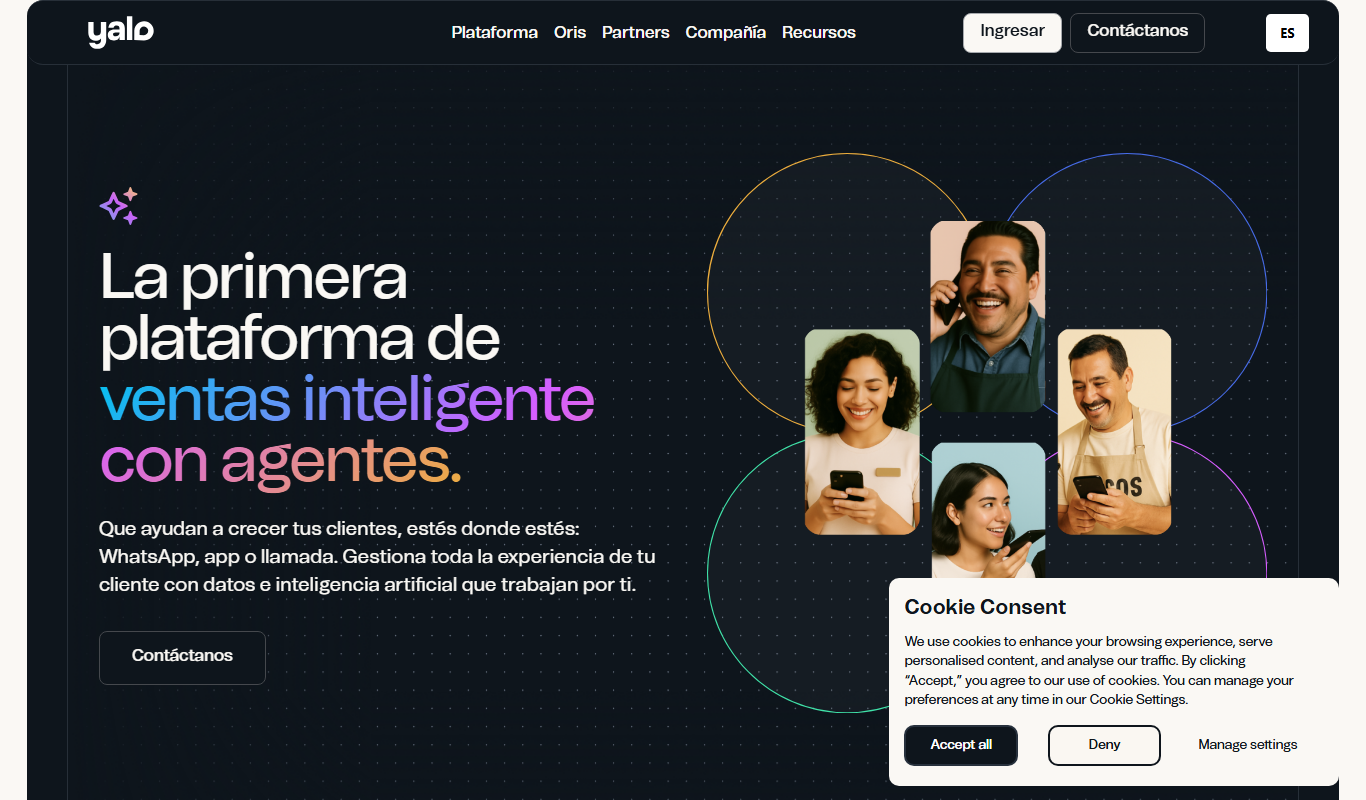
What is yalo.ai?
Yalo is a sales and conversations platform on WhatsApp for large companies, now positioned as a sales platform with AI agents rather than only chatbots. Pricing is custom.
Key features of yalo.ai
The platform offers AI-powered chatbots, multi-channel messaging integration, CRM and e-commerce system connectivity, payment processing within chats, and analytics to optimize customer engagement and sales workflows.
WhatsApp, app and calls
It focuses on AI sales agents across WhatsApp, app and calls.
AI Sales Agents
It uses AI sales agents, not only chatbots.
CRM and E-commerce Integration
Seamlessly connects with existing business systems to synchronize customer data and order information.
In-Chat Payment Processing
Allows customers to make secure payments directly within the conversation, simplifying transactions.
Analytics and Reporting
Provides insights into chatbot performance, customer interactions, and sales metrics to inform strategy.
Pros and cons of yalo.ai
Pros
- Supports multiple popular messaging platforms
- Integrates with CRM and e-commerce systems
- Enables in-chat payment processing
- Provides detailed analytics for optimization
Cons
- Pricing is not publicly available and requires contact
- May require technical resources for complex chatbot designs
- Limited language support focused on English, Spanish, and Portuguese
Key use cases for yalo.ai
Customer Support Automation
Automate customer service interactions through AI-powered chatbots on messaging platforms to provide instant responses and reduce support costs.
Sales and Lead Generation
Engage prospects via conversational AI to qualify leads, schedule appointments, and drive sales conversions directly through messaging apps.
Order Management and E-commerce
Enable customers to browse products, place orders, and track shipments through conversational interfaces integrated with e-commerce systems.
Marketing Campaigns
Deliver personalized promotions and campaigns via conversational channels to increase customer engagement and retention.
Payment Collection
Facilitate secure payment processing within chat conversations to streamline transactions and improve cash flow.
How yalo.ai works
- 1
Integration Setup
Connect Yalo.ai with your preferred messaging channels and backend systems like CRM or e-commerce platforms.
- 2
Design Conversational Flows
Create AI-driven chatbots with customized conversation paths tailored to your business needs.
- 3
Deploy and Engage
Launch chatbots on messaging apps to interact with customers, answer queries, and drive sales.
- 4
Monitor and Optimize
Use analytics dashboards to track performance and refine chatbot interactions for better results.
Who is using yalo.ai
yalo.ai pricing
Custom Pricing
Contact for pricing
Tailored plans based on business size, usage volume, and feature requirements.
Plans and prices are as published by the vendor and can change. Check the official site before you buy. Open the pricing page (opens in a new tab)
Frequently asked questions about yalo.ai
Yalo focuses on WhatsApp, app and calls.
Yes, Yalo.ai offers integrations with various CRM and e-commerce platforms to synchronize data and workflows.
Yalo.ai provides tools for both technical and non-technical users to design conversational flows, but complex customizations may require developer support.
Yes, the platform enables secure payment collection directly through conversational interfaces.
This tool is designed to help users accomplish its core tasks more efficiently. It is typically used by individuals or teams looking to improve productivity and workflow.
Yes, it can help with that use case depending on how you configure it and what features are available. You’ll get the best results with clear inputs and a defined goal.
It depends on your specific needs and how you plan to use the tool. The official website and documentation are the best sources for the latest details.
Conclusion
Sales on WhatsApp for large companies is the core use, and the platform is now positioned around AI sales agents rather than only chatbots. Those agents work across WhatsApp, app and calls. Behind the conversation, it connects with CRM and e-commerce systems to synchronize customer data and order information. Customers can also make secure payments directly within the conversation.
It is aimed at retail and e-commerce businesses and financial services companies. Pricing is custom and not publicly listed, so it requires contacting the company.
Sources
Sign in to review this tool.
Sign In to ReviewNo reviews yet
Be the first to share how this tool worked for you.
Ask about pricing, limits, or how it compares — or answer someone else.
Sign In to AskNo questions yet
Have a question about using or paying for this tool? Be the first to ask.
Featured on TiorAI



More AI Automation & Workflow Tools tools
Other tools in the same category, for when this one is not quite the fit.

TestGenAI
TestGenAI is an AI test case generator that creates structured test cases with steps, expected results and edge cases from business requirements and user stories.

AutoRFP.ai
AutoRFP.ai is an AI-powered platform that automates RFP response creation, enabling sales teams to quickly generate tailored proposals and manage content efficiently.

BulkGPT.ai
BulkGPT.ai is a no-code AI workflow platform for web scraping, search enrichment, SEO operations, research and batch content generation.

Upreach
Upreach is an AI-driven outreach platform that automates personalized cold email campaigns and follow-ups to help sales teams generate and qualify leads efficiently.
Moveworks
Moveworks is an AI-driven platform that automates IT support by understanding employee requests via chat and resolving issues instantly, reducing helpdesk tickets and improving efficiency.

cinnamon.ai
cinnamon.ai is an AI-driven automation platform specializing in enterprise document processing and workflow automation using OCR and NLP technologies.
Inflyx
Inflyx is an influencer marketing platform that enables brands to discover influencers, manage campaigns, track performance, and handle payments all in one place.

RADAAR
RADAAR is a social media management tool that helps businesses schedule posts, collaborate with teams, manage messages, and analyze social media performance from one platform.