

From my experience with Targum Video, I found it excels at simplifying the creation of accurate, multilingual subtitles through AI automation. The platform’s intuitive subtitle editor and support for numerous languages make it particularly well-suited for content creators and marketers aiming to expand their video reach internationally. However, the web-only interface and limitations on the free plan’s video length may require users with heavier workloads to upgrade. Overall, if you need efficient, AI-powered subtitle generation and translation for videos, Targum Video delivers a practical and accessible solution.
Targum Video AI Subtitle Generator for Multilingual Video Captions
Targum Video is an AI-driven platform that automatically generates and translates video subtitles into multiple languages, enabling creators to produce accessible and localized video content efficiently.
- Best for
- Automatic Subtitle Generation
- Key capability
- AI-Powered Transcription
Your actions
Save Targum Video, follow its updates and vote on it — everything stays in your account.
Sign in or create a free account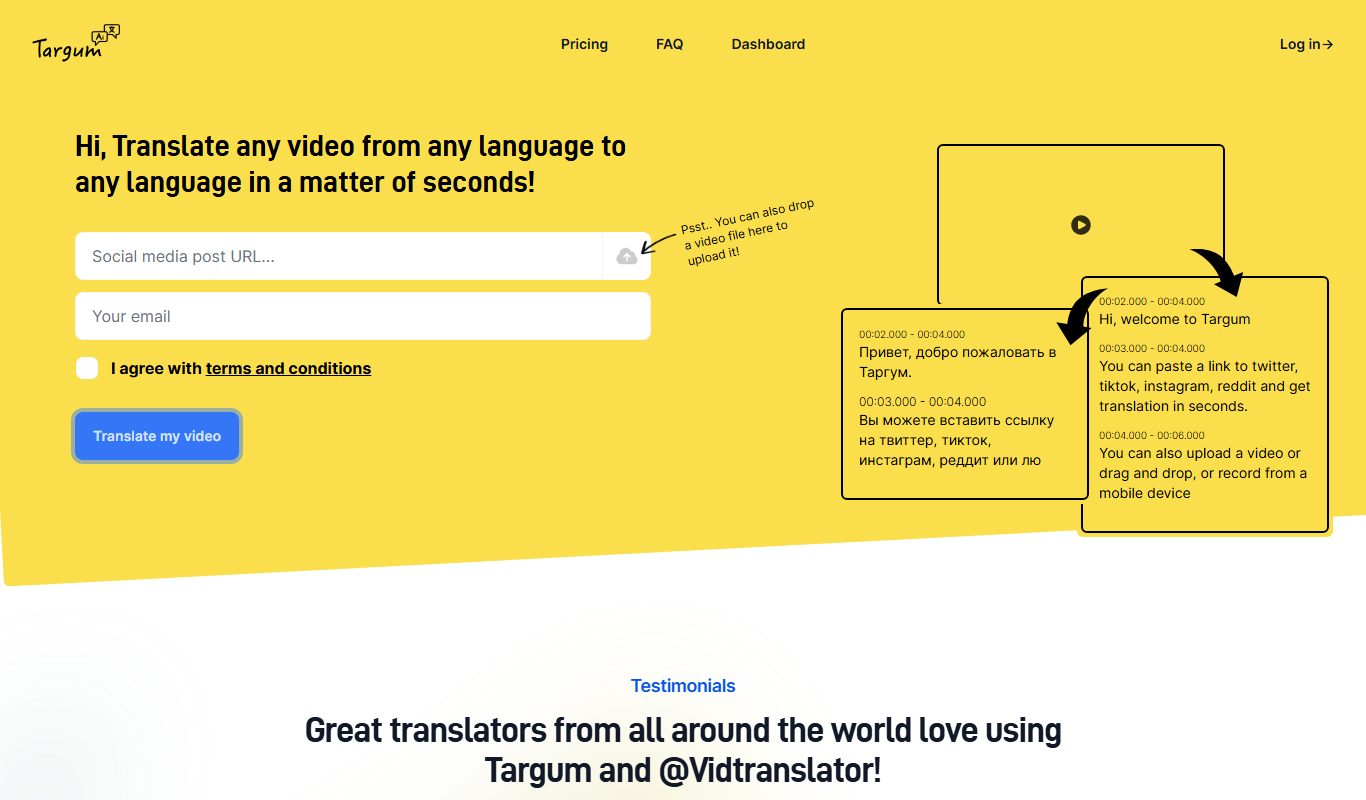
What is Targum Video?
Targum Video is an AI-powered platform designed to automatically generate subtitles and captions for videos in multiple languages. It leverages advanced speech recognition and translation technologies to provide accurate, time-synced subtitles that enhance video accessibility and localization. The tool is web-based and caters to content creators, marketers, and businesses aiming to expand their video reach globally.
Key features of Targum Video
Targum Video offers automatic transcription, AI-driven translation, subtitle editing, and export options in various subtitle formats. It supports numerous languages and provides an intuitive interface for reviewing and adjusting subtitles before publishing.
AI-Powered Transcription
High-accuracy speech-to-text conversion with time-synced captions.
Multilingual Translation
Supports automatic translation into over 30 languages for global reach.
Subtitle Editor
User-friendly interface to fine-tune subtitles and correct errors.
Multiple Export Formats
Export subtitles as SRT, VTT, or embed directly into videos.
Cloud-Based Platform
No software installation required; accessible via web browser.
Pros and cons of Targum Video
Pros
- Supports multiple languages for global audiences
- Easy-to-use subtitle editor for customization
- Cloud-based with no installation needed
- Multiple export formats for flexibility
Cons
- Free plan has limited video length and features
- No desktop or mobile app, web-only platform
- Translation quality may vary with complex audio
Key use cases for Targum Video
Automatic Subtitle Generation
Generate accurate subtitles for videos in multiple languages automatically using AI.
Multilingual Video Captioning
Create captions in various languages to reach a broader international audience.
Video Accessibility Enhancement
Improve video accessibility for hearing-impaired viewers by providing clear subtitles.
Content Localization
Localize video content efficiently to adapt to different markets and languages.
Video Marketing
Boost engagement and SEO by adding subtitles that improve viewer retention and search visibility.
How Targum Video works
- 1
Upload Video
Users upload their video files directly to the Targum Video platform.
- 2
Automatic Transcription
The AI engine transcribes the spoken content into text with timestamps.
- 3
AI Translation
The transcription is translated into selected target languages automatically.
- 4
Subtitle Editing
Users can review, edit, and adjust subtitles within the platform to ensure accuracy.
- 5
Export and Publish
Final subtitles can be exported in multiple formats or embedded into videos for publishing.
Who is using Targum Video
Content creators
Marketing teams
Video producers
Educational institutions
Businesses expanding internationally
Targum Video pricing
Free
$0/month
Limited video length and subtitle exports with basic features.
Pro
$29/month
Extended video length, priority processing, and advanced subtitle options.
Enterprise
Custom pricing
Tailored solutions with dedicated support and bulk processing.
Plans and prices are as published by the vendor and can change. Check the official site before you buy. Open the pricing page (opens in a new tab)
Frequently asked questions about Targum Video
Targum Video supports common video formats such as MP4, MOV, AVI, and more.
Yes, the platform includes an editor to review and adjust subtitles before export.
Accuracy depends on audio quality, but Targum Video uses advanced AI models to deliver high-quality transcriptions.
Yes, the free plan has restrictions on maximum video length and number of exports.
It depends on your specific needs and how you plan to use the tool. The official website and documentation are the best sources for the latest details.
Yes, it can help with that use case depending on how you configure it and what features are available. You’ll get the best results with clear inputs and a defined goal.
Yes, it can help with that use case depending on how you configure it and what features are available. You’ll get the best results with clear inputs and a defined goal.
Pricing depends on the plan and included features. For the most accurate and up-to-date details, check the official pricing page.
Sign in to review this tool.
Sign In to ReviewNo reviews yet
Be the first to share how this tool worked for you.
Ask about pricing, limits, or how it compares — or answer someone else.
Sign In to AskNo questions yet
Have a question about using or paying for this tool? Be the first to ask.
Featured on TiorAI



More AI Multilingual Tools tools
Other tools in the same category, for when this one is not quite the fit.

Free
Smodin
Smodin is an AI writing assistant that helps generate, paraphrase, translate, and summarize text in over 100 languages via a web platform with free and premium options.

Freemium
ChatALL — all-in-one GPT’s app
ChatALL is an AI chatbot app that integrates multiple GPT models and supports multilingual conversations, available on web, iOS, and Android platforms.