

Ananke stock signal analyzer GPT for quantitative research reports
Ananke Stock Signal Analyzer is a GPT that turns raw model output into a structured quantitative research report with multi-timeframe signals, a trade setup, invalidation and risk assessment.
- Best for
- Stock signal reports
- Key capability
- Multi-timeframe structure
Save Ananke Stock Signal Analyzer, follow its updates and vote on it — everything stays in your account.
Sign in or create a free account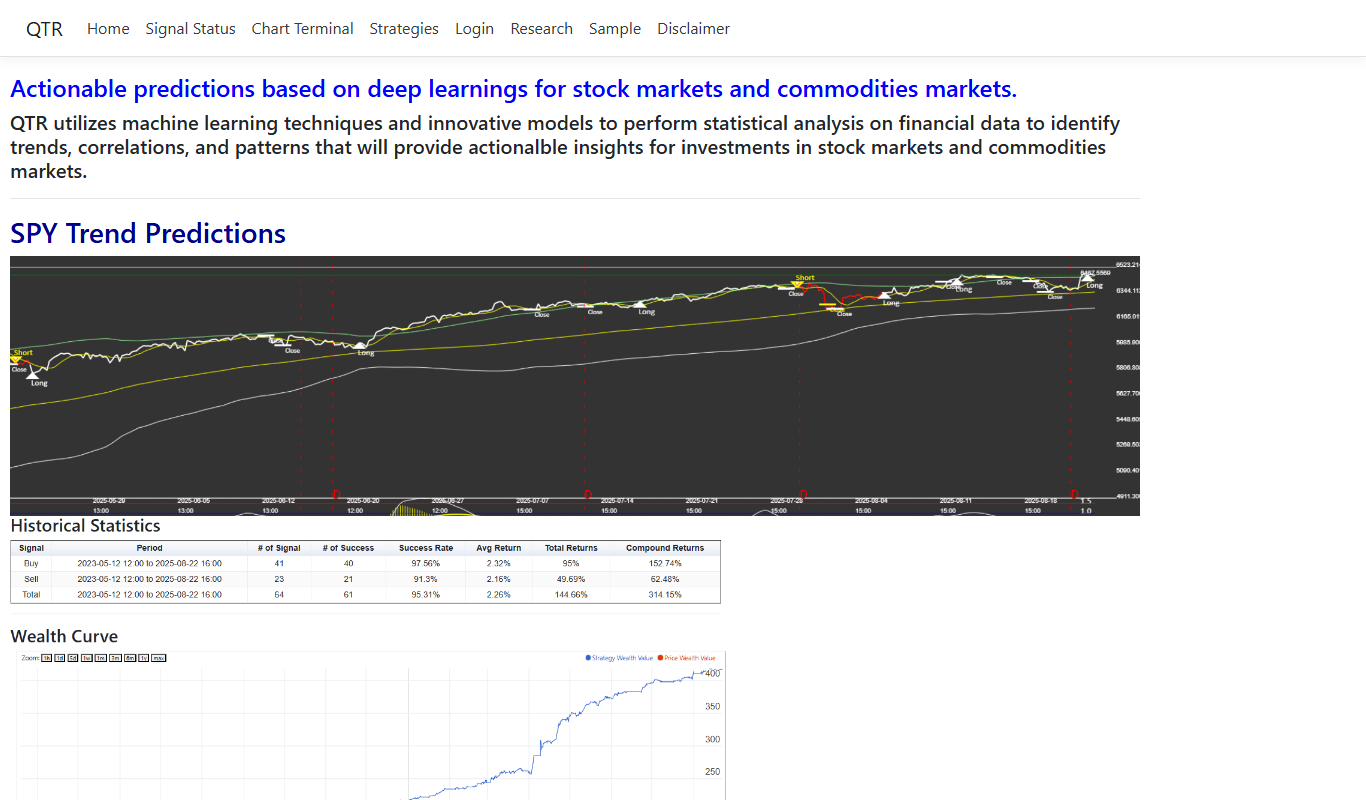
What is Ananke Stock Signal Analyzer?
Ananke Stock Signal Analyzer is a GPT that transforms raw model output into a structured quantitative research report for a stock symbol. It summarizes multi-timeframe signals, explains style rotation, interprets technical structure and turns the latest model state into a trade setup with invalidation and risk assessment, alongside a Discord community where signals are shared.
Key features of Ananke Stock Signal Analyzer
Ananke builds a research-style report from multi-timeframe model outputs, with a signal summary, structure analysis, trade setup, invalidation and overall risk.
Multi-timeframe structure
Reads Daily, Hourly and 15-minute model outputs together instead of treating signals in isolation.
Style rotation context
Integrates growth vs value and QQQ vs IWM rotation to judge whether the backdrop supports or weakens the trade.
Research-style report
Outputs a report with signal summary, structure analysis, trade setup, invalidation and overall risk.
Discord signal community
Real-time signal releases with their structural analysis logic are shared in a Discord community.
Pros and cons of Ananke Stock Signal Analyzer
Pros
- Combines Daily, Hourly and 15-minute model outputs in one report
- Each report includes invalidation and an overall risk assessment
- Educational resources to deepen trading knowledge
Cons
- Generating a report on the page needs a Quant API key
- The site states it is not investment advice and that past performance does not guarantee future results
Key use cases for Ananke Stock Signal Analyzer
Stock signal reports
Turn raw model output for a symbol into a structured quantitative research report.
Market context
Check growth vs value and QQQ vs IWM rotation behind a trade.
Community signal review
Collaborate with other traders in Discord to validate signals.
Educational Resources
Delivers educational content and research papers to enhance traders' understanding of quantitative methods.
How Ananke Stock Signal Analyzer works
- 1
Open the GPT
Use the Ananke GPT directly on the page or open it in a new tab.
- 2
Enter a symbol and API key
Enter a symbol and your Quant API key to generate a full multi-timeframe report.
- 3
Read the report
Review the signal summary, structure analysis, trade setup, invalidation and overall risk.
- 4
Follow the community
Join the Discord community where signals and their verification logic are shared.
Who is using Ananke Stock Signal Analyzer
Ananke Stock Signal Analyzer pricing
Standard Subscription
$99/month
Full access to market research, strategy tools, and educational resources.
Annual Subscription
$999/year
Discounted annual plan with the same features as the monthly subscription.
Plans and prices are as published by the vendor and can change. Check the official site before you buy. Open the pricing page (opens in a new tab)
Frequently asked questions about Ananke Stock Signal Analyzer
It is designed for traders, quantitative analysts, and financial professionals seeking data-driven market insights and strategy development tools.
The platform primarily focuses on equity markets but also provides insights applicable to other asset classes.
While the platform offers tools and frameworks for strategy development, it does not provide direct backtesting software.
Currently, Quantum Trading Research does not offer a free trial but provides detailed information about its services on the website.
This tool is designed to help users accomplish its core tasks more efficiently. It is typically used by individuals or teams looking to improve productivity and workflow.
It depends on your specific needs and how you plan to use the tool. The official website and documentation are the best sources for the latest details.
Yes, it can help with that use case depending on how you configure it and what features are available. You’ll get the best results with clear inputs and a defined goal.
Conclusion
Raw model output for a stock symbol goes in, and a structured quantitative research report comes out. The analyzer reads Daily, Hourly and 15-minute signals together and adds growth versus value and QQQ versus IWM rotation as context for the trade. Each report closes with a trade setup, an invalidation level and an overall risk assessment.
It runs as a GPT on the page, and generating a full report there requires a symbol plus a Quant API key. A Discord community shares signals in real time with their structural logic, and the site invites traders to validate them together. No subscription or price is shown, and the site says its output is not investment advice and that past performance is no promise of future results.
Sources
Sign in to review this tool.
Sign In to ReviewNo reviews yet
Be the first to share how this tool worked for you.
Ask about pricing, limits, or how it compares — or answer someone else.
Sign In to AskNo questions yet
Have a question about using or paying for this tool? Be the first to ask.
Featured on TiorAI



Alternative Tools
Explore similar AI tools that might fit your needs

QuantConnect
QuantConnect is a cloud platform that enables users to develop, backtest, and deploy algorithmic trading strategies using C# and Python with access to extensive financial data and brokerage integrations.

TradingView
TradingView is a financial platform offering real-time market data, advanced charting tools, and a social network for traders to analyze stocks, forex, cryptocurrencies, and more.