

QR Code Generator Premium for Custom QR Codes and Tracking Features
QR Code Generator Premium by QR-Kode AS is a web tool for creating customizable and trackable QR codes with dynamic editing and detailed analytics.
- Best for
- Marketing Campaigns
- Key capability
- Dynamic QR Codes
Save QR Code Generator – Premium, follow its updates and vote on it — everything stays in your account.
Sign in or create a free account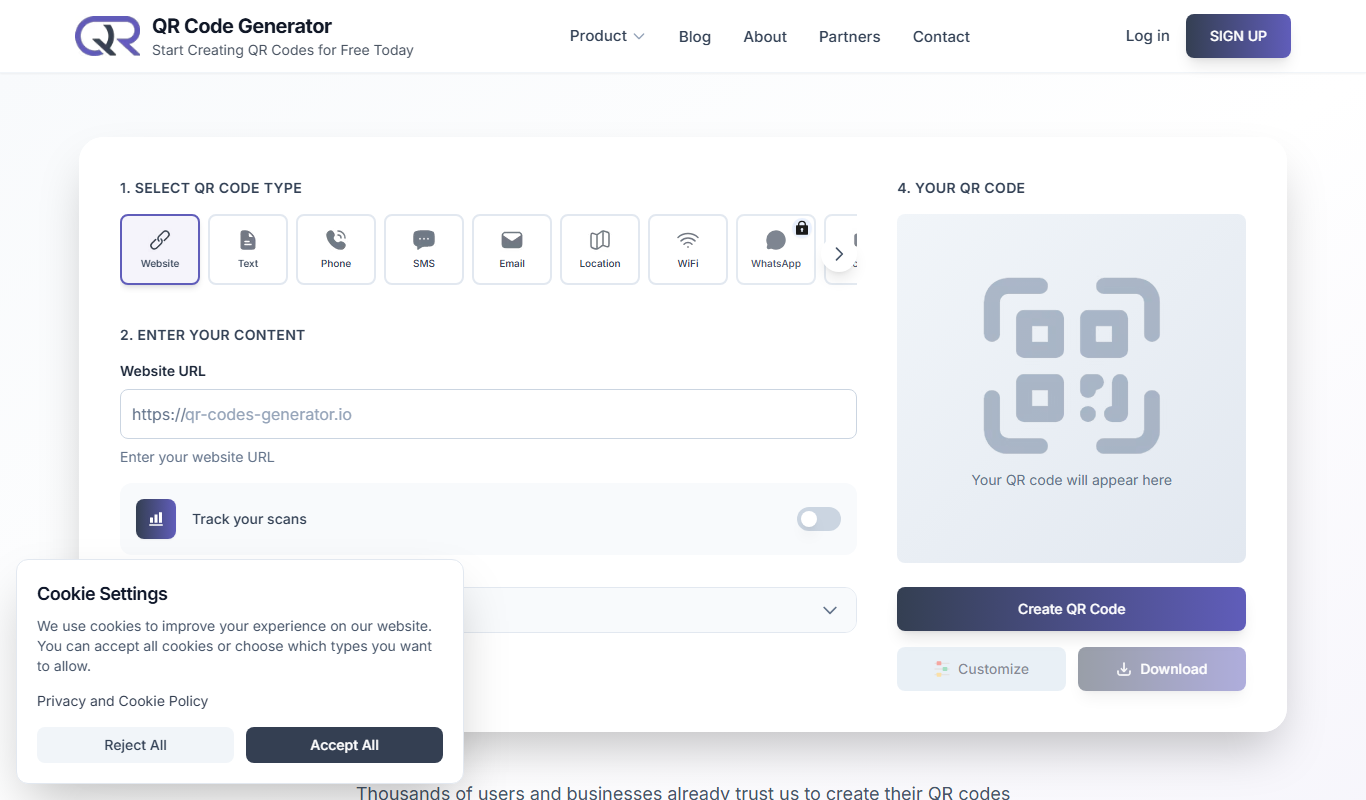

What is QR Code Generator – Premium?
QR Code Generator Premium by QR-Kode AS is a web-based platform that enables users to create customized QR codes with advanced design options and tracking capabilities. It is designed for businesses and marketers who want to generate branded QR codes, monitor scan analytics, and integrate QR codes into various marketing and operational workflows.
Key features of QR Code Generator – Premium
The tool offers customizable QR code designs, dynamic QR codes that can be edited after creation, detailed scan analytics, and multiple QR code formats. It supports high-resolution downloads suitable for print and digital use, making it versatile for marketing, events, and product labeling.
Dynamic QR Codes
Edit the destination URL or content of QR codes after printing without changing the code.
Custom Design Options
Customize QR code colors, shapes, and embed logos to match branding.
Scan Analytics
Access detailed reports on scan counts, locations, devices, and time.
Multiple Download Formats
Download QR codes in high-resolution PNG, SVG, PDF, and EPS formats.
Bulk QR Code Generation
Generate multiple QR codes at once for large campaigns or product lines.
Pros and cons of QR Code Generator – Premium
Pros
- User-friendly interface with easy customization
- Dynamic QR codes allow post-print edits
- Detailed scan analytics for marketing insights
- Supports multiple download formats
- Bulk QR code generation for large projects
Cons
- Free plan includes only 1 dynamic QR code and 7 days of scan statistics
- No mobile app available, web-only platform
Key use cases for QR Code Generator – Premium
Marketing Campaigns
Create custom QR codes to engage customers and track campaign performance.
Product Packaging
Add branded QR codes on packaging to provide product information and promotions.
Event Management
Generate QR codes for event tickets and check-ins to streamline attendee management.
Business Cards
Design QR codes linking to digital business cards or contact details.
Analytics and Tracking
Monitor QR code scans with detailed analytics to optimize marketing strategies.
How QR Code Generator – Premium works
- 1
Choose type and content
No account is needed for a basic code: choose the QR code type, enter the content and create the code.
- 2
Design QR Code
Choose the QR code type, customize colors, shapes, and add logos or images.
- 3
Generate and Download
Generate the QR code and download it in various formats like PNG, SVG, or PDF.
- 4
Track Scans
Use the dashboard to monitor scan statistics and analyze user engagement.
Who is using QR Code Generator – Premium
QR Code Generator – Premium pricing
Free
NOK 0
No card needed: unlimited static QR codes, 1 dynamic QR code, 1 BioLink page, 1 digital business card (vCard), 1 file link, 1 custom email signature and 7 days of scan statistics.
Premium
NOK 149 /month
Everything in Free plus unlimited dynamic QR codes, advanced analytics, custom logo and branding, custom domain, unlimited BioLink pages, unlimited virtual business cards, unlimited teams and projects, UTM tracking pixels, REST API access and priority support.
Plans and prices are as published by the vendor and can change. Check the official site before you buy. Open the pricing page (opens in a new tab)
Frequently asked questions about QR Code Generator – Premium
Yes, with dynamic QR codes, you can change the destination URL anytime without reprinting.
You can download QR codes in PNG, SVG, PDF, and EPS formats.
Yes, the free plan includes 7 days of scan statistics.
Yes, a REST API lets developers create and manage QR codes from their own app or website; API access is part of the Premium plan.
It depends on your specific needs and how you plan to use the tool. The official website and documentation are the best sources for the latest details.
Yes, it can help with that use case depending on how you configure it and what features are available. You’ll get the best results with clear inputs and a defined goal.
Yes, it can help with that use case depending on how you configure it and what features are available. You’ll get the best results with clear inputs and a defined goal.
Conclusion
Making a basic code requires no account: the user chooses the QR code type, enters the content and creates the code in the browser. Colors, shapes and logos can be customized to match branding. Dynamic codes are the part that changes over time, since their destination URL can be edited after printing without reprinting the code. The same account also covers BioLink pages, digital business cards and a REST API for building QR codes into other apps.
Marketing agencies, event organizers and product manufacturers are among the intended users. The free plan allows unlimited static QR codes but only 1 dynamic QR code and 7 days of scan statistics. Premium removes those limits with unlimited dynamic QR codes, advanced analytics, a custom domain and REST API access.
Sources
Sign in to review this tool.
Sign In to ReviewNo reviews yet
Be the first to share how this tool worked for you.
Ask about pricing, limits, or how it compares — or answer someone else.
Sign In to AskNo questions yet
Have a question about using or paying for this tool? Be the first to ask.
Featured on TiorAI



Alternative Tools
Explore similar AI tools that might fit your needs

QR Code Monkey
QR Code Monkey is a free online tool that lets you create customizable QR codes with logos and colors, suitable for marketing, business branding, and event management.

Unitag QR Code Generator
Unitag QR Code Generator is a web-based tool that allows users to create customizable QR codes with options for colors, logos, and shapes, supporting multiple QR code types and offering scan analytics in paid plans.