

From my experience with PocketGuard, I found it excels at simplifying personal budgeting by clearly showing how much money is available to spend after bills and savings. The automatic expense categorization and bill tracking features reduce the manual effort typically required to manage finances. It’s particularly well-suited for individuals who want an easy-to-use app to keep their spending in check without complex setups. However, the app has limited support for investment accounts and some useful features require a paid subscription. Overall, if you need straightforward budgeting and expense tracking on mobile or web, PocketGuard delivers reliable and secure tools.
PocketGuard Personal Finance App for Budgeting and Expense Tracking
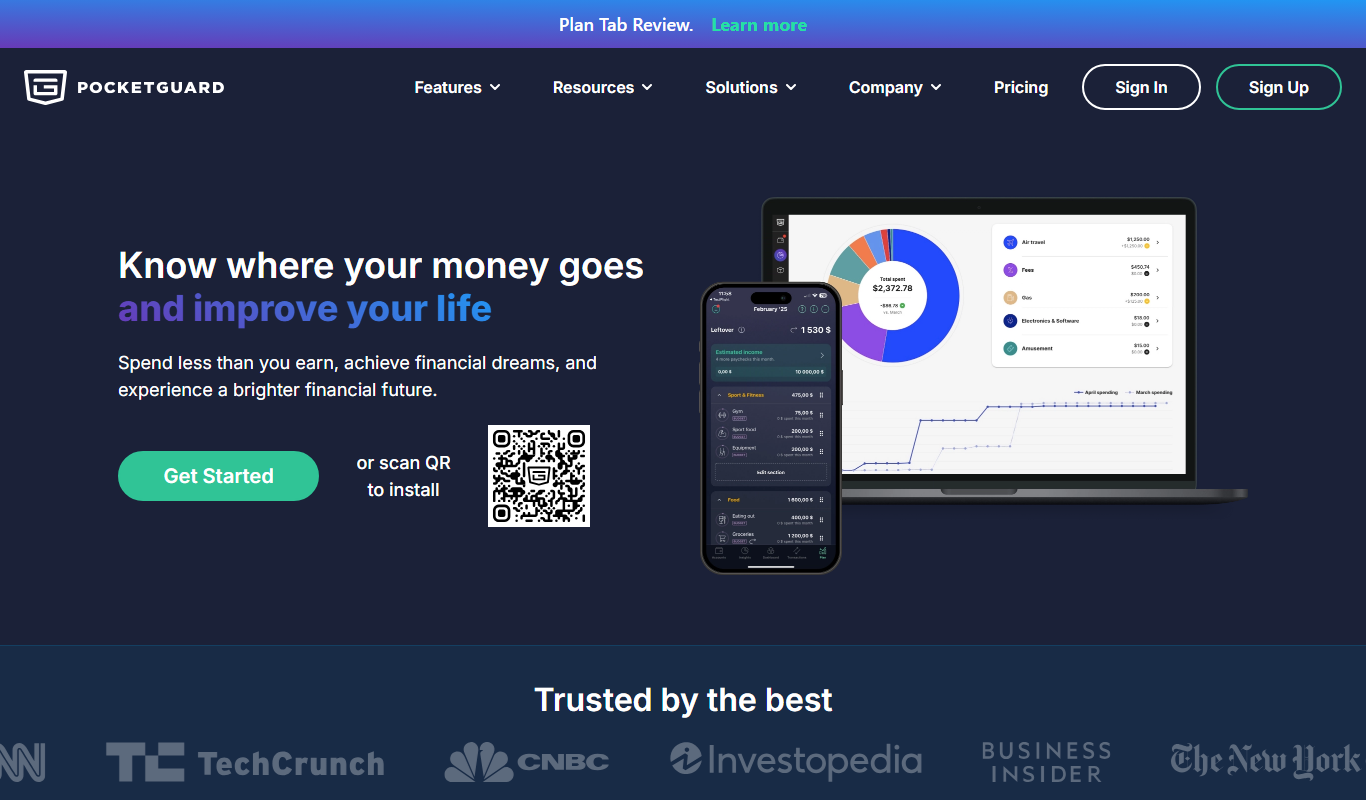
PocketGuard is a personal finance app that helps users manage budgets, track expenses, and monitor bills by securely linking bank accounts and providing real-time financial insights.
- Best for
- Budget Management
- Key capability
- In My Pocket Feature
Do you recommend this tool?
What is PocketGuard?
PocketGuard is a personal finance app designed to help users manage their money by tracking income, expenses, and bills in one place. It connects securely to bank accounts and credit cards to provide real-time updates on spending and budgeting. The app simplifies financial management by showing how much money is available to spend after accounting for bills and savings goals.
Key features of PocketGuard
PocketGuard offers automated expense tracking, budget creation, bill reminders, and personalized financial insights. Its intuitive interface helps users stay on top of their finances with minimal effort, promoting smarter spending and saving habits.
In My Pocket Feature
Shows how much money is available to spend after bills and savings are accounted for.
Automatic Expense Categorization
Transactions are automatically sorted into categories for easy tracking.
Bill and Subscription Tracking
Keeps track of recurring bills and subscriptions to avoid surprises.
Savings Goals
Helps users set and monitor progress toward specific savings targets.
Security and Privacy
Uses bank-level encryption and does not sell user data to third parties.
Pros and cons of PocketGuard
Pros
- Easy to use with intuitive interface
- Automatic transaction categorization saves time
- Helpful 'In My Pocket' feature for real spending money
- Secure connections and strong privacy policies
Cons
- Limited investment account tracking
- Some advanced features require paid subscription
- No desktop app, only web and mobile
Key use cases for PocketGuard
Budget Management
Create and manage personalized budgets to control spending and save money.
Expense Tracking
Automatically track and categorize expenses by linking bank accounts and credit cards.
Bill Monitoring
Monitor upcoming bills and recurring payments to avoid late fees.
Financial Insights
Receive insights and alerts about spending habits and opportunities to save.
Debt Reduction Planning
Plan and track debt payments to reduce liabilities effectively.
How PocketGuard works
- 1
Connect Financial Accounts
Securely link your bank accounts, credit cards, and loans to PocketGuard.
- 2
Set Budgets and Goals
Define monthly budgets and savings goals tailored to your financial situation.
- 3
Track Spending Automatically
PocketGuard categorizes transactions and monitors your spending in real time.
- 4
Receive Alerts and Insights
Get notifications about upcoming bills, overspending, and saving opportunities.
Who is using PocketGuard
Individuals seeking simple budgeting tools
Young professionals managing personal finances
People wanting to track bills and subscriptions
Users looking for automated expense tracking
Small business owners managing personal and business expenses
PocketGuard pricing
Free
$0/month
Basic budgeting and expense tracking with limited features.
PocketGuard Plus
$4.99/month
Includes advanced budgeting tools, unlimited budgets, and priority support.
Plans and prices are as published by the vendor and can change. Check the official site before you buy. Open the pricing page (opens in a new tab)
Frequently asked questions about PocketGuard
Yes, PocketGuard uses bank-level encryption and secure connections to protect your data.
You can manually add transactions, but linking accounts provides automatic tracking and categorization.
PocketGuard primarily supports checking, savings, credit cards, and loans; investment account support is limited.
Yes, you can cancel PocketGuard Plus subscription at any time through your app store or account settings.
Yes, it can help with that use case depending on how you configure it and what features are available. You’ll get the best results with clear inputs and a defined goal.
It depends on your specific needs and how you plan to use the tool. The official website and documentation are the best sources for the latest details.
Sign in to review this tool.
Sign In to ReviewNo reviews yet
Be the first to share how this tool worked for you.
Ask about pricing, limits, or how it compares — or answer someone else.
Sign In to AskNo questions yet
Have a question about using or paying for this tool? Be the first to ask.
Featured on TiorAI



Alternative Tools
Explore similar AI tools that might fit your needs

Free
Mint
Mint is a free personal finance app by Intuit that helps users manage budgets, track expenses, monitor credit scores, and receive bill reminders through web and mobile platforms.

Subscription
YNAB
YNAB is a personal budgeting tool that uses zero-based budgeting to help users assign every dollar a job, track expenses, and achieve financial goals with real-time bank syncing and mobile apps.
Free
Personal Capital
Personal Capital is a financial management platform that provides free tools for budgeting, investment tracking, and retirement planning, along with optional paid wealth management advisory services.
More Business Management tools
Other tools in the same category, for when this one is not quite the fit.

Free
Roadtrippers
Roadtrippers is a travel planning app that helps users create detailed road trip itineraries by mapping routes, discovering attractions, and optimizing travel plans.

Free
TripIt
TripIt is a travel app that automatically organizes your travel plans into a single itinerary by parsing confirmation emails, providing real-time flight alerts, and allowing itinerary sharing.

Free
FormSwift
FormSwift is an online platform that provides customizable legal and business document templates, PDF editing, and electronic signature capabilities to help users create and manage important documents easily.

Pay As You Go
TextMagic
TextMagic is a cloud-based SMS marketing platform that enables businesses to send bulk text messages, automate notifications, and engage customers with two-way messaging and API integration.

Free Trial
EZ Texting
EZ Texting is a cloud-based SMS marketing platform that enables businesses to send mass text messages, automate campaigns, and engage customers with two-way messaging.

Free Trial
SimpleTexting
SimpleTexting is a cloud-based SMS marketing platform that enables businesses to send mass text messages, automate SMS workflows, and engage customers with two-way messaging to improve communication and marketing effectiveness.

Free
Spocket
Spocket is a dropshipping platform that helps ecommerce entrepreneurs source products from vetted US and EU suppliers, automate order fulfillment, and integrate with major online store platforms like Shopify and WooCommerce.

Free
Oberlo
Oberlo is a dropshipping app for Shopify that automates product importing, inventory management, and order fulfillment, enabling entrepreneurs to run ecommerce stores without holding inventory.