

From my experience with Memento Database, I found it excels at providing a highly customizable and flexible platform for managing diverse data types. Its cross-platform support and offline capabilities make it particularly well-suited for users who need to organize data on the go or in the field. However, the interface can feel overwhelming for beginners, and some advanced features require a paid subscription. Overall, if you need a powerful, adaptable database tool that balances mobile and desktop use, Memento Database delivers strong functionality.
Memento Database App for Custom Data Management and Organization
Memento Database is a customizable database app that lets users create, manage, and share databases across Android, Windows, and web platforms with offline access and cloud synchronization.
- Best for
- Personal Data Organization
- Key capability
- Customizable Database Templates
Your actions
Save Memento Database, follow its updates and vote on it — everything stays in your account.
Sign in or create a free account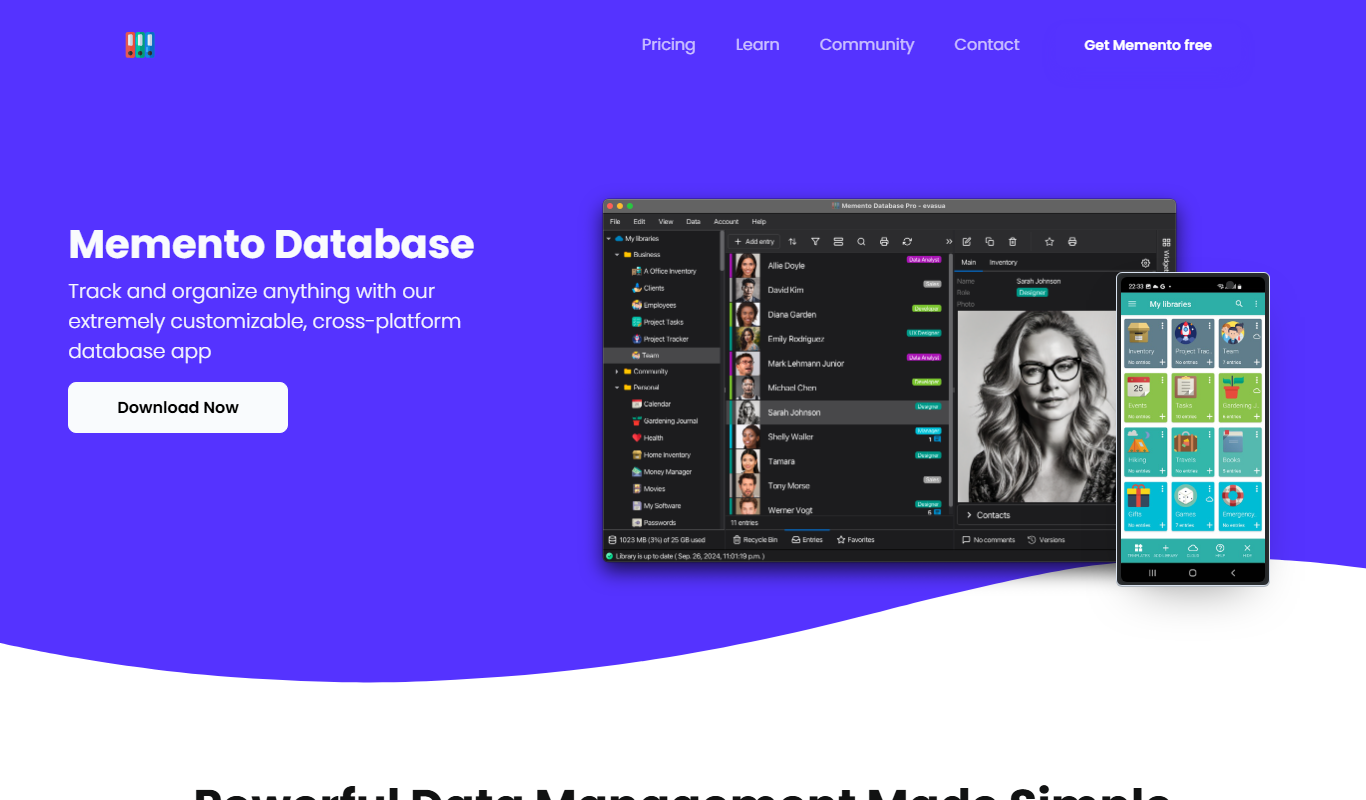
What is Memento Database?
Memento Database is a flexible, customizable database management application that allows users to create, manage, and share their own databases. It supports a wide range of data types and structures, enabling users to organize information tailored to their specific needs. Available on Android, Windows, and via a web interface, Memento Database offers cloud synchronization and collaboration features, making it suitable for personal, professional, and business use.
Key features of Memento Database
Memento Database provides customizable database templates, cloud synchronization, offline data access, data import/export options, and collaboration tools. It supports barcode scanning, geolocation, and scripting for automation, making it a versatile tool for managing complex data sets across devices.
Customizable Database Templates
Pre-built templates and the ability to create databases tailored to any data type or structure.
Cloud Synchronization
Seamless syncing of data across Android, Windows, and web platforms to keep information up to date.
Offline Access and Editing
Work with your databases without internet connection; changes sync automatically once online.
Barcode Scanning and Geolocation
Enhance data entry with barcode scanning and location tagging for inventory and field data.
Data Import/Export
Supports CSV, Excel, and other formats for easy data migration and backup.
Collaboration Tools
Share databases with team members with adjustable permissions for collaborative data management.
Scripting and Automation
Use JavaScript to automate workflows and customize database behavior.
Pros and cons of Memento Database
Pros
- Highly customizable database structures
- Cross-platform support with cloud sync
- Offline data access and editing
- Supports barcode scanning and geolocation
- Scripting capabilities for automation
Cons
- User interface can be complex for beginners
- Limited iOS support (no native app)
- Advanced features require paid subscription
Key use cases for Memento Database
Personal Data Organization
Users can create custom databases to organize personal collections, inventories, or any data they want to track.
Small Business Inventory Management
Small businesses can manage inventory, customer data, and sales records with customizable templates.
Project Management
Teams can track project tasks, deadlines, and resources using tailored database structures.
Field Data Collection
Mobile users can collect and update data on the go, syncing it with cloud storage for real-time access.
Research Data Tracking
Researchers can organize experimental data, notes, and references in a structured and searchable format.
How Memento Database works
- 1
Create or Choose a Database
Start by creating a new database from scratch or selecting from pre-built templates tailored to various use cases.
- 2
Customize Data Structure
Define fields, data types, and relationships to suit your specific data organization needs.
- 3
Add and Manage Records
Input data manually or import from external sources, then edit, sort, and filter records as needed.
- 4
Sync and Share
Use cloud synchronization to access your data across devices and share databases with collaborators.
Who is using Memento Database
Small business owners
Data enthusiasts and hobbyists
Field researchers and data collectors
Project managers
Inventory managers
Memento Database pricing
Free
$0/month
Basic features with limited cloud storage and database size.
Pro
$4.99/month
Increased storage, advanced features like scripting, and priority support.
Business
$9.99/month
Extended collaboration tools, higher limits, and enhanced security options.
Plans and prices are as published by the vendor and can change. Check the official site before you buy. Open the pricing page (opens in a new tab)
Frequently asked questions about Memento Database
Yes, Memento Database allows offline access and editing. Changes will sync automatically when you reconnect to the internet.
Absolutely. It offers features like collaboration, scripting, and cloud sync that support small to medium business needs.
Memento Database is available on Android, Windows, and through a web interface.
Yes, you can import data using CSV and Excel formats to populate your databases.
This tool is designed to help users accomplish its core tasks more efficiently. It is typically used by individuals or teams looking to improve productivity and workflow.
Some tools offer a free plan or trial with limited features. Availability can vary, so confirm on the official website.
Data handling and security practices vary by provider. Review the official privacy policy to understand how your data is stored and used.
Data handling and security practices vary by provider. Review the official privacy policy to understand how your data is stored and used.
Sign in to review this tool.
Sign In to ReviewNo reviews yet
Be the first to share how this tool worked for you.
Ask about pricing, limits, or how it compares — or answer someone else.
Sign In to AskNo questions yet
Have a question about using or paying for this tool? Be the first to ask.
Featured on TiorAI



Alternative Tools
Explore similar AI tools that might fit your needs

Free
Airtable
Airtable is a no-code platform that lets users create custom databases, automate workflows, and collaborate in real time without programming skills.
More AI Knowledge Base Tools tools
Other tools in the same category, for when this one is not quite the fit.

Contact Sales
Knowz
Knowz is an AI-driven knowledge management platform that enables enterprises to unify data sources and perform natural language search to extract precise answers and insights.
Contact Sales
deephow.com
DeepHow captures expert knowledge, guides workers and verifies task execution in real time.

Free
Nolej
Nolej is an AI-powered education platform that generates personalized learning content and manages knowledge bases to improve learner engagement and outcomes.

Free
Znote AI
Znote is a free, local Markdown editor for Windows, Mac and Linux where you can ask your notes with AI, run code blocks inline, connect tools through MCP and version notes with git.

Free
Penseum
Penseum is a knowledge management platform that helps individuals and teams organize, share, and collaborate on notes and documents through a hierarchical structure and powerful search, accessible via web and API.
Free
Asklo AI
Asklo AI is an AI-powered conversational search platform that enables users to query internal documents and data sources using natural language, providing context-aware answers and seamless integration via API.

Custom Pricing
Glean
Glean is an AI-powered enterprise knowledge management platform that integrates multiple data sources to provide unified search, expert identification, and collaboration tools for organizations.

Free Trial
RAGFlow
RAGFlow is a no-code AI platform that enables users to build and automate retrieval-augmented generation workflows by integrating document retrieval with generative AI to provide accurate, context-aware responses.