
From my experience with MakerJournal, I found it excels at helping solo makers maintain consistent progress through simple daily journaling and goal tracking. The app’s clean, distraction-free design makes it easy to focus on what matters without overwhelming features. It’s particularly well-suited for indie developers and product creators who want to build accountability and optionally share their journey publicly. However, if you need team collaboration or deep integrations with other tools, MakerJournal may feel limited. Overall, for individual makers seeking a straightforward way to track and reflect on their product development, this app delivers solid, focused functionality.
MakerJournal App for Product Makers and Indie Developers Tracking Progress
MakerJournal is a productivity app designed for indie makers and solo developers to track daily progress, set goals, and share their product development journey publicly.
What is MakerJournal?
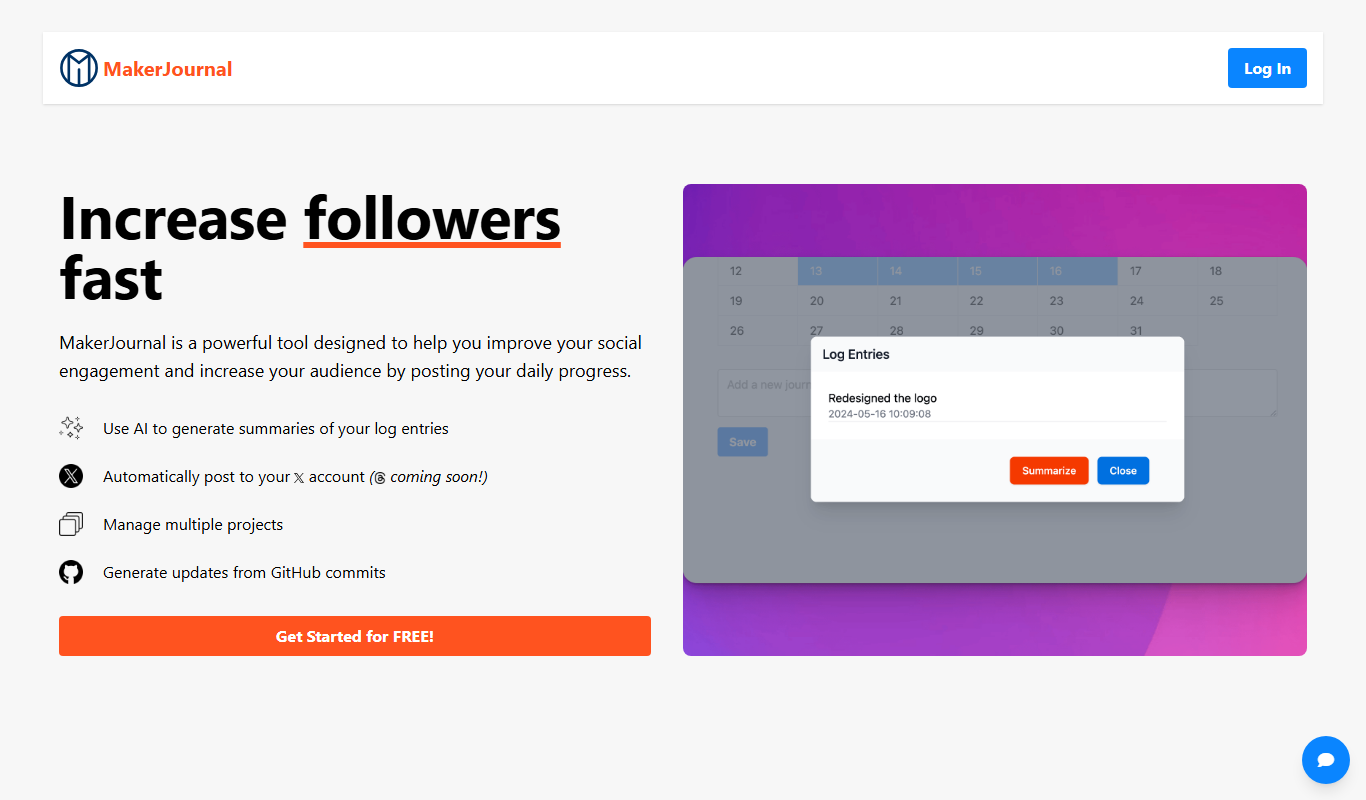
MakerJournal is a productivity app designed specifically for indie makers and solo developers to track their daily progress, set goals, and reflect on their product development journey. It combines journaling with project tracking to help users maintain momentum and build accountability.
Key Features of MakerJournal
Daily Progress Journaling
Simple interface to log daily work and reflect on achievements.
Goal and Milestone Tracking
Set and monitor project goals to stay focused and motivated.
Public Sharing
Share your progress publicly to engage with an audience and build trust.
Cross-Platform Access
Available on web, iOS, and Android for seamless tracking anywhere.
Clean, Minimalist Design
Distraction-free UI tailored for makers focused on productivity.
Pros and Cons of MakerJournal
Pros
- Tailored specifically for indie makers and solo developers
- Simple and clean interface focused on productivity
- Supports public sharing to build audience and accountability
- Cross-platform availability on web and mobile
Cons
- Not designed for team collaboration
- Limited integrations with other project management tools
- Pricing may be a barrier for some users seeking advanced features
Key Use Cases for MakerJournal
Progress Tracking for Indie Makers
Helps independent makers track daily progress on projects, fostering consistency and motivation.
Goal Setting and Reflection
Enables users to set clear goals and reflect on achievements and challenges regularly.
Project Management for Solo Developers
Provides a simple interface to manage tasks and milestones without complex project management tools.
Building a Public Portfolio
Allows makers to share their progress publicly to build audience trust and engagement.
How MakerJournal Works
-
1
Create an Account
Sign up on the MakerJournal website or app to start tracking your projects.
-
2
Set Your Goals
Define your project goals and milestones to guide your daily work.
-
3
Log Daily Progress
Use the journaling interface to record what you accomplished each day.
-
4
Review and Reflect
Regularly review your entries to assess progress and adjust plans.
-
5
Share Your Journey
Optionally share your progress publicly to build community and accountability.
Who's Using MakerJournal
Indie makers
Solo developers
Product creators
Startup founders
Freelancers focused on product development
MakerJournal Pricing
Free
$0/month
Basic journaling and progress tracking with limited features.
Pro
$5/month
Full access to all features including unlimited entries and public sharing.
Frequently Asked Questions About MakerJournal
MakerJournal is primarily designed for solo makers and indie developers rather than team collaboration.
Yes, MakerJournal allows you to share your progress publicly to build an audience.
Yes, MakerJournal is available on both iOS and Android platforms.
Yes, there is a free plan with basic features to get started.
This tool is designed to help users accomplish its core tasks more efficiently. It is typically used by individuals or teams looking to improve productivity and workflow.
It depends on your specific needs and how you plan to use the tool. The official website and documentation are the best sources for the latest details.
Yes, it can help with that use case depending on how you configure it and what features are available. You’ll get the best results with clear inputs and a defined goal.
Some tools offer a free plan or trial with limited features. Availability can vary, so confirm on the official website.
Share your review
Reviews are limited to one per logged-in user and are published after moderation.
You need an account to review this tool.
0.0
★
★
★
★
★
0 reviews
5 star
0
4 star
0
3 star
0
2 star
0
1 star
0
No reviews yet
Be the first to share how this tool worked for you.
Questions from the community
Read questions and answers about this tool, or ask your own.
No questions yet
Start the conversation by asking the first question about this tool.
Is this tool helpful?
Alternative Tools
Explore similar AI tools that might fit your needs

Free
Notion
Notion is a versatile productivity tool that combines note-taking, task management, databases, and team collaboration in one customizable workspace accessible across devices.

Free
Trello
Trello is a visual project management tool that helps teams organize tasks and workflows using boards, lists, and cards, with automation and integrations to enhance productivity.

Freemium
Notely
Notely AI is an AI-powered meeting assistant that transcribes meetings in real-time and generates clear summaries to save time and improve collaboration.
Free
Twine
Twine Launcher is a free, lightweight game launcher that helps you organize and launch your indie and PC games on Windows, Mac, and Linux with a simple interface.

One-time purchase
Notion Templates For AI
Notion Templates For AI by Niche Plates offers customizable, AI-optimized templates for Notion to enhance productivity and automate workflows with a one-time purchase.

Freemium
Minduck
Minduck is an AI writing assistant that generates and optimizes content such as blog posts, marketing copy, and social media text, supporting English and Chinese languages.

Free
AFAnotes – AI Productivity
AFAnotes is an AI-powered productivity tool that streamlines note taking, task management, and collaboration by using artificial intelligence to organize content, generate summaries, and prioritize tasks.

Freemium
Narrative Nooks
Narrative Nooks is an AI-driven storytelling platform that assists writers in developing stories, characters, and dialogue through interactive AI suggestions, helping overcome writer’s block and enhancing creative writing workflows.

Free Trial
FGenEds
FGenEds is an AI writing assistant focused on academic and educational content creation, offering tools for essay generation, topic brainstorming, and structured writing support.

Free
knowt.com
Knowt.com is an AI-driven study platform that automatically generates notes and quizzes from your study materials to enhance learning and retention.