

Lucidspark Collaborative Online Whiteboard for Team Brainstorming & Planning
Lucidspark is a cloud-based collaborative whiteboard tool that enables teams to brainstorm, plan, and collaborate visually in real time with features like sticky notes, templates, voting, and integrations.
- Best for
- Team Brainstorming
- Key capability
- Real-Time Collaboration
Save Lucidspark, follow its updates and vote on it — everything stays in your account.
Sign in or create a free account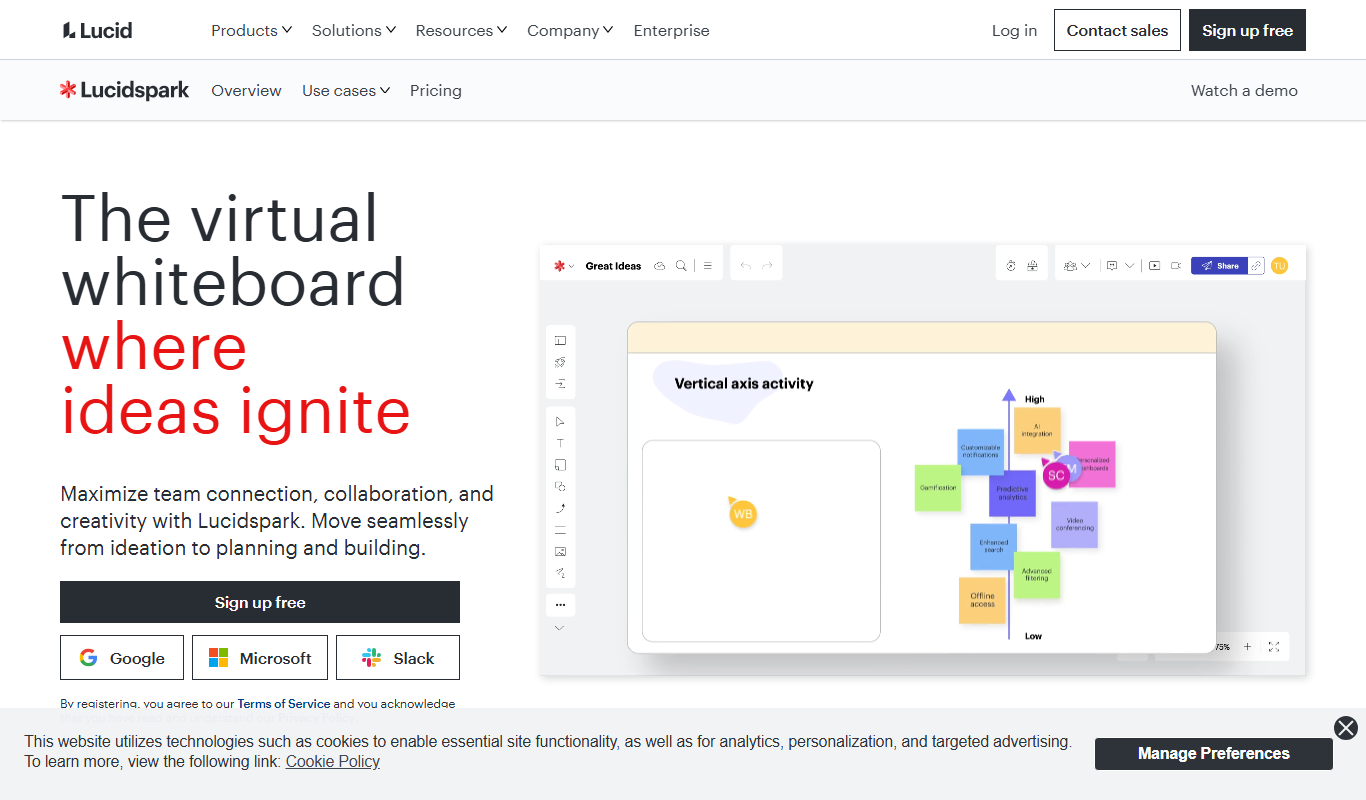
What is Lucidspark?
Lucidspark is a cloud-based collaborative online whiteboard platform designed to help teams brainstorm, plan, and collaborate visually in real time. It provides an intuitive digital canvas where users can add sticky notes, drawings, shapes, and templates to capture ideas and organize workflows. The tool supports remote and hybrid teams by enabling seamless interaction and communication on a shared workspace.
Key features of Lucidspark
Lucidspark offers real-time collaboration, customizable templates, sticky notes, freehand drawing, voting and chat tools, integrations with popular productivity apps, and robust sharing and export options to enhance team productivity and creativity.
Real-Time Collaboration
Multiple users can simultaneously edit and contribute to the board with live updates.
Customizable Templates
Access a variety of templates for brainstorming, project planning, retrospectives, and more.
Sticky Notes and Drawing Tools
Add and organize ideas visually using sticky notes, freehand drawing, and shapes.
Voting and Chat
Engage participants with voting sessions and integrated chat to gather feedback.
Integrations
Connect with tools like Slack, Microsoft Teams, Google Drive, and Lucidchart for enhanced workflows.
Pros and cons of Lucidspark
Pros
- Intuitive and flexible digital whiteboard interface
- Robust real-time collaboration features
- Wide range of templates for various workflows
- Strong integrations with popular productivity tools
- Supports remote and hybrid team collaboration
Cons
- Free plan has limited features and collaborators
- Some advanced features require paid subscription
- Mobile app experience is less comprehensive than web
Key use cases for Lucidspark
Team Brainstorming
Facilitates real-time collaborative brainstorming sessions with sticky notes, freehand drawing, and templates.
Project Planning
Helps teams visually organize tasks, workflows, and timelines to streamline project management.
Remote Collaboration
Enables distributed teams to work together seamlessly on a shared digital canvas regardless of location.
Workshops and Meetings
Supports interactive workshops and meetings with features like voting, chat, and timer tools.
Idea Mapping
Allows users to create mind maps and diagrams to structure ideas and concepts visually.
How Lucidspark works
- 1
Create an Account
Sign up on the Lucidspark website to start using the platform.
- 2
Start a New Board
Create a new whiteboard from scratch or use a template to begin your session.
- 3
Invite Team Members
Share the board link with collaborators to enable real-time teamwork.
- 4
Collaborate and Organize
Add sticky notes, drawings, and shapes; use chat and voting features to gather input.
- 5
Export and Share
Export your board as images or PDFs or integrate with other tools for further use.
Who is using Lucidspark
Lucidspark pricing
Free
$0/month
Basic features with limited collaborators and boards.
Individual
$7.95/month
Expanded features for solo users including unlimited boards and templates.
Team
$9.95/user/month
Advanced collaboration tools, admin controls, and integrations for teams.
Enterprise
Custom pricing
Tailored solutions with enhanced security, support, and onboarding.
Plans and prices are as published by the vendor and can change. Check the official site before you buy. Open the pricing page (opens in a new tab)
Frequently asked questions about Lucidspark
Yes, Lucidspark offers a free plan with basic features and limited collaborators.
Yes, it integrates with Slack, Microsoft Teams, Google Drive, and Lucidchart among others.
Absolutely, it is designed to facilitate real-time collaboration for distributed teams.
Yes, you can export boards as images, PDFs, or share them via links.
This tool is designed to help users accomplish its core tasks more efficiently. It is typically used by individuals or teams looking to improve productivity and workflow.
Some tools offer a free plan or trial with limited features. Availability can vary, so confirm on the official website.
Integration support depends on the tool and its available connectors or API. Check the official documentation or integrations page to confirm what is supported.
Yes, it can help with that use case depending on how you configure it and what features are available. You’ll get the best results with clear inputs and a defined goal.
Conclusion
A Lucidspark session starts with a new whiteboard, created from scratch or from a template for brainstorming, project planning or retrospectives. Collaborators join through a shared board link and add sticky notes, freehand drawings and shapes, with voting, chat and timer tools for gathering input. Mind maps and diagrams can also be created to structure ideas and concepts visually.
Boards can be exported as images or PDFs or shared via links, and integrations with Slack, Microsoft Teams, Google Drive and Lucidchart connect the work to other tools. For project planning, boards help teams visually organize tasks, workflows and timelines. It is designed to facilitate real-time collaboration for distributed teams, including remote and hybrid teams, agile and scrum teams, and workshop facilitators. The platform is cloud-based, with web, desktop and mobile access, and is made by Lucid Software Inc.
Plans run from Free to Individual, Team and Enterprise. The free plan has basic features with limited collaborators and boards, while paid tiers add unlimited boards, admin controls or enhanced security. The mobile app experience is less comprehensive than the web version.
Sources
Sign in to review this tool.
Sign In to ReviewNo reviews yet
Be the first to share how this tool worked for you.
Ask about pricing, limits, or how it compares — or answer someone else.
Sign In to AskNo questions yet
Have a question about using or paying for this tool? Be the first to ask.
Featured on TiorAI



More Business Management tools
Other tools in the same category, for when this one is not quite the fit.

KROCK.IO
KROCK.IO is video review and online proofing software for creative teams, with frame-accurate comments, version comparisons, approvals and unlimited reviewers.

TwinMind
TwinMind is an AI second brain that transcribes and summarizes your day, organizes it into memory and powers any AI with the context of your life.

Wren AI Cloud
Wren AI is one governed data agent for people and AI agents: ask your data in plain language with the GenBI agent, or call it from Claude, ChatGPT or your own agents over MCP.
BioBrain Insights MROps Platform
BioBrain Insights unifies all of market research operations in one platform powered by AI and automation, from automated survey programming to boardroom reports.

Justmatch
Justmatch is an AI-driven platform that provides personalized job matching, resume optimization, and career insights to help job seekers find relevant opportunities and grow professionally.

Storytide.io – Corporate Influencing
Storytide is a LinkedIn content workflow platform with strategy, writing with AI support, structured processes and analytics for ghostwriters, communications teams and corporate influencer programs.

TIL bot for Slack
TIL bot for Slack is an AI assistant that gets insights from conversations, summarizes threads, finds action items, sets one time and recurring reminders and gets answers with AI.

VenueLog
VenueLog is restaurant management software that connects POS, rostering and accounting systems for automated reporting, real-time insights and AI-powered tools.