

Glary Utilities PC Optimization Software for System Cleanup and Maintenance
Glary Utilities is a Windows-based PC optimization tool that cleans junk files, repairs registry errors, manages startup programs, and protects user privacy to improve system performance.
- Best for
- System Cleanup
- Key capability
- One-Click Maintenance
Save Glary Utilities, follow its updates and vote on it — everything stays in your account.
Sign in or create a free account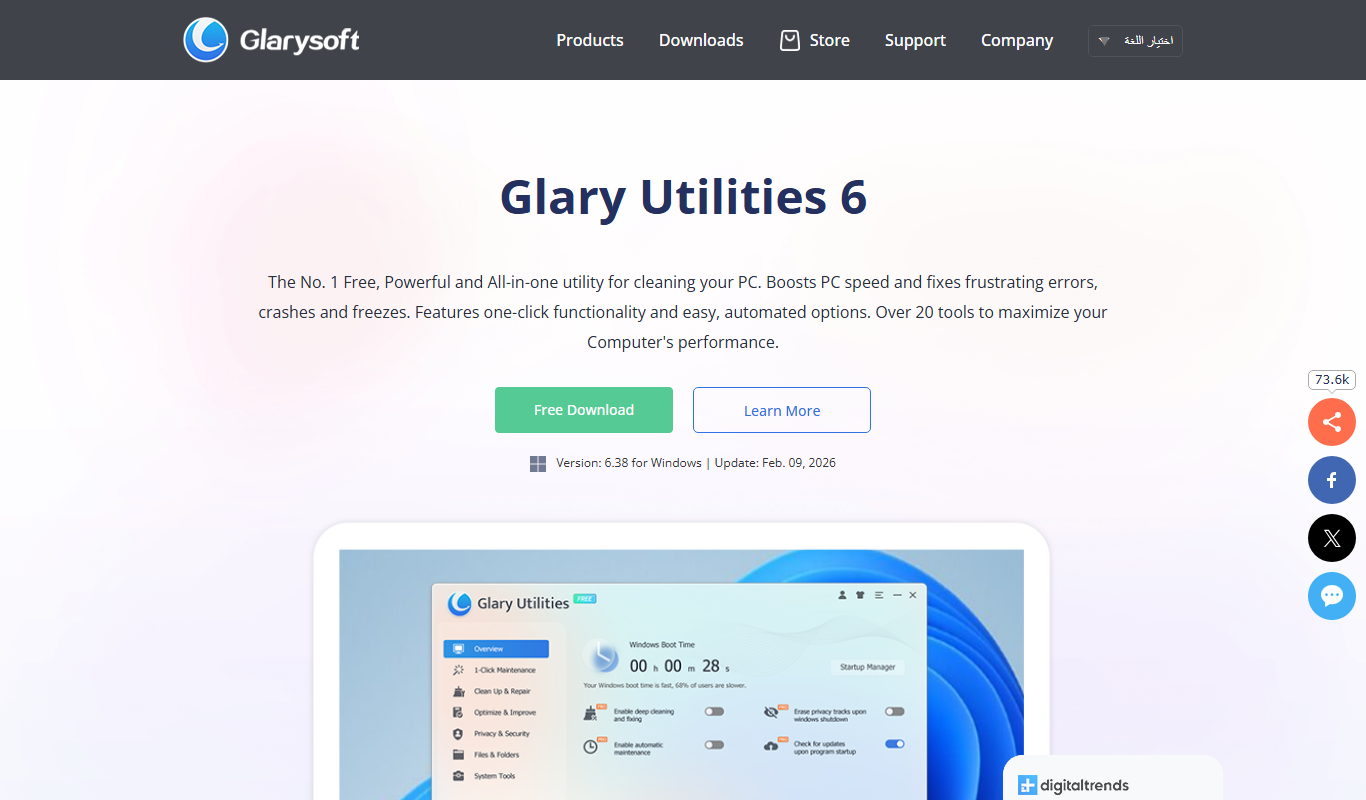
What is Glary Utilities?
Glary Utilities is a comprehensive PC optimization suite designed to improve Windows system performance by cleaning junk files, repairing registry errors, managing startup items, and protecting user privacy. It offers a user-friendly interface with one-click maintenance tools and advanced utilities for power users.
Key features of Glary Utilities
The software combines multiple system maintenance tools including disk cleanup, registry repair, privacy protection, startup management, and file recovery to keep PCs running smoothly and efficiently.
One-Click Maintenance
Automatically scans and fixes common system issues with a single click.
Registry Cleaner
Detects and repairs invalid or obsolete registry entries to improve system stability.
Disk Cleaner
Removes unnecessary files to free up disk space and speed up your PC.
Startup Manager
Enables control over programs that launch at startup to reduce boot time.
Privacy Cleaner
Erases browsing history and other traces to protect your privacy.
File Utilities
Includes tools for finding duplicates, securely deleting files, and recovering lost data.
Pros and cons of Glary Utilities
Pros
- Comprehensive all-in-one system maintenance tools
- User-friendly interface with one-click optimization
- Supports backup and restore for safety
- Regular updates and active development
Cons
- Windows only, no Mac or Linux support
- Some advanced features require Pro version
- Interface can feel overwhelming for beginners
Key use cases for Glary Utilities
System Cleanup
Remove junk files, temporary files, and invalid shortcuts to free up disk space and improve system speed.
Registry Repair
Scan and fix Windows registry errors to enhance system stability and reduce crashes.
Privacy Protection
Erase browsing history, cookies, and other privacy traces to protect user data.
Startup Management
Manage startup programs to speed up boot time and optimize system performance.
Disk Analysis and Defragmentation
Analyze disk space usage and defragment hard drives to improve data access speed.
File Management
Find duplicate files, securely delete files, and recover accidentally deleted files.
How Glary Utilities works
- 1
Download and Install
Download Glary Utilities from the official website and install it on your Windows PC.
- 2
Run System Scan
Launch the program and perform a system scan to detect junk files, registry issues, and other problems.
- 3
Review Scan Results
Review the detected issues and select which ones to fix or clean.
- 4
Optimize System
Use one-click maintenance or individual tools to clean, repair, and optimize your PC.
- 5
Schedule Regular Maintenance
Set up automatic scans and maintenance tasks to keep your system optimized over time.
Who is using Glary Utilities
Glary Utilities pricing
Free
$0
Basic system cleaning and optimization features with limited support.
Pro
$39.95/year for 3 PCs
Full access to all features including automatic updates and premium support.
Plans and prices are as published by the vendor and can change. Check the official site before you buy. Open the pricing page (opens in a new tab)
Frequently asked questions about Glary Utilities
Yes, Glary Utilities is widely used and considered safe. It creates backups before making changes to your system.
Yes, by cleaning junk files, repairing registry errors, and managing startup programs, it can help speed up your PC.
Yes, it supports all modern Windows versions including Windows 10 and Windows 11.
No, Glary Utilities is only available for Windows desktop platforms.
This tool is designed to help users accomplish its core tasks more efficiently. It is typically used by individuals or teams looking to improve productivity and workflow.
Some tools offer a free plan or trial with limited features. Availability can vary, so confirm on the official website.
It depends on your specific needs and how you plan to use the tool. The official website and documentation are the best sources for the latest details.
It depends on your specific needs and how you plan to use the tool. The official website and documentation are the best sources for the latest details.
Conclusion
A system scan comes first, flagging junk files, registry issues and other problems that the user reviews before choosing what to fix. One-click maintenance handles common issues, while separate tools repair the registry, clean the disk and control startup programs. File tools find duplicates, delete files securely and recover accidentally deleted files. Scans and maintenance tasks can also run on a schedule.
Home PC users, IT professionals and system administrators are among its intended users. It runs on Windows only. Pro is priced at $39.95/year for 3 PCs, not as a one-time purchase.
Sources
Sign in to review this tool.
Sign In to ReviewNo reviews yet
Be the first to share how this tool worked for you.
Ask about pricing, limits, or how it compares — or answer someone else.
Sign In to AskNo questions yet
Have a question about using or paying for this tool? Be the first to ask.
Featured on TiorAI



Alternative Tools
Explore similar AI tools that might fit your needs
Advanced SystemCare
Advanced SystemCare is a Windows-based PC optimization software by IObit that cleans junk files, optimizes system performance, protects privacy, and removes malware to keep your computer running smoothly.
More AI Workflow tools
Other tools in the same category, for when this one is not quite the fit.

Rentec Direct
Rentec Direct is a cloud-based property management software that helps landlords and property managers handle tenant screening, rent collection, maintenance requests, and financial reporting efficiently.
OfficeSpace Software
OfficeSpace Software is a workspace management platform that helps businesses plan office layouts, manage desk and room bookings, track maintenance, and analyze space utilization to support efficient and flexible workplace operations.

Anomali
Anomali is a cybersecurity threat intelligence platform that aggregates and analyzes threat data to help organizations detect and respond to cyber threats efficiently.
Zuora
Zuora is a cloud-based subscription management platform that automates billing, revenue recognition, and subscription analytics for businesses with recurring revenue models.

Workflowy
Workflowy is a web-based outliner tool that helps users organize tasks, notes, and projects using infinite nested lists, tagging, and real-time collaboration.

Kerlink Wanesy Management Center
Kerlink Wanesy Management Center is a centralized platform designed to manage IoT networks and devices, primarily supporting LoRaWAN technology, offering real-time monitoring, device provisioning, and analytics.

Lightspeed POS
Lightspeed POS is a cloud-based point of sale system designed for retail and restaurant businesses, offering inventory management, ecommerce integration, and customer relationship tools.

AutoDS
AutoDS is a dropshipping automation tool that streamlines product imports, price and stock monitoring, and order fulfillment for eCommerce sellers.