

CoolText Logo Maker and Graphic Text Generator for Custom Designs
CoolText is a free online tool for creating custom logos and graphic text designs with various fonts and effects, ideal for quick branding needs.
- Best for
- Logo Creation
- Key capability
- Wide Range of Fonts and Styles
Save CoolText, follow its updates and vote on it — everything stays in your account.
Sign in or create a free account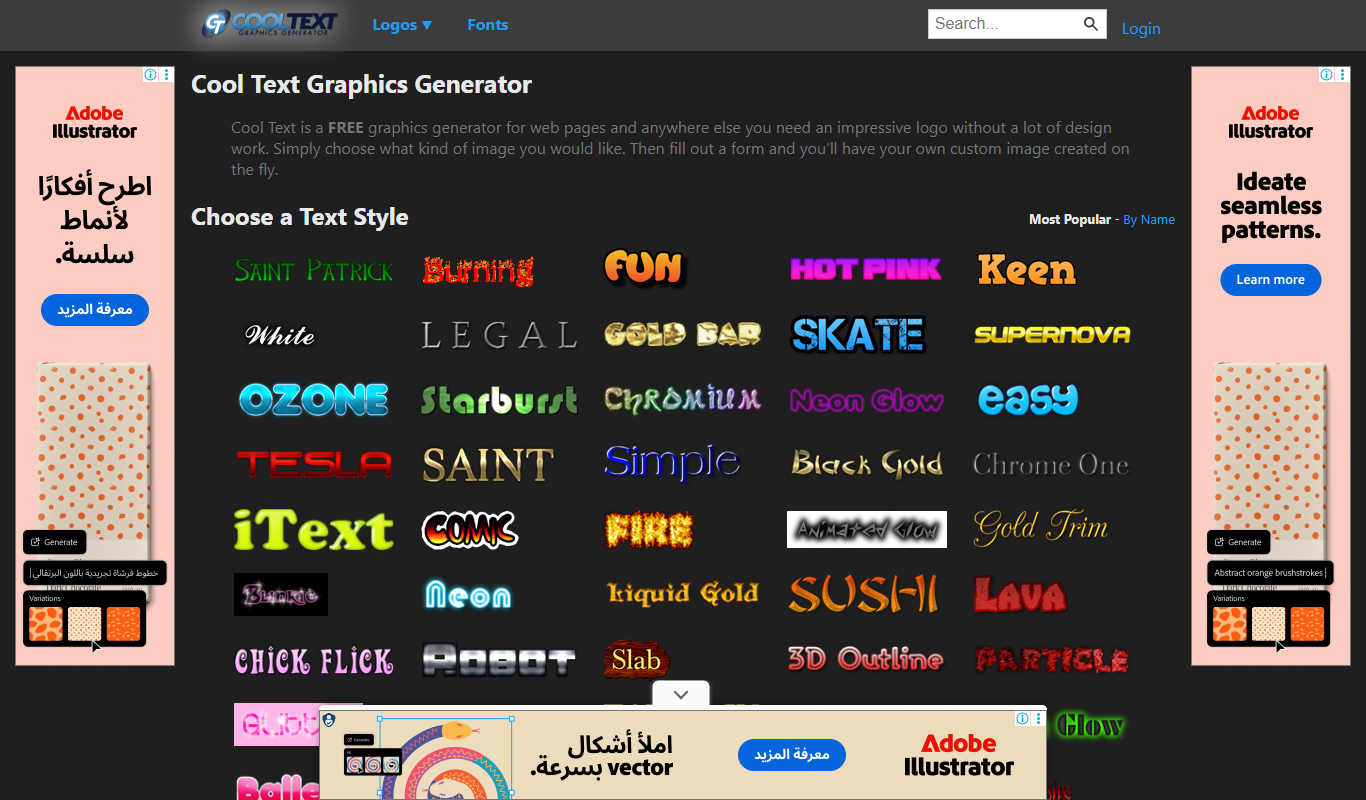
What is CoolText?
CoolText is a free online logo maker and graphic text generator that allows users to create custom logos and stylized text graphics easily. It offers a variety of fonts, colors, and effects to personalize text-based designs without requiring advanced graphic design skills. The tool is web-based and accessible to anyone looking to produce quick visual branding elements.
Key features of CoolText
CoolText provides a simple interface to generate logos and text graphics with customizable fonts, colors, shadows, and animations. Users can download their creations in multiple formats suitable for web and print use. The platform focuses on ease of use and speed, making it ideal for small businesses, bloggers, and individuals needing quick design solutions.
Wide Range of Fonts and Styles
Access numerous font options and pre-made styles to suit different branding needs.
Customizable Text Effects
Apply shadows, outlines, gradients, and animations to enhance text visuals.
Instant Preview
See changes in real-time as you customize your design.
Free to Use
No cost for creating and downloading logos and text graphics.
Easy Download Options
Download images in web-friendly formats without watermarks.
Pros and cons of CoolText
Pros
- Completely free with no hidden fees
- User-friendly interface with instant previews
- Wide variety of fonts and styles
- No account or registration required
- Quick download in common image formats
Cons
- Limited to text-based logos and graphics
- No advanced vector editing or export options
- Customization options are basic compared to professional tools
Key use cases for CoolText
Logo Creation
Create custom logos quickly for personal or business use without graphic design skills.
Graphic Text Design
Generate stylized text graphics for websites, social media, presentations, and marketing materials.
Banner and Button Design
Design banners, buttons, and headers with customizable fonts and effects for online branding.
Social Media Branding
Produce unique text-based graphics to enhance social media profiles and posts.
Quick Visual Content
Generate visual content on the fly for blogs, newsletters, and promotional campaigns.
How CoolText works
- 1
Select a Logo Style
Choose from a variety of pre-designed logo and text styles available on the homepage.
- 2
Customize Text and Effects
Enter your desired text and adjust font, size, color, and special effects like shadows or outlines.
- 3
Preview and Adjust
View the live preview of your design and tweak settings until satisfied.
- 4
Download Your Graphic
Download the finished logo or text graphic in PNG or GIF format for immediate use.
Who is using CoolText
CoolText pricing
Free
$0
Full access to all logo styles and text generators with free downloads.
Plans and prices are as published by the vendor and can change. Check the official site before you buy. Open the pricing page (opens in a new tab)
Frequently asked questions about CoolText
Yes, CoolText offers all its logo and text generation features for free without requiring payment.
No account is necessary; you can create and download logos instantly without signing up.
You can download your logos and text graphics primarily in PNG and GIF formats.
Yes, logos created with CoolText can be used for personal and commercial projects.
It depends on your specific needs and how you plan to use the tool. The official website and documentation are the best sources for the latest details.
Some tools offer a free plan or trial with limited features. Availability can vary, so confirm on the official website.
Yes, it can help with that use case depending on how you configure it and what features are available. You’ll get the best results with clear inputs and a defined goal.
Yes, it can help with that use case depending on how you configure it and what features are available. You’ll get the best results with clear inputs and a defined goal.
Conclusion
No account is needed on CoolText: a user chooses a pre-designed logo or text style, enters the text and adjusts font, size, color and effects in a live preview. The finished logo or text graphic downloads in PNG or GIF format without watermarks and can be used for personal and commercial projects. All features are free, with no payment required. It is web-based and requires no advanced graphic design skills.
Effects include shadows, outlines, gradients and animations, applied across numerous font options and pre-made styles. Common uses are custom logos created without graphic design skills, banners, buttons and headers, and text graphics for social media profiles and posts. Stylized text graphics also serve websites, presentations and marketing materials, and the downloads come in formats suitable for web and print use. Visual content can also be generated on the fly for blogs, newsletters and promotional campaigns. It may suit small business owners, bloggers, freelancers needing quick logos, and students and educators.
Designs are limited to text-based logos and graphics, customization options are basic compared to professional tools, and there is no advanced vector editing or export.
Sources
Sign in to review this tool.
Sign In to ReviewNo reviews yet
Be the first to share how this tool worked for you.
Ask about pricing, limits, or how it compares — or answer someone else.
Sign In to AskNo questions yet
Have a question about using or paying for this tool? Be the first to ask.
Featured on TiorAI



Alternative Tools
Explore similar AI tools that might fit your needs
LogoMakr
LogoMakr is a web-based logo design tool that enables users to create custom logos easily using drag-and-drop features and a large icon library, with free low-res downloads and paid high-res options.
More AI Banner Generator tools
Other tools in the same category, for when this one is not quite the fit.
Bannersnack
Bannersnack is a web-based banner maker that allows users to create static and animated banners for digital marketing campaigns with customizable templates and collaboration features.
Brella
Brella is an AI-driven event networking platform that facilitates meaningful connections and engagement for virtual, hybrid, and in-person events through personalized matchmaking and scheduling.

AI Santa Claus
AI Santa Claus is a web-based platform that generates personalized video messages featuring a virtual Santa Claus using AI voice and facial animation technology.

Nextatlas Generate
Nextatlas Generate is an AI-driven trend forecasting platform that analyzes digital data to predict emerging market trends and consumer behaviors, helping businesses innovate and strategize effectively.

CorelDRAW
CorelDRAW is a professional graphic design software suite used for vector illustration, page layout, photo editing, and typography, available on Windows and Mac platforms.

minimaxme
Minimaxme is an AI chatbot platform that enables users to build and deploy personalized conversational bots for customer support, lead generation, and engagement without coding.

AI LinkedIn Banners
AI LinkedIn Banners is a web tool that uses AI to generate and customize LinkedIn banner images, helping users create professional profile headers quickly without design skills.

Brandix AI
Brandix AI is an AI-driven branding tool that helps users create professional logos and brand identity kits quickly through an easy web interface, suitable for startups and small businesses.