

Wheel Color Picker
Click or drag on the color wheel to pick a color, then generate a matching color palette.
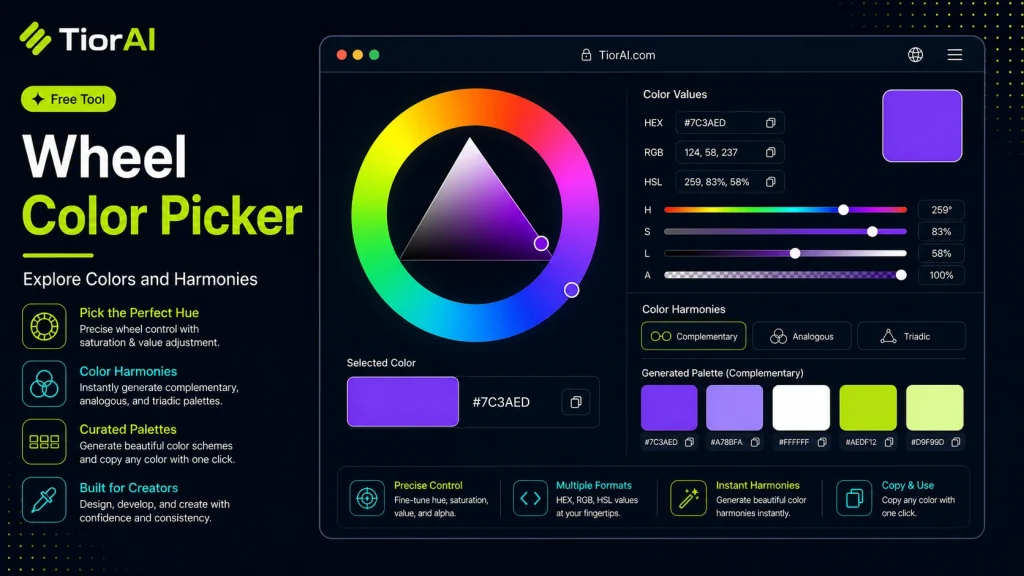
Wheel Color Picker
Drag across the wheel to adjust hue and saturation.
Click any swatch to copy its HEX value.
Color values
| Format | Value |
|---|---|
| HEX | |
| RGB | |
| HSL | |
| HSV |
How to use it
- Pick or Enter a Color Use the color picker or enter a color value into the Wheel Color Picker. Supports HEX, RGB, HSL, and more.
- Adjust and Preview Fine-tune your color selection and preview results in real time with instant visual feedback.
- Copy Color Values Copy the generated color codes in your preferred format for use in CSS, design tools, or development.
Tip Combine the Wheel Color Picker with CSS variables to create a dynamic, theme-ready color system for your site.
Understanding the Color Wheel and Color Pickers
A wheel color picker is a visual tool that represents colors arranged in a circular format, based on the color wheel concept from color theory. The color wheel organizes hues around a circle, showing relationships between primary, secondary, and tertiary colors. This arrangement helps users intuitively select colors by hue, saturation, and brightness.
Why use a wheel color picker? It simplifies the process of choosing colors that harmonize well together, such as complementary or analogous colors. Designers, artists, and developers use it to find precise colors for digital projects, branding, UI design, and more.
How it works: The wheel displays a spectrum of colors. Users can click or drag a selector around the wheel to pick a hue, then adjust saturation and brightness often via inner circles or sliders. The tool converts the selected color into various formats like HEX, RGB, or HSL, which are compatible with web and graphic design software.
Common use cases include:
- Choosing brand colors that maintain visual harmony.
- Creating color palettes for websites or apps.
- Matching colors for digital illustrations or UI components.
By visualizing colors in a circular format, the wheel color picker helps users understand color relationships and make informed choices quickly.
What Is a Wheel Color Picker?
A wheel color picker is a tool that visually represents colors arranged in a circular format, based on the traditional color wheel. It helps users select colors by hue, saturation, and brightness, providing an intuitive way to explore color relationships.
When to Use a Wheel Color Picker
- Designing color schemes that require harmonious combinations like complementary or analogous colors.
- Converting selected colors into formats such as HEX, RGB, or HSL for use in web or graphic design.
- Experimenting with different shades and tones to find the perfect color for UI elements or branding.
- Matching colors precisely across digital projects.
Common Mistakes to Avoid
- Choosing colors without considering contrast or accessibility, which can reduce readability and user experience.
- Using color codes in the wrong format, causing issues when applying colors in different software or platforms.
Technical Context
The wheel color picker relies on color theory principles, organizing hues in a circle to show their relationships. It converts user selections into standard color codes like HEX (used in HTML/CSS), RGB (used in digital displays), and HSL (which separates hue, saturation, and lightness). This makes it a versatile tool for designers and developers working across various digital mediums.
Frequently asked questions
Reviews and questions
Whether this tool gave people the answer they needed, and what they asked about it.
Sign in to review this tool.
Sign In to ReviewNo reviews yet
Be the first to say whether this tool gave you what you needed.
Ask how to read the result, or what the tool does with an edge case — or answer someone else.
Sign In to AskNo questions yet
Not sure how to read a result? Be the first to ask.
AI tools related to this topic
Tools from the TiorAI directory that work on the same kind of job.

Atomica: Simplify Color Workflow
Atomica is a web-based tool that simplifies color workflows by enabling designers and teams to create, organize, and collaborate on color palettes efficiently.

Color Hunt
Color Hunt is a free web-based platform offering curated color palettes for designers and creators to easily find and use harmonious color combinations.

Color Pop – Coloring powered by AI
Color Pop AI is a web tool that uses artificial intelligence to automatically add realistic colors to black and white or grayscale images, enabling quick photo restoration and enhancement.

Comment Picker
Comment Picker is an online tool that helps you randomly select winners from comments on social media posts like Instagram, Facebook, and YouTube, making giveaways fair and easy.

My Color Analysis AI
My Color Analysis AI uses artificial intelligence to analyze your photo and generate a personalized seasonal color palette with style and makeup recommendations.