

SRT to VTT Converter
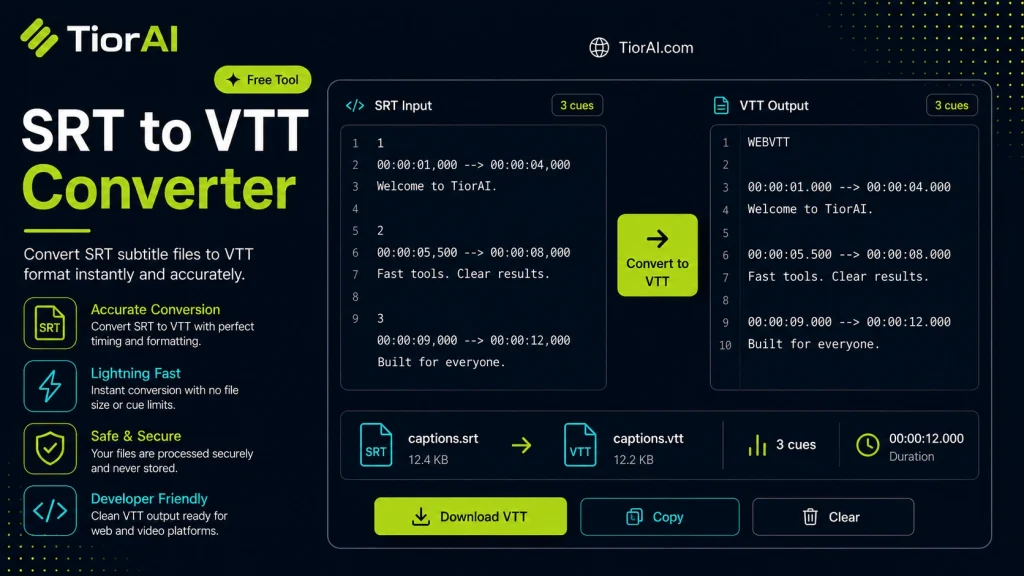
Subtitles enhance video accessibility by displaying text synchronized with audio. The SRT format is a simple subtitle file widely used across media players. However, for web videos, the VTT format is preferred because it supports additional features like styling and works seamlessly with HTML5 video…
How to use it
- Enter Your Input Value Type or paste the value you want to convert into the input field. The tool accepts any numeric value.
- Select Units and Convert Choose your source and target units from the dropdown menus. The converted result appears instantly.
- Copy or Use the Result Click copy to grab the converted value for use in your project, document, or calculation.
Tip Chain multiple conversions by copying the output and pasting it as the next input - works seamlessly.
Understanding Subtitle File Formats: SRT and VTT
Subtitles and captions are essential for making video content accessible and understandable across different languages and hearing abilities. Two common subtitle file formats are SRT (SubRip Subtitle) and VTT (WebVTT – Web Video Text Tracks). Both formats contain text and timing information to display subtitles synchronized with video playback.
The SRT format is widely used and supported by many media players. It consists of numbered subtitle entries with start and end times and the subtitle text. However, it lacks some features needed for modern web video players.
VTT is an extension of SRT designed specifically for web use. It supports additional metadata, styling, and positioning options, making it compatible with HTML5 <track> elements for captions and subtitles. Converting SRT files to VTT format is necessary when you want to use subtitles on web platforms that require or perform better with VTT files.
Common use cases for converting SRT to VTT include:
- Embedding subtitles in HTML5 video players on websites.
- Improving compatibility with streaming platforms that prefer VTT.
- Adding styling or positioning metadata supported only in VTT.
This conversion is straightforward because VTT builds upon the SRT format but adds a header and supports enhanced features.
What is SRT to VTT Conversion?
Subtitles enhance video accessibility by displaying text synchronized with audio. The SRT format is a simple subtitle file widely used across media players. However, for web videos, the VTT format is preferred because it supports additional features like styling and works seamlessly with HTML5 video elements.
Converting SRT files to VTT involves adding a specific header and ensuring the timing format matches VTT standards. This process enables subtitles to be embedded in web pages using the <track> tag, improving compatibility and user experience.
When Should You Use an SRT to VTT Converter?
- Embedding subtitles in HTML5 videos on websites.
- Preparing videos for streaming platforms that require VTT subtitles.
- Adding styling or positioning cues supported only in VTT.
- Updating legacy SRT files for modern web use.
- Ensuring subtitles display correctly across different browsers and devices.
Common Mistakes to Avoid
- Uploading SRT files directly to HTML5 players without conversion, which can cause subtitles not to appear.
- Assuming SRT and VTT files are interchangeable without checking platform requirements.
- Manually editing files without adding the necessary VTT header, leading to errors.
Using an online converter tool simplifies this process by automating the necessary formatting changes, ensuring your subtitles work correctly on the web.
Frequently asked questions
<track> element inside an HTML5 <video> tag. For example: <track kind='subtitles' src='subtitles.vtt' srclang='en' label='English'>.Reviews and questions
Whether this tool gave people the answer they needed, and what they asked about it.
Sign in to review this tool.
Sign In to ReviewNo reviews yet
Be the first to say whether this tool gave you what you needed.
Ask how to read the result, or what the tool does with an edge case — or answer someone else.
Sign In to AskNo questions yet
Not sure how to read a result? Be the first to ask.
AI tools related to this topic
Tools from the TiorAI directory that work on the same kind of job.

Wolfram Alpha
Wolfram Alpha is a computational knowledge engine that answers factual queries by performing computations on curated data, offering detailed solutions, visualizations, and an API for developers.

ChatGPT
ChatGPT is an AI chatbot by OpenAI powered by GPT-4o. It handles writing, coding, research, data analysis, and natural conversation. Free tier available, Plus at $20/month.