

JSON to TXT Converter
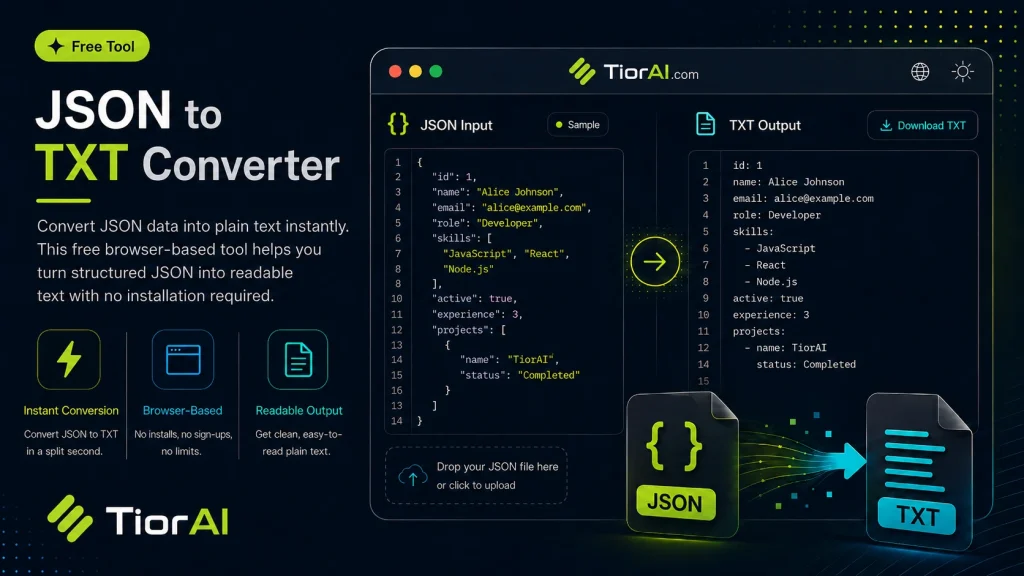
Understanding JSON to Text Conversion JSON is a structured format used to represent data in key-value pairs and arrays. While machines can easily parse JSON, it is not always convenient for humans to read or use in plain text environments. Converting JSON to text transforms…
How to use it
- Enter Your Input Value Type or paste the value you want to convert into the input field. The tool accepts any numeric value.
- Select Units and Convert Choose your source and target units from the dropdown menus. The converted result appears instantly.
- Copy or Use the Result Click copy to grab the converted value for use in your project, document, or calculation.
Tip Bookmark this converter - it handles edge cases like zero values and very large numbers accurately.
About JSON to TXT Converter
JSON (JavaScript Object Notation) is a lightweight data-interchange format widely used for storing and exchanging structured data. It represents data as key-value pairs, arrays, and nested objects, making it easy for machines to parse and generate. However, JSON is not always human-readable or suitable for plain text processing.
Converting JSON to plain text (.txt) involves transforming the structured JSON data into a simple text format. This process strips away the JSON syntax (such as braces, brackets, and quotes) and presents the information in a linear, readable form. This conversion is useful when you want to extract meaningful content from JSON files for documentation, logs, or sharing data in a format that does not require specialized parsers.
Why Convert JSON to Text?
- Readability: Plain text is easier for humans to read and edit without needing JSON syntax knowledge.
- Compatibility: Some applications or workflows only accept plain text input.
- Data Extraction: Extracting specific information from JSON for reports or summaries.
Common Use Cases
- Developers debugging API responses by viewing JSON data as readable text.
- Converting configuration files or logs stored in JSON into text for archival or review.
- Preparing data for systems that do not support JSON but accept text files.
Understanding JSON to Text Conversion
JSON is a structured format used to represent data in key-value pairs and arrays. While machines can easily parse JSON, it is not always convenient for humans to read or use in plain text environments. Converting JSON to text transforms the structured data into a simple, readable format by removing JSON-specific syntax like braces and quotes.
This conversion is essential when you want to share or review data without requiring JSON parsers or when working with systems that only accept plain text input. For example, developers often convert API responses from JSON to text to quickly inspect the data, or analysts extract key information from JSON logs for reporting.
When to Use a JSON to Text Converter
- To view JSON data in a human-readable format without JSON syntax.
- When preparing data for applications or workflows that only accept plain text files.
- Extracting and summarizing information from JSON for documentation or analysis.
- Debugging or reviewing API responses and configuration files.
Common Mistakes to Avoid
- Attempting to convert deeply nested JSON without flattening it first, which can lead to confusing or incomplete text output.
- Expecting the converter to preserve the JSON structure or formatting; instead, the output is plain text focused on readability.
Understanding these points helps you use JSON to text converters effectively and avoid common pitfalls when working with JSON data in plain text form.
Frequently asked questions
Reviews and questions
Whether this tool gave people the answer they needed, and what they asked about it.
Sign in to review this tool.
Sign In to ReviewNo reviews yet
Be the first to say whether this tool gave you what you needed.
Ask how to read the result, or what the tool does with an edge case — or answer someone else.
Sign In to AskNo questions yet
Not sure how to read a result? Be the first to ask.
AI tools related to this topic
Tools from the TiorAI directory that work on the same kind of job.

Wolfram Alpha
Wolfram Alpha is a computational knowledge engine that answers factual queries by performing computations on curated data, offering detailed solutions, visualizations, and an API for developers.

ChatGPT
ChatGPT is an AI chatbot by OpenAI powered by GPT-4o. It handles writing, coding, research, data analysis, and natural conversation. Free tier available, Plus at $20/month.