

Binary to Decimal
Enter a binary number (e.g., 1010) to convert it to a decimal number.
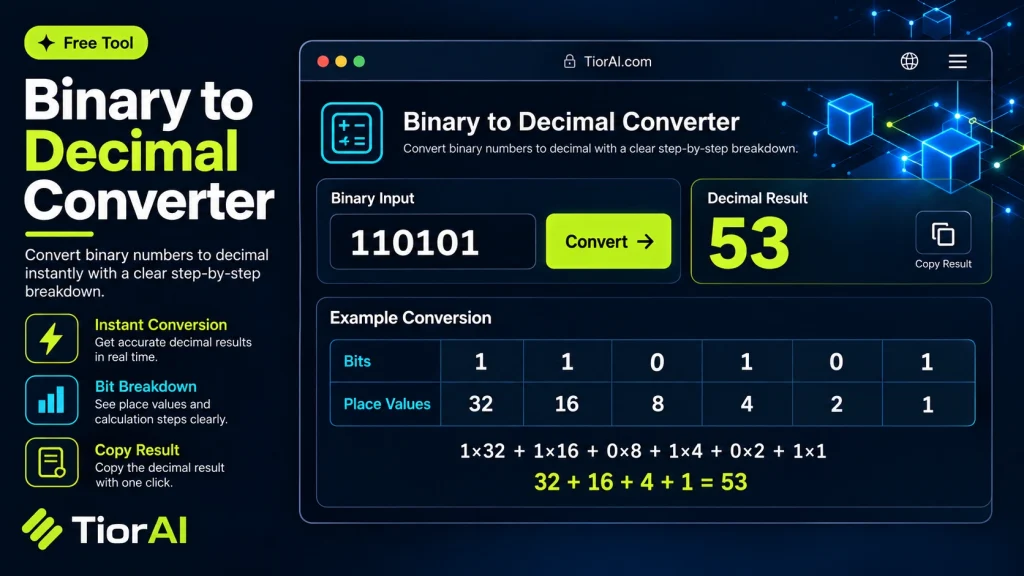
How to use it
- Enter Source Value Type or paste the value you want to convert into the Binary to Decimal. The tool accepts a wide range of input formats.
- Select Target Format Choose your desired output format or unit from the available options. The conversion starts automatically.
- Copy the Result Review the converted output and click copy to use it in your project, document, or workflow.
Tip The Binary to Decimal preserves formatting and structure during conversion, so your output stays clean and usable.
Understanding Binary to Decimal Conversion
Binary and decimal are two different numeral systems used to represent numbers. The binary system uses only two digits, 0 and 1, and is the foundation of all modern digital computing. Each binary digit (bit) represents an increasing power of 2, starting from the rightmost bit which is 20. Decimal, or base-10, is the standard numbering system used in everyday life, consisting of digits 0 through 9.
Converting binary to decimal means translating a number expressed in base-2 into its equivalent in base-10. This process is essential because while computers operate using binary internally, humans typically work with decimal numbers. For example, the binary number 1011 corresponds to the decimal number 11.
Why is this conversion important?
- It helps programmers and engineers interpret machine-level data in a human-readable format.
- It is used in debugging and understanding how data is stored and processed in computers.
- It facilitates communication between hardware and software systems.
Common situations where binary to decimal conversion is needed include analyzing memory addresses, interpreting binary-coded data, and educational purposes when learning computer science fundamentals.
What is Binary to Decimal Conversion?
Binary to decimal conversion is the process of translating numbers from the binary numeral system, which uses only 0s and 1s, into the decimal system, which uses digits 0 through 9. This conversion is fundamental because computers operate using binary internally, but humans typically use decimal numbers for everyday calculations and understanding.
Each binary digit represents a power of 2, starting from the rightmost bit at 20. By multiplying each bit by its corresponding power of 2 and summing the results, you get the decimal equivalent. For example, the binary number 1101 equals 1×2³ + 1×2² + 0×2¹ + 1×2⁰ = 13 in decimal.
When to Use Binary to Decimal Conversion
- Interpreting raw data from computer memory or hardware devices.
- Debugging programs that output binary values.
- Learning computer science concepts related to number systems.
- Converting sensor or machine data into human-readable formats.
Common Mistakes to Avoid
- Reading binary digits from left to right instead of right to left when calculating their decimal value.
- Mixing up binary with other numeral systems like octal or hexadecimal, leading to incorrect conversions.
Understanding binary to decimal conversion is a key skill in computing and digital electronics, enabling clearer communication between machines and humans.
Frequently asked questions
Reviews and questions
Whether this tool gave people the answer they needed, and what they asked about it.
Sign in to review this tool.
Sign In to ReviewNo reviews yet
Be the first to say whether this tool gave you what you needed.
Ask how to read the result, or what the tool does with an edge case — or answer someone else.
Sign In to AskNo questions yet
Not sure how to read a result? Be the first to ask.
AI tools related to this topic
Tools from the TiorAI directory that work on the same kind of job.

Any Video Converter
Any Video Converter is a multimedia software that converts video files between numerous formats, downloads online videos, and offers basic editing and DVD burning features.

Bank Statement Converter
Bank Statement Converter is an online tool that converts PDF bank statements into Excel and CSV formats, enabling easy data extraction and financial management.