

DigitalSeal Studio Digital Stamp Maker with Templates and Live Preview
DigitalSeal Studio (SealsDigital) is an online stamp maker for designing custom business stamps with templates and a live preview, then exporting them as PNG or vector files.
- Best for
- Business document stamps
- Key capability
- Stamp templates
Save DigitalSeal Studio, follow its updates and vote on it — everything stays in your account.
Sign in or create a free account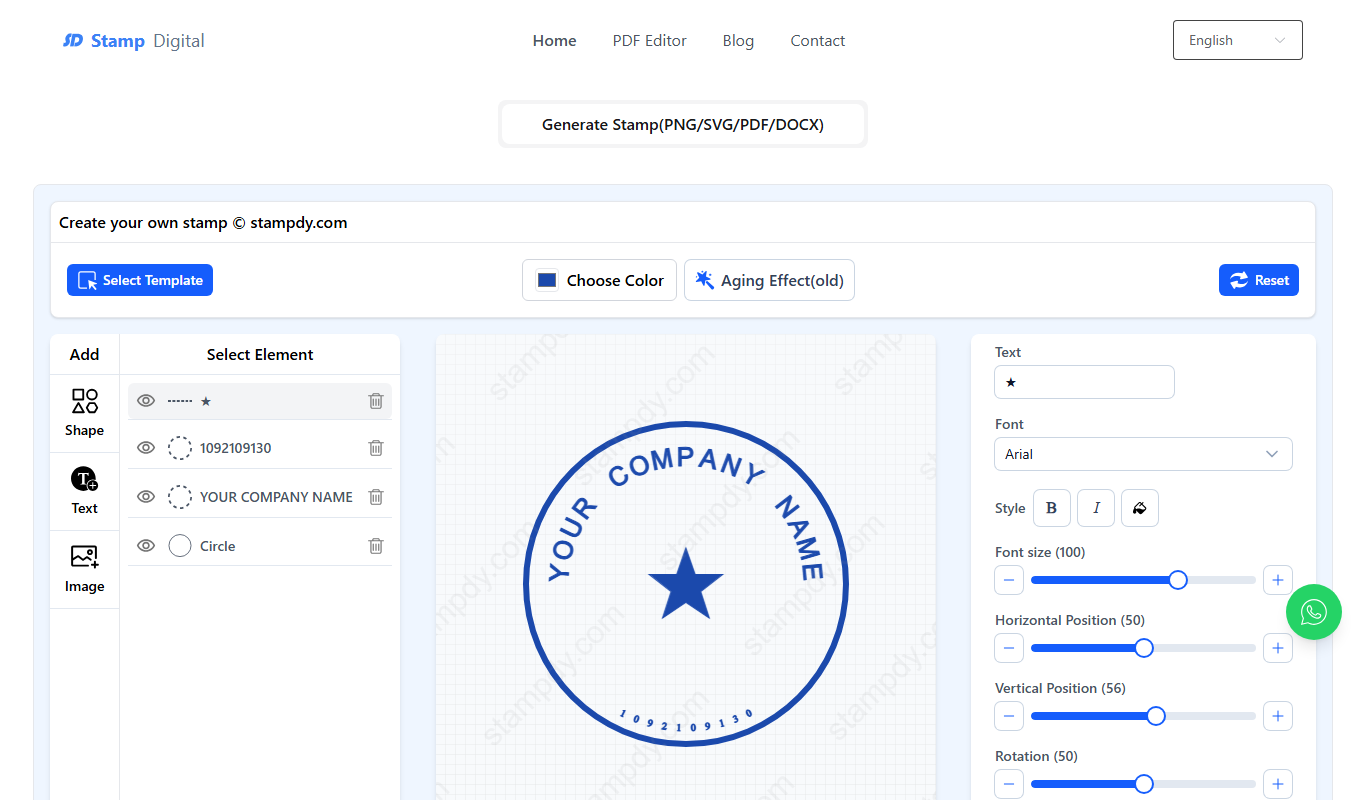
What is DigitalSeal Studio?
DigitalSeal Studio, published as SealsDigital, is an online digital stamp maker. Users pick a round, rectangular, company, approval or signature template, adjust text, color, spacing, opacity and aging in a live preview, and export the stamp as PNG, JPG, SVG, EPS, PDF or DOCX. It creates visual stamp artwork, not cryptographic digital signatures, and a separate PDF editor is free.
Key features of DigitalSeal Studio
DigitalSeal Studio offers stamp templates in round, rectangular, company, approval and signature layouts, controls for text, color, spacing, opacity and aging with a live preview, exports in PNG, JPG, SVG, EPS, PDF and DOCX, and a free PDF editor for placing stamps in documents.
Stamp templates
Round, rectangular, company, approval and signature layouts give a starting structure without rebuilding the geometry.
Live preview controls
Adjust text, type, color, spacing, position, opacity and aging while the stamp updates in the same workspace.
Raster and vector exports
Download PNG, JPG, SVG, EPS, PDF or DOCX files for screen, print and office workflows.
Free PDF editor
Place the finished stamp artwork in a document with the free PDF tool.
AI seal generator
An AI seal generator is available alongside the template editor.
Pros and cons of DigitalSeal Studio
Pros
- Designs can be previewed before paying
- Vector SVG and EPS exports for print and production
- Single exports need no account
- The PDF editor is free
- No design experience needed thanks to templates
Cons
- Limited language support (English only)
- Stamps are visual artwork, not cryptographic digital signatures
- No mobile app currently available
Key use cases for DigitalSeal Studio
Business document stamps
Create company, paid, received, approval and date marks for recurring paperwork.
Records and approvals
Keep recurring paperwork visually consistent with approval and date marks.
Brand and packaging
Turn a logo or short message into scalable stamp artwork for labels, mockups, cards and packaging.
Events and personal projects
Build wedding, library, address and custom stamp designs.
Stamps in PDF documents
Place finished stamp artwork in PDF documents with the free PDF tool.
How DigitalSeal Studio works
- 1
Choose a template
Pick a round, rectangular, company, approval or signature layout.
- 2
Edit in the live preview
Adjust text, type, color, spacing, position, opacity and aging while the preview updates.
- 3
Choose an export
Buy a single export as PNG, PNG + SVG + EPS or the complete bundle, or use an unlimited plan.
- 4
Download the files
Download PNG, JPG, SVG, EPS, PDF or DOCX files.
- 5
Place it in a PDF
Use the free PDF editor to place the stamp in a document.
Who is using DigitalSeal Studio
DigitalSeal Studio pricing
Single export
$2.50 / stamp
One-time payment for one finished stamp, no login required: PNG $2.50, PNG + SVG + EPS $2.90, complete bundle $3.50.
Monthly
$15.90 / month
Unlimited stamp creation and downloads, billed monthly; cancel any time.
Lifetime
$299 once
One payment with no renewal for unlimited stamp creation and downloads forever.
Plans and prices are as published by the vendor and can change. Check the official site before you buy. Open the pricing page (opens in a new tab)
Frequently asked questions about DigitalSeal Studio
No. SealsDigital creates visual stamp artwork; check the legal and document requirements before placing it on official materials.
Yes. Export the visual stamp artwork, then place it in a document with the free PDF tool.
Yes. Choose a template, edit every visual property and review the live result before selecting an export.
PNG is practical for documents and websites, while SVG and EPS suit printers or designers who need scalable vector artwork.
Data handling and security practices vary by provider. Review the official privacy policy to understand how your data is stored and used.
Yes, it can help with that use case depending on how you configure it and what features are available. You’ll get the best results with clear inputs and a defined goal.
Integration support depends on the tool and its available connectors or API. Check the official documentation or integrations page to confirm what is supported.
Conclusion
Despite the old signature-software description, the product is an online digital stamp maker that produces visual stamp artwork, not cryptographic signatures. Work starts from a ready template such as a company or approval layout, and the wording, color and aging effect are adjusted beside a live preview. Finished stamps export as raster PNG or JPG files, vector SVG or EPS artwork, or PDF and DOCX documents. A separate PDF editor, which stays free, places the stamp into a document.
Designs can be built and previewed before paying, and a single export needs no account. Payment is per stamp for one-off files, or through monthly, yearly or lifetime plans for unlimited downloads. The site advises checking the legal requirements of a document before placing a visual stamp on official materials.
Sources
Sign in to review this tool.
Sign In to ReviewNo reviews yet
Be the first to share how this tool worked for you.
Ask about pricing, limits, or how it compares — or answer someone else.
Sign In to AskNo questions yet
Have a question about using or paying for this tool? Be the first to ask.
Featured on TiorAI



Alternative Tools
Explore similar AI tools that might fit your needs

DocuSign
DocuSign is a cloud-based electronic signature platform that enables secure, legally binding digital signing and management of documents, streamlining workflows and ensuring compliance.
More AI Automation & Workflow Tools tools
Other tools in the same category, for when this one is not quite the fit.

Remagine AI
Remagine AI is a web-based platform that uses artificial intelligence to generate marketing content and automate marketing workflows, helping businesses create SEO-friendly and brand-consistent materials efficiently.

Postly
Postly is an AI social media and blog scheduler that publishes across social media, blogs and email, with Postly CRM, Bio Pages and Analytics in one workspace.

Emly Labs
Emly Labs offers a no-code AI framework to build AI chatbots and predictive AI models and to prepare data.

Midjourney API
Midjourney API is available through TTAPI, which gives access to Midjourney and 100+ AI models through one unified REST API with one API key, one balance and pay as you go billing.

Socialdude.ai
Socialdude.ai uses 15 hyper-personalized AI Agents to instantly generate tailored social media content from a selected feature and a description of your audience and business.

lempod.com
Lempod is a LinkedIn engagement automation tool that uses engagement pods to increase likes and comments on your posts, helping grow your network and visibility organically.

Leadlister
Leadlister turns a plain-language description of your perfect lead into a hyper-targeted, verified and CRM-ready list of prospects.

Agent Crop
Agent Crop uses computer vision to detect crop diseases and identify plants from photos, with recommended treatments for detected issues.