Targum Video AI Subtitle Generator for Multilingual Video Captions
Targum Video is an AI-driven platform that automatically generates and translates video subtitles into multiple languages, enabling creators to produce accessible and localized video content efficiently.
- Best for
- Automatic Subtitle Generation
- Key capability
- AI-Powered Transcription
Save Targum Video, follow its updates and vote on it — everything stays in your account.
Sign in or create a free account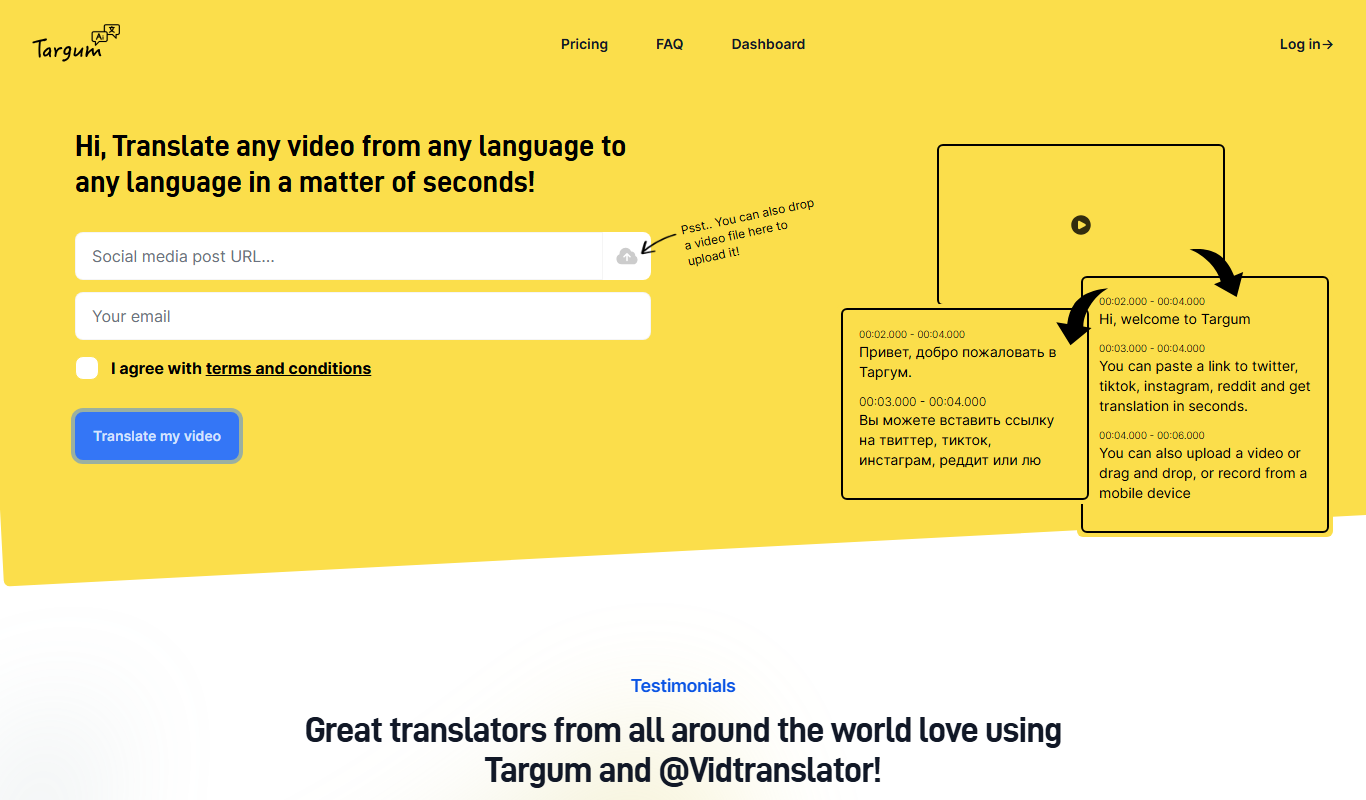
What is Targum Video?
Targum Video is an AI-powered platform designed to automatically generate subtitles and captions for videos in multiple languages. It leverages advanced speech recognition and translation technologies to provide accurate, time-synced subtitles that enhance video accessibility and localization. The tool is web-based and caters to content creators, marketers, and businesses aiming to expand their video reach globally.
Key features of Targum Video
Targum Video offers automatic transcription, AI-driven translation, subtitle editing, and export options in various subtitle formats. It supports numerous languages and provides an intuitive interface for reviewing and adjusting subtitles before publishing.
AI-Powered Transcription
High-accuracy speech-to-text conversion with time-synced captions.
Multilingual Translation
Translates videos to 99+ languages, including English translation on every plan.
Subtitle Editor
User-friendly interface to fine-tune subtitles and correct errors.
Multiple Export Formats
Export subtitles as SRT, VTT, or embed directly into videos.
Cloud-Based Platform
No software installation required; accessible via web browser.
Pros and cons of Targum Video
Pros
- Supports multiple languages for global audiences
- Easy-to-use subtitle editor for customization
- Cloud-based with no installation needed
- Multiple export formats for flexibility
Cons
- Free plan has limited video length and features
- No desktop or mobile app, web-only platform
- Translation quality may vary with complex audio
Key use cases for Targum Video
Automatic Subtitle Generation
Generate accurate subtitles for videos in multiple languages automatically using AI.
Multilingual Video Captioning
Create captions in various languages to reach a broader international audience.
Video Accessibility Enhancement
Improve video accessibility for hearing-impaired viewers by providing clear subtitles.
Content Localization
Localize video content efficiently to adapt to different markets and languages.
Video Marketing
Boost engagement and SEO by adding subtitles that improve viewer retention and search visibility.
How Targum Video works
- 1
Upload Video
Users upload their video files directly to the Targum Video platform.
- 2
Automatic Transcription
The AI engine transcribes the spoken content into text with timestamps.
- 3
AI Translation
The transcription is translated into selected target languages automatically.
- 4
Subtitle Editing
Users can review, edit, and adjust subtitles within the platform to ensure accuracy.
- 5
Export and Publish
Final subtitles can be exported in multiple formats or embedded into videos for publishing.
Who is using Targum Video
Targum Video pricing
Starter
$6 USD billed monthly
Everything you need to understand quick social media videos in other languages: up to 30 minutes/mo, translation to 99+ languages, max. 10 minutes per video.
Basic
$15 USD billed monthly
Hobbyist translator tier: download translated .mp4 files and SRT files, Telegram bot access, max. 30 minutes per video.
Creator/Business
$50 USD billed monthly
For creators or businesses with large volumes of video: 300 minutes per month, higher upload limits, priority queue, customize (or remove) watermark, priority email support, metered usage at $0.2/min.
Plans and prices are as published by the vendor and can change. Check the official site before you buy. Open the pricing page (opens in a new tab)
Frequently asked questions about Targum Video
Targum Video supports common video formats such as MP4, MOV, AVI, and more.
Yes, the platform includes an editor to review and adjust subtitles before export.
Accuracy depends on audio quality, but Targum Video uses advanced AI models to deliver high-quality transcriptions.
Yes, the free plan has restrictions on maximum video length and number of exports.
It depends on your specific needs and how you plan to use the tool. The official website and documentation are the best sources for the latest details.
Yes, it can help with that use case depending on how you configure it and what features are available. You’ll get the best results with clear inputs and a defined goal.
Yes, it can help with that use case depending on how you configure it and what features are available. You’ll get the best results with clear inputs and a defined goal.
Pricing depends on the plan and included features. For the most accurate and up-to-date details, check the official pricing page.
Conclusion
Videos come in as a pasted link from Twitter, TikTok, Instagram or Reddit, as an upload or as a recording from a mobile device, and the translation is ready in seconds. Every plan translates videos into 99+ languages, and English translation is included throughout. Time-synced captions can be reviewed and adjusted in an editor before export.
Paid access runs on monthly subscriptions with a set number of translation minutes, and Starter covers quick social media videos in other languages. Basic adds downloads of translated MP4 files and SRT files, while Creator/Business adds higher upload limits, a priority queue and a customizable or removable watermark. The pricing page still carries a notice that introductory prices go up July 15, 2023.
Sources
Sign in to review this tool.
Sign In to ReviewNo reviews yet
Be the first to share how this tool worked for you.
Ask about pricing, limits, or how it compares — or answer someone else.
Sign In to AskNo questions yet
Have a question about using or paying for this tool? Be the first to ask.
Featured on TiorAI



More AI Multilingual Tools tools
Other tools in the same category, for when this one is not quite the fit.