

Yogger Video Analysis and AI Movement Assessments
Yogger helps physical therapists, chiropractors, coaches and trainers measure movement using just a phone, with video analysis, AI movement assessments and clear reports.
- Best for
- In-clinic assessments
- Key capability
- Guided movement assessments
Save Yogger, follow its updates and vote on it — everything stays in your account.
Sign in or create a free account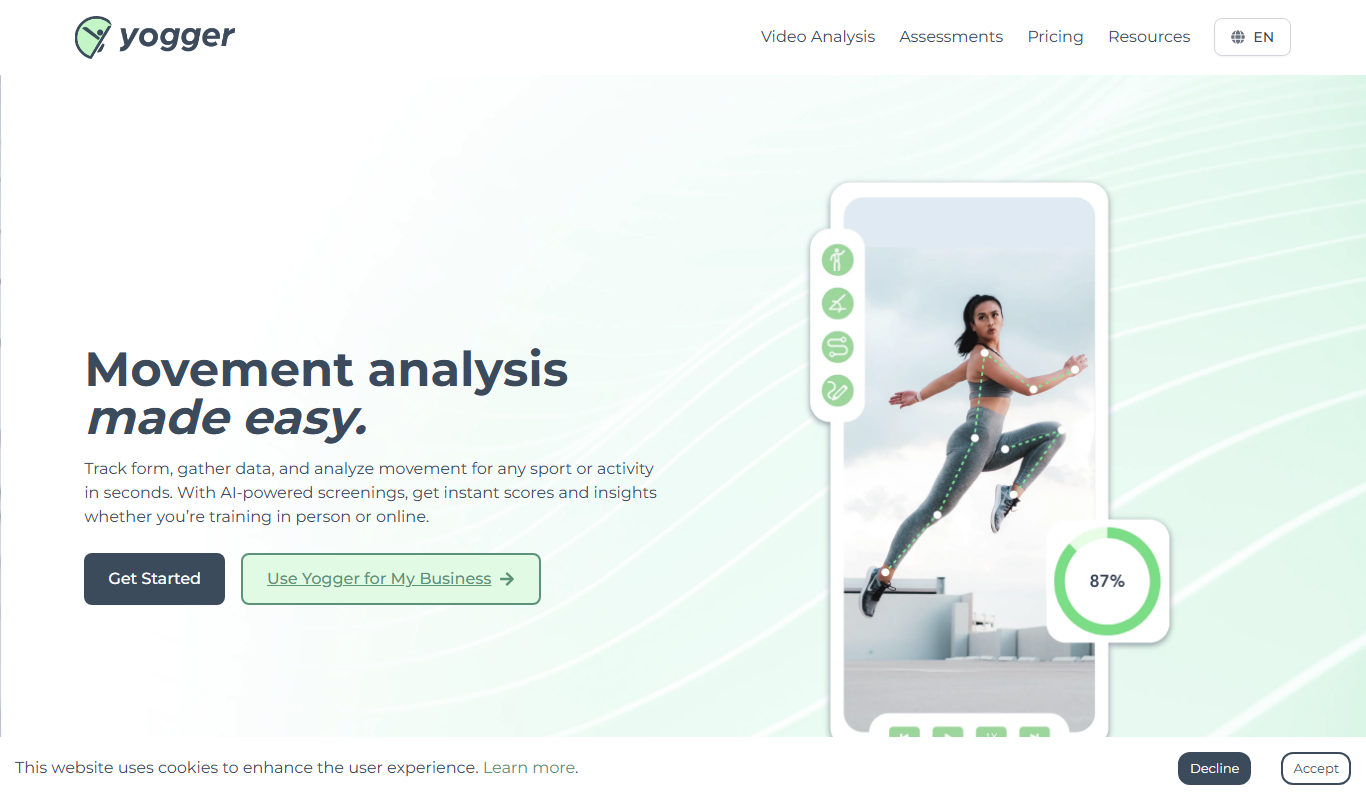

What is Yogger?
Yogger is video analysis and AI movement assessment software for physical therapists, chiropractors, coaches and trainers. It measures movement using just a phone: users run guided movement assessments with automated scoring or analyze recorded video with frame-by-frame playback, joint tracking and angle measurements, then track progress and generate professional reports.
Key features of Yogger
Yogger offers guided movement assessments with automated scoring, frame-by-frame video analysis with joint tracking and angle measurements, movement overlays and side-by-side comparisons, progress tracking with reassessments, remote assessments and professional reports, on phone, tablet and desktop.
Guided movement assessments
Automated scoring, progress tracking and professional reporting.
Video analysis tools
Analyze any recorded video with frame-by-frame playback, joint tracking and angle measurements.
Visual movement feedback
Movement overlays and side-by-side comparisons to show clients what is happening during movement.
Progress tracking and Movement Age
Track measurable improvement with reassessments, comparison tools and Movement Age reporting.
Remote assessments
Send guided assessments clients complete from anywhere and review the results remotely.
Pros and cons of Yogger
Pros
- Measures movement using just a phone
- Unlimited video and movement analysis on the Professional plan
- 7 day free trial with no charge today
- Mobile and desktop access
Cons
- The Professional plan covers 1 provider and up to 25 active athletes per month
- Paid plans start at $99 per month
- Some advanced features require paid subscription
Key use cases for Yogger
In-clinic assessments
Perform guided movement screenings, track progress and generate professional reports during evaluations.
Live video analysis
Review movement frame-by-frame, measure joint angles and give immediate visual feedback during sessions.
Remote assessments
Send guided assessments clients can complete from anywhere.
Async video coaching
Analyze uploaded videos and deliver screen-recorded movement reviews without live sessions.
Team Collaboration
Facilitate content creation workflows for marketing teams with shared access and editing.
How Yogger works
- 1
Record the movement
Capture movement with a phone or tablet in seconds.
- 2
Analyze
Run a guided assessment with automated scoring, or analyze the video with joint tracking and angle measurements.
- 3
Share feedback and reports
Generate professional reports and share clear visual feedback with clients.
- 4
Track progress
Run reassessments over time and compare results to make progress visible between visits.
- 5
Edit and Collaborate
Refine the content and collaborate with team members within the platform.
Who is using Yogger
Yogger pricing
Professional
Starting at $99 per month
For solo practitioners: 1 provider, up to 25 active athletes per month, unlimited video and movement analysis, AI movement and range of motion assessments, professional reports, mobile and desktop access, email support.
Pro
$29/month
Full access to all features, higher usage limits, and priority support.
Plans and prices are as published by the vendor and can change. Check the official site before you buy. Open the pricing page (opens in a new tab)
Frequently asked questions about Yogger
It helps physical therapists, chiropractors, coaches and trainers measure movement using just a phone, track progress and generate clear reports.
Yes. You can send guided assessments that clients complete from anywhere and review the results remotely.
Frame-by-frame playback, joint tracking, angle measurements, movement overlays and side-by-side comparisons.
Yes. The Professional plan starts with a 7 day free trial, with no charge on the day you start and cancellation at any time.
This tool is designed to help users accomplish its core tasks more efficiently. It is typically used by individuals or teams looking to improve productivity and workflow.
Yes, it can help with that use case depending on how you configure it and what features are available. You’ll get the best results with clear inputs and a defined goal.
It depends on your specific needs and how you plan to use the tool. The official website and documentation are the best sources for the latest details.
Pricing depends on the plan and included features. For the most accurate and up-to-date details, check the official pricing page.
Conclusion
A phone or tablet is the only capture device Yogger needs: practitioners record a client’s movement, then either run a guided assessment that scores it automatically or study the clip frame by frame with joint tracking and angle measurements. Overlays, side-by-side comparisons and reassessments turn those measurements into progress clients can see between visits.
Physical therapists, chiropractors, personal trainers and performance coaches are the intended users, working in clinic sessions or remotely through guided assessments and asynchronous video reviews. Plans scale from a solo practitioner tier to clinic and enterprise options. The entry Professional plan includes a free trial but covers only one provider and a capped number of active athletes per month.
Sources
Sign in to review this tool.
Sign In to ReviewNo reviews yet
Be the first to share how this tool worked for you.
Ask about pricing, limits, or how it compares — or answer someone else.
Sign In to AskNo questions yet
Have a question about using or paying for this tool? Be the first to ask.
Featured on TiorAI



More AI Video Recording tools
Other tools in the same category, for when this one is not quite the fit.
wingfield.io
Wingfield makes AI-powered court cameras for padel, tennis and pickleball that capture matches, highlights and analytics automatically, with video feedback and live streaming.

reccloud.cn
RecCloud.cn is an online AI audio and video platform for speech-to-text with AI summaries, multilingual subtitles, video translation and dubbing, and text-to-speech.

Roll
Roll is an AI video production studio that records pro-quality remote video calls with a phone, adds special effects and edits and publishes them in minutes.
Wudpecker
Wudpecker is an AI-powered meeting assistant that automatically transcribes and summarizes online meetings to improve productivity and collaboration.

Noota
Noota is an AI notetaker that captures meetings, calls and conversations automatically and produces notes and follow-ups.

Layerpath
Layerpath turns a recorded software workflow into interactive walkthroughs, step-by-step guides, videos and SOPs for training, onboarding and customer education.

Webcam Motion Capture
Webcam Motion Capture is software that uses a standard webcam to track body and facial movements in real time, enabling users to animate 3D characters without expensive hardware.

Otter AI
Otter is an AI notetaker that transcribes every meeting, turning it into searchable knowledge with summaries and action items.