

Make-Print - open source prototyping and 3D print shop workflow
Make-Print is an open source prototyping workflow with a kanban board, browser previews of 3D files, team chat, a 3D printer and CNC inventory, and AI quoting of customer orders.
- Best for
- Prototyping projects
- Key capability
- Kanban project board
Save Make-Print Platform, follow its updates and vote on it — everything stays in your account.
Sign in or create a free account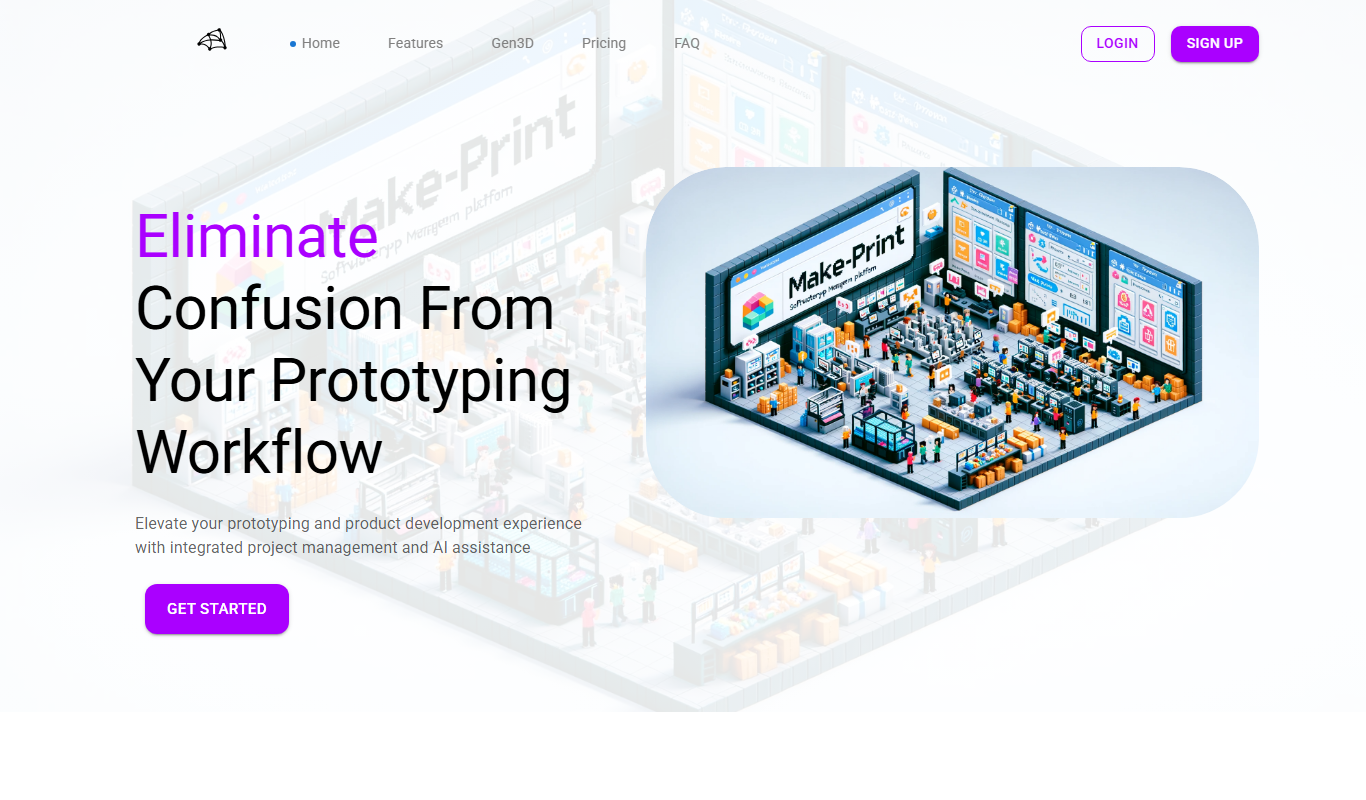
What is Make-Print Platform?
Make-Print is an open source project management and AI assistance platform for prototyping and product development. It tracks projects on a kanban board, previews 3D files in the browser, keeps team chat, manages a machine and materials inventory, and quotes customer orders automatically by analyzing 3D models.
Key features of Make-Print Platform
Make-Print offers a kanban board for projects, browser previews of .stl, .step, .obj, .fbx, .3mf and .gltf files, live team chat, a 3D printer and CNC machine inventory, AI chat and automatic quoting from 3D models.
Kanban project board
Add and edit all projects in one space, create tasks, assign team members and attach files and machines.
3D file previews
Preview .stl, .step, .obj, .fbx, .3mf and .gltf files in the browser for preliminary inspection and part validation.
Machine and materials inventory
Browse a machine inventory for 3D printers and CNCs or create a custom machine, and add in-house materials and colors.
Automatic quoting
Quotes are calculated by analyzing 3D models with material costs, complexity and the shop's cost structure.
Team chat and AI chat
Project chat threads with collaborators, plus AI chat for real-time answers on any project.
Pros and cons of Make-Print Platform
Pros
- Open source platform
- Browser previews of common 3D file formats
- Automatic quotes based on 3D models and shop costs
- Custom development available for specific shop needs
- Integration with multiple print shops
Cons
- Running it locally needs separate server, client and file converter processes
- Self-hosting requires several environment variables and API keys
- Primarily web-based with no mobile apps
Key use cases for Make-Print Platform
Prototyping projects
Track all tasks and projects from idea to production in one place.
Part validation
Inspect 3D parts in the browser before production.
Quoting customer orders
Quote customer orders automatically from 3D models and shop costs.
Self-hosting the platform
Build and run Make-Print locally from its open source repositories.
Print Product Catalog Management
Manage and update print product offerings and pricing within the platform.
How Make-Print Platform works
- 1
Create a project
Add the project to the Kanban board, create tasks and assign team members.
- 2
Upload and inspect parts
Attach 3D files and preview them in the browser.
- 3
Assign machines and materials
Pick 3D printers or CNCs from the inventory and add in-house materials and colors.
- 4
Quote the order
Let the system calculate a quote from the 3D model, material costs and complexity.
- 5
Collaborate
Discuss specific projects with collaborators in chat threads.
Who is using Make-Print Platform
Make-Print Platform pricing
Custom Pricing
Contact for pricing
Pricing tailored to business needs based on volume and features.
Plans and prices are as published by the vendor and can change. Check the official site before you buy. Open the pricing page (opens in a new tab)
Frequently asked questions about Make-Print Platform
Yes. It is an open source integrated project management and AI assistance platform for prototyping.
.stl, .step, .obj, .fbx, .3mf and .gltf, directly in the browser.
The system analyzes 3D models and takes material costs, complexity and your shop’s cost structure into account.
Follow the local development guide and run the server, client and file converter, each in its own terminal.
Yes. Custom development services tailor the platform to a shop’s workflow.
It depends on your specific needs and how you plan to use the tool. The official website and documentation are the best sources for the latest details.
It depends on your specific needs and how you plan to use the tool. The official website and documentation are the best sources for the latest details.
It depends on your specific needs and how you plan to use the tool. The official website and documentation are the best sources for the latest details.
Conclusion
Built for prototyping and product development, the platform follows a job from idea to production on a Kanban board, where each project collects its tasks, assigned team members, files and machines. Parts can be inspected right in the browser, with previews of common 3D formats such as .stl, .step and .obj files for preliminary inspection and part validation. A machine inventory covers 3D printers and CNCs, alongside in-house materials and color options.
For shops taking customer work, automatic quoting analyzes the 3D model together with material costs, complexity and the shop’s cost structure, and an AI chat answers questions about any project. Make-Print is open source, and running it locally means starting the server, the client and a Python file converter as separate processes with several environment variables and API keys configured. Shops that need specific features can request custom development.
Sources
Sign in to review this tool.
Sign In to ReviewNo reviews yet
Be the first to share how this tool worked for you.
Ask about pricing, limits, or how it compares — or answer someone else.
Sign In to AskNo questions yet
Have a question about using or paying for this tool? Be the first to ask.
Featured on TiorAI



Alternative Tools
Explore similar AI tools that might fit your needs

Printavo
Printavo is a cloud-based print shop management software that helps print businesses manage workflows, scheduling, quoting, approvals, and customer communications efficiently.
Printful
Printful is a print-on-demand and dropshipping platform that allows users to create custom products, integrate with ecommerce stores, and automate order fulfillment without holding inventory.
Printify
Printify is a print-on-demand platform that enables users to design custom products and sell them online with automated printing and shipping handled by global print providers.
More AI Files Assistant tools
Other tools in the same category, for when this one is not quite the fit.

ChatBuild AI
ChatBuild AI lets businesses create custom trained AI chatbot agents for their website in minutes, with no coding experience needed.

MindPal
MindPal turns your expertise into AI agents and multi-agent workflows that you can publish as chatbots, embedded tools or branded portals.
FileZen
FileZen is a secure file sharing and cloud storage platform that provides end-to-end encryption for safe file transfer and storage across multiple devices.

QuickSearchPlus
QuickSearchPlus is an advanced search platform that enables fast, accurate data retrieval through real-time indexing, customizable filters, and API integration, ideal for enterprises and content managers.