

From my experience with PromptLayer, I found it excels at providing detailed prompt logging and version control, which is invaluable for refining AI prompts over time. The analytics dashboard offers clear insights that help optimize prompt performance and manage API costs effectively. It’s particularly well-suited for AI developers and teams who need collaboration features and transparency in their AI workflows. However, integrating PromptLayer requires some technical setup, and the pricing might be a consideration for smaller projects. Overall, if you are serious about prompt engineering and want to streamline your AI development process, PromptLayer delivers practical and robust tools.
PromptLayer AI Prompt Management Platform for Developers and Teams
PromptLayer is a platform that helps developers log, version, and analyze AI prompts and completions to improve prompt engineering and optimize costs when using large language models like OpenAI's GPT.
- Best for
- Prompt Tracking and Versioning
- Key capability
- Prompt Logging and Versioning
Your actions
Save PromptLayer, follow its updates and vote on it — everything stays in your account.
Sign in or create a free account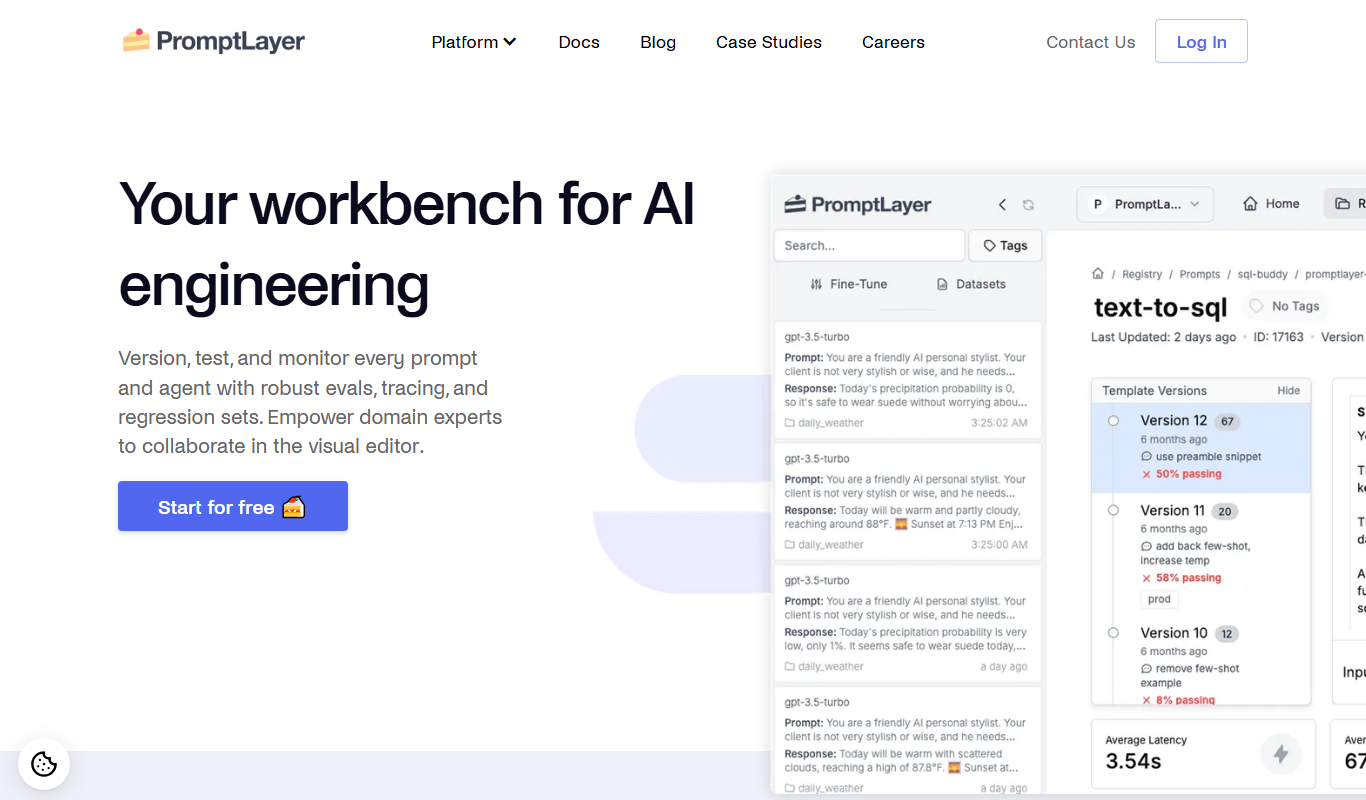

What is PromptLayer?
PromptLayer is a prompt management and analytics platform designed for developers and teams working with large language models (LLMs) like OpenAI’s GPT. It provides tools to log, version, and analyze prompts and completions, enabling better prompt engineering, debugging, and cost optimization. By acting as a middleware layer between your application and AI APIs, PromptLayer helps improve transparency and collaboration in AI development workflows.
Key features of PromptLayer
PromptLayer offers prompt logging, version control, analytics dashboards, team collaboration features, and API integrations. It supports tracking prompt usage over time, comparing prompt versions, and gaining insights into model behavior to refine AI outputs effectively.
Prompt Logging and Versioning
Automatically log every prompt and completion with version control to track changes over time.
Analytics Dashboard
Visualize prompt usage, success rates, and cost metrics to identify optimization opportunities.
Team Collaboration
Manage user roles and share prompt libraries to streamline team workflows.
API Integration
Supports integration with OpenAI and other LLM APIs via middleware or direct API calls.
Cost Monitoring
Track API usage costs associated with prompts to manage budgets effectively.
Pros and cons of PromptLayer
Pros
- Comprehensive prompt logging and version control
- Insightful analytics to optimize AI prompt performance
- Supports team collaboration and role management
- Easy integration with OpenAI and other LLM APIs
- Helps monitor and control API usage costs
Cons
- Limited language support (English only)
- Pricing may be high for small projects with low budgets
- Requires some technical knowledge to integrate
Key use cases for PromptLayer
Prompt Tracking and Versioning
Track, log, and version AI prompts and completions to improve prompt engineering workflows.
Prompt Analytics and Insights
Analyze prompt performance metrics to optimize AI model outputs and reduce costs.
Collaboration for AI Teams
Enable teams to share, review, and manage prompts collectively for consistent AI application development.
API Request Logging
Log all API requests and responses to OpenAI or other LLM providers for debugging and auditing.
Integration with AI Workflows
Seamlessly integrate prompt management into existing AI development pipelines via API.
How PromptLayer works
- 1
Sign Up and Connect API
Create an account on PromptLayer and connect your OpenAI or other LLM API keys.
- 2
Integrate PromptLayer Middleware
Use PromptLayer’s SDK or API to route your prompt requests through their platform for logging and tracking.
- 3
Monitor and Analyze Prompts
Access dashboards to review prompt usage, performance metrics, and version histories.
- 4
Collaborate and Optimize
Share prompt versions with your team, iterate based on analytics, and optimize AI outputs.
Who is using PromptLayer
AI developers and engineers
Prompt engineers
Data scientists working with LLMs
AI-focused startups and enterprises
Product teams building AI-powered applications
PromptLayer pricing
Free
$0/month
Basic prompt logging and analytics with limited usage and features.
Pro
$49/month
Advanced analytics, unlimited prompt logging, team collaboration, and priority support.
Plans and prices are as published by the vendor and can change. Check the official site before you buy. Open the pricing page (opens in a new tab)
Frequently asked questions about PromptLayer
PromptLayer primarily supports OpenAI’s GPT models but can integrate with other large language model APIs.
Yes, PromptLayer offers features to share prompts and manage user roles within teams.
By providing detailed analytics on prompt usage and performance, it helps identify inefficient prompts to optimize API calls.
Yes, PromptLayer offers a free plan with basic logging and analytics capabilities.
This tool is designed to help users accomplish its core tasks more efficiently. It is typically used by individuals or teams looking to improve productivity and workflow.
Integration support depends on the tool and its available connectors or API. Check the official documentation or integrations page to confirm what is supported.
Pricing depends on the plan and included features. For the most accurate and up-to-date details, check the official pricing page.
Yes, it can help with that use case depending on how you configure it and what features are available. You’ll get the best results with clear inputs and a defined goal.
Sign in to review this tool.
Sign In to ReviewNo reviews yet
Be the first to share how this tool worked for you.
Ask about pricing, limits, or how it compares — or answer someone else.
Sign In to AskNo questions yet
Have a question about using or paying for this tool? Be the first to ask.
Featured on TiorAI



More AI Ppt Maker tools
Other tools in the same category, for when this one is not quite the fit.

Freemium
SEO GPT
SEO GPT is an AI tool that automates the creation of SEO-optimized content, including articles, meta titles, and descriptions, helping marketers improve search rankings efficiently.

Custom Pricing
secretsaucepartners.com
Secret Sauce Partners is a consulting firm specializing in growth strategies and fundraising support for startups and scaleups, offering tailored advisory services to accelerate business growth.

Freemium
Planit Teachers
Planit Teachers is an AI-driven platform that automates lesson plan creation, helping teachers save time and align lessons with curriculum standards.

Free Trial
Juicebox (PeopleGPT)
Juicebox PeopleGPT is an AI-driven collaboration platform that helps teams centralize knowledge and interact with it through natural language queries, enhancing productivity and communication.

Freemium
Pressmaster.ai
Pressmaster.ai is an AI-driven platform that helps users create professional press releases and marketing copy efficiently with customizable templates and SEO optimization.

Freemium
BulkGPT.ai
BulkGPT.ai is a web-based platform that uses GPT-3 AI to generate large volumes of unique written content quickly, ideal for marketers and businesses needing bulk content automation.

Free
The Prompt Index
The Prompt Index is a free online library offering curated AI prompts organized by categories to help users find effective prompts for creative writing, productivity, and AI experimentation.

Free
AiPPT
AiPPT is an AI-driven web tool that helps users create professional presentations quickly by generating slide content and designs automatically.