

FlowAlgo Stock Market Analytics Platform with Real-Time Options Flow Data
FlowAlgo is a web platform providing real-time options flow data and alerts to help traders identify unusual market activity and generate trade ideas.
- Best for
- Options Flow Analysis
- Key capability
- Real-Time Options Flow Data
Save FlowAlgo, follow its updates and vote on it — everything stays in your account.
Sign in or create a free account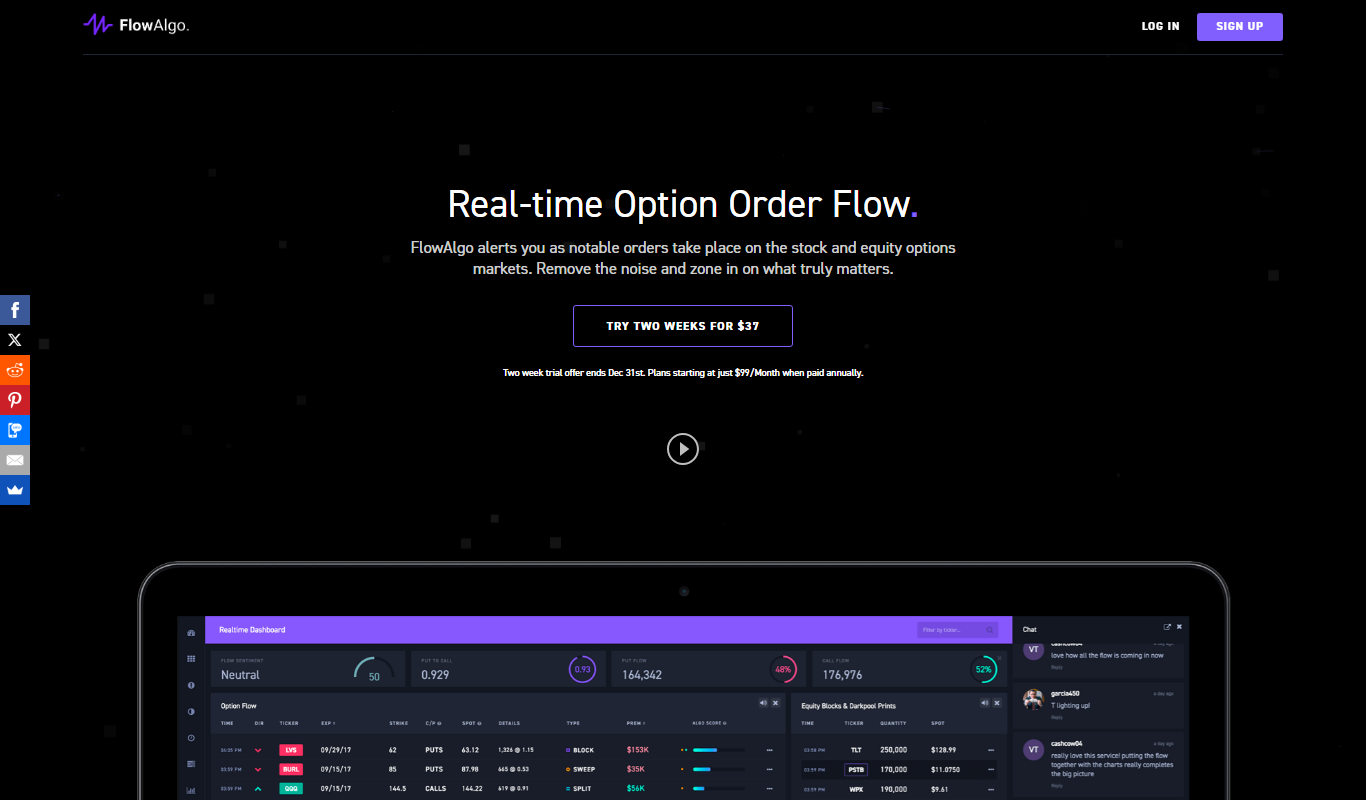
What is FlowAlgo?
FlowAlgo is a web-based stock market analytics platform specializing in real-time options flow data. It helps traders and investors identify unusual options activity, providing insights into market sentiment and potential price movements. By aggregating and analyzing large volumes of options and stock data, FlowAlgo delivers actionable trade signals and alerts to support informed decision-making.
Key features of FlowAlgo
FlowAlgo offers real-time options flow tracking, customizable alerts, detailed market data visualization, and historical data analysis. Its platform is designed to highlight unusual options activity, enabling users to spot potential market trends and trading opportunities quickly.
Real-Time Options Flow Data
Monitor live options market activity to detect unusual volume and trades.
Customizable Alerts
Receive notifications for significant options flow events tailored to your preferences.
Data Visualization
Interactive charts and heatmaps help visualize market sentiment and activity.
Historical Data Access
Review past options flow to analyze trends and validate trading strategies.
User-Friendly Interface
Intuitive design allows traders of all experience levels to navigate and use the platform effectively.
Pros and cons of FlowAlgo
Pros
- Real-time, actionable options flow data
- Customizable alerts tailored to user preferences
- User-friendly interface suitable for all experience levels
- Comprehensive historical data for strategy validation
- Responsive customer support
Cons
- Pricing may be high for casual traders
- Limited mobile app support; primarily web-based
- No direct brokerage integration
Key use cases for FlowAlgo
Options Flow Analysis
Track real-time unusual options activity to identify potential market moves and trading opportunities.
Stock Market Research
Analyze large volumes of options and stock data to gain insights into market sentiment and trends.
Trade Idea Generation
Generate actionable trade ideas based on detected unusual options flow and volume spikes.
Portfolio Management Support
Use options flow data to inform portfolio adjustments and risk management strategies.
Market Timing
Leverage real-time alerts and data visualization to time entries and exits in the stock market.
How FlowAlgo works
- 1
Sign Up
Create an account on FlowAlgo’s website to access the platform.
- 2
Select Subscription Plan
Choose a monthly, quarterly or annual plan; all plans are all-inclusive, and the monthly plan starts with a two-week trial for $37.
- 3
Access Dashboard
Use the web-based dashboard to monitor real-time options flow and market data.
- 4
Set Alerts
Configure alerts for unusual options activity based on your criteria.
- 5
Analyze and Trade
Interpret the data and alerts to generate trade ideas and manage your portfolio.
Who is using FlowAlgo
FlowAlgo pricing
Monthly Plan
Two weeks for $37, then $149/month (auto-renews)
All-inclusive: realtime option order flow, equity block and dark pool order data, Alpha Ai Signals, dark pool insights, on-demand historical data, voice alerts, trader chatroom and top open interest changes.
Quarterly Plan
$129/month, billed at $387 every 3 months
The same all-inclusive feature set as the other plans, billed every 3 months.
Annual Plan
$99/month, billed at $1188 every 12 months
The same all-inclusive feature set as the other plans, billed annually.
Plans and prices are as published by the vendor and can change. Check the official site before you buy. Open the pricing page (opens in a new tab)
Frequently asked questions about FlowAlgo
Options flow refers to the real-time buying and selling activity in the options market. It can indicate investor sentiment and potential stock price movements.
There is no free plan; FlowAlgo can be test run for 2 full weeks for $37, after which the monthly plan renews at $149/month.
Yes, the platform is designed with an intuitive interface and provides educational resources to assist traders at all levels.
FlowAlgo provides real-time data updates throughout the trading day to ensure timely information.
This tool is designed to help users accomplish its core tasks more efficiently. It is typically used by individuals or teams looking to improve productivity and workflow.
It depends on your specific needs and how you plan to use the tool. The official website and documentation are the best sources for the latest details.
It depends on your specific needs and how you plan to use the tool. The official website and documentation are the best sources for the latest details.
Pricing depends on the plan and included features. For the most accurate and up-to-date details, check the official pricing page.
Conclusion
The service monitors the tape (time and sales) market wide and alerts subscribers as notable orders take place on the stock and equity options markets. Each order is analyzed on data points such as order type, size, speed, fill pattern and volume to identify smart money transactions. Tracked activity covers intermarket sweep orders consolidated into one order, privately negotiated option block trades, and equity blocks and darkpool prints. Plans also include Alpha Ai Signals, on-demand historical data going back to June 2017 and voice alerts.
Dark pool transactions cannot be reported in realtime, and equity block and print data is delayed up to 20 minutes due to exchange regulations. It is aimed at active stock and options traders, including day traders and swing traders. There is no free plan: all plans are all-inclusive and billed monthly, quarterly or annually, and the monthly plan starts with a paid two-week trial. The company describes itself as solely a data-provider and not a stock picks alert service.
Sources
Sign in to review this tool.
Sign In to ReviewNo reviews yet
Be the first to share how this tool worked for you.
Ask about pricing, limits, or how it compares — or answer someone else.
Sign In to AskNo questions yet
Have a question about using or paying for this tool? Be the first to ask.
Featured on TiorAI



More AI Analytics Assistant tools
Other tools in the same category, for when this one is not quite the fit.

TranscribetoText.AI
TranscribetoText.AI is an AI-driven online service that converts audio and video files into accurate text transcripts, supporting multiple languages and features like speaker identification and timestamps.

SPSSAU
SPSSAU is an online statistical analysis platform that provides a wide range of data analysis and visualization tools accessible through a web browser, suitable for academic, business, and educational use.

TwinMind
TwinMind is an AI second brain that transcribes and summarizes your day, organizes it into memory and powers any AI with the context of your life.
Azna AI
Azna AI turns ideas into personalized AI copilot apps in minutes with a no-code solution: choose a template, add your data and deploy the copilot.

Vuepak
Vuepak drives growth with AI-powered multichannel outreach and smart email delivery: share multimedia presentations and track engagement in real time.

PerceptInsight
Percept Insight is a real-time analytics platform that gives insights into user behaviour, user engagement and the effectiveness of marketing campaigns, with built-in engagement tools.

Roast That Face
Roast That Face is an AI roaster that turns an uploaded photo or a public Instagram, Twitter, X or LinkedIn profile into a funny, shareable roast.

Heatbot.io
Heatbot is a data-driven generative UI builder: upload user analysis heatmaps and let AI generate code for an improved website in seconds.