

Story321 AI Story Generator - Create Stories Online
Story321's AI story generator turns any idea into a story: choose a genre and length, generate online without signing up, then copy or download the draft.
- Best for
- Creative Story Writing
- Key capability
- Free to try
Save Story321 AI Story Generator, follow its updates and vote on it — everything stays in your account.
Sign in or create a free account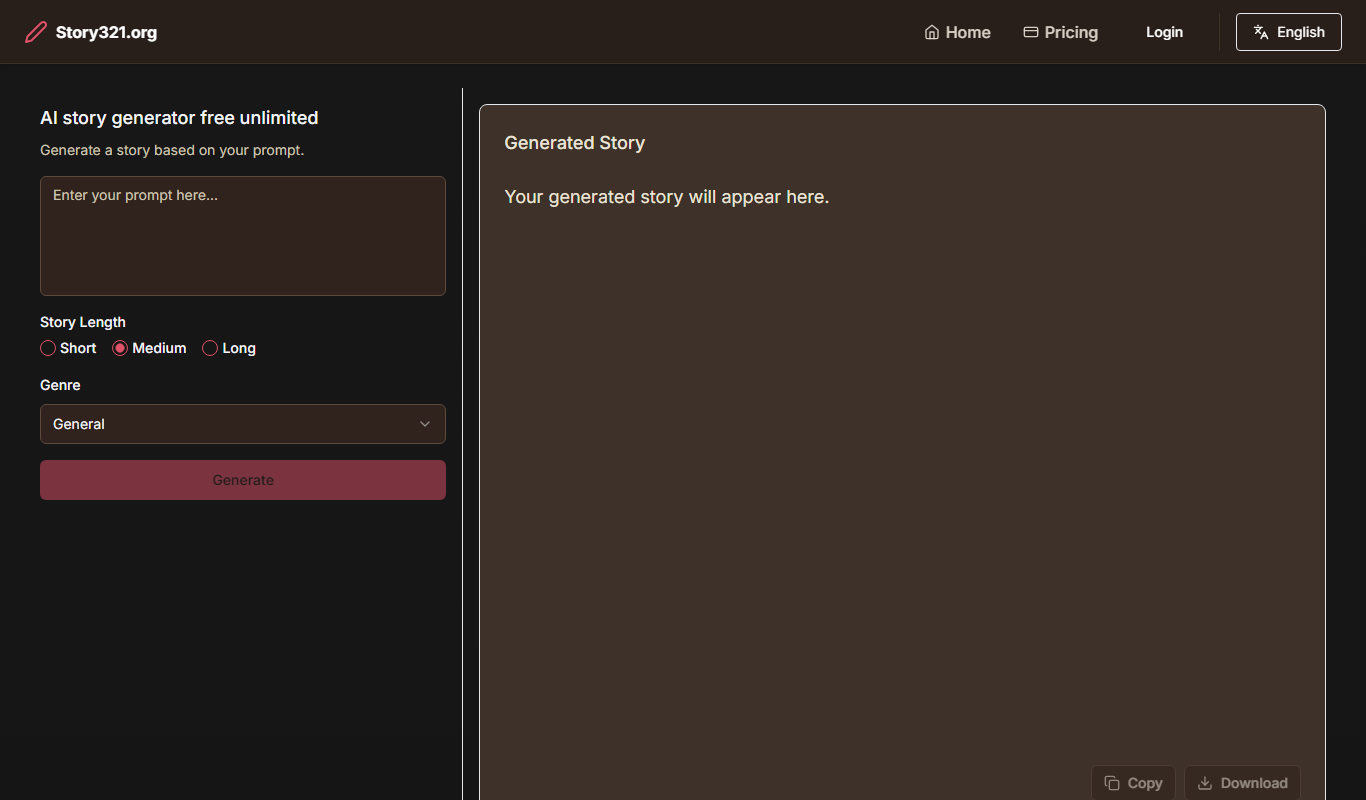
What is Story321 AI Story Generator?
Story321’s AI story generator is a web-based tool that turns any idea into a story. Users choose a genre and length, generate a story online without signing up, then copy or download the draft. It is free to try with usage limits, and paid plans add credits and a commercial license.
Key features of Story321 AI Story Generator
The generator combines a prompt with a chosen length and genre and streams an AI-generated story to the result panel. Public use needs no signup, usage limits apply, and stories can be copied or downloaded.
Free to try
The public generator is free to try with no signup required; usage limits apply.
Simple Web Interface
No account or installation needed; accessible directly via browser.
Customizable Prompts
Users can input specific themes or ideas to tailor the story output.
Instant Story Creation
Stories are generated quickly, enabling fast creative workflows.
Pros and cons of Story321 AI Story Generator
Pros
- Free to try with no signup required for public use
- No sign-up or installation required
- Simple and intuitive interface
- Quick story generation
Cons
- Limited to English language
- No advanced editing or formatting tools
- Lacks integration with other writing platforms
Key use cases for Story321 AI Story Generator
Creative Story Writing
Generate original stories for personal or professional creative writing projects.
Educational Storytelling
Assist educators and students in creating engaging stories for learning and teaching.
Content Creation
Help content creators produce narrative content for blogs, social media, or marketing.
Idea Generation
Provide inspiration and story ideas for writers experiencing creative blocks.
How Story321 AI Story Generator works
- 1
Access the Website
Navigate to the Story321 AI Story Generator web page to start.
- 2
Enter a Prompt
Provide a theme, character, or idea to guide the story generation.
- 3
Generate Story
Click the generate button to receive a unique story based on the input.
- 4
Review and Edit
Read the generated story and make any desired edits or use it as inspiration.
Who is using Story321 AI Story Generator
Story321 AI Story Generator pricing
Free
$0 / month
For students and testers: 10 credits for free trial, supports all core features, non-commercial use, no credit card required.
Basic
$4.00 / month, billed as $48
6,000 credits/year, all tools and features, commercial license.
Pro
$8.25 / month, billed as $99
For novelists and self-media writers: 14,400 credits/year, all tools and features, commercial license.
Premium
$23.00 / month, billed as $276
For high-intensity creators and teams/studios: 60,000 credits/year, all tools and features, commercial license.
Plans and prices are as published by the vendor and can change. Check the official site before you buy. Open the pricing page (opens in a new tab)
Frequently asked questions about Story321 AI Story Generator
Story321 is free to try: the public generator works without signing up, but usage limits apply.
No. Public use does not require an account, but you may be asked to sign in when public usage limits are reached.
You can input your own prompts to guide the story creation, but the output is AI-generated and may need manual editing.
Some tools offer a free plan or trial with limited features. Availability can vary, so confirm on the official website.
Yes, it can help with that use case depending on how you configure it and what features are available. You’ll get the best results with clear inputs and a defined goal.
Yes, it can help with that use case depending on how you configure it and what features are available. You’ll get the best results with clear inputs and a defined goal.
Conclusion
A premise, a character or a setting is the starting input, and the user then picks a story length and a genre before generating. Story321 streams the AI-generated story into a result panel, where it can be copied or downloaded as a TXT file. Lengths run from short to long, and the genres include fantasy, romance, mystery, horror and science fiction.
Writers exploring openings and premises, students practising creative writing and teachers building classroom exercises are the main groups the site addresses. The output is a starting draft, and the site itself warns that generated details can be inaccurate or inconsistent in longer stories.
Public use needs no account and is free to try, but usage limits apply and a sign-in may be requested once they are reached. The free plan runs on a small credit allowance and is for non-commercial use, while the paid plans add more credits and a commercial license.
Sources
Sign in to review this tool.
Sign In to ReviewNo reviews yet
Be the first to share how this tool worked for you.
Ask about pricing, limits, or how it compares — or answer someone else.
Sign In to AskNo questions yet
Have a question about using or paying for this tool? Be the first to ask.
Featured on TiorAI



More AI Fanfic Generator tools
Other tools in the same category, for when this one is not quite the fit.
AI-Novel
AI-Novel is a web-based AI writing assistant designed to help authors generate novels and stories by providing AI-driven content creation tools and customizable writing styles.

Imagine Stories
Imagine Stories uses AI to write reading texts, fairy tales and stories for children, including therapeutic tales and texts for therapy.

TooToon
TooToon turns your ideas into webtoons: create and illustrate your webtoon with AI-driven tools for story writing, line art, character assets and full-color artwork.

Imaginebuddy
Imaginebuddy is an AI product photoshoot prompts library: copy, paste and create campaign ready product photography using Gemini and ChatGPT.

Film Fan
FilmFan lets you rate films quickly and get personalised recommendations from 25k+ titles, shaped by your taste profile.

ArticleForge
ArticleForge is an AI-driven platform that automatically creates unique, SEO-optimized articles based on user keywords, helping marketers and businesses automate content creation.

Lek
Lek AI is a conversational AI platform that enables businesses to build intelligent chatbots for automating customer support, lead qualification, and more, improving response times and reducing manual workload.