

A11Y Boost web accessibility articles and free Heading Checker tools
A11Y Boost publishes web accessibility news and articles and offers free tools, such as a Heading Checker, to help developers and designers build accessible websites.
- Best for
- Learning web accessibility
- Key capability
- Heading Checker Chrome Extension
Save A11YBoost, follow its updates and vote on it — everything stays in your account.
Sign in or create a free account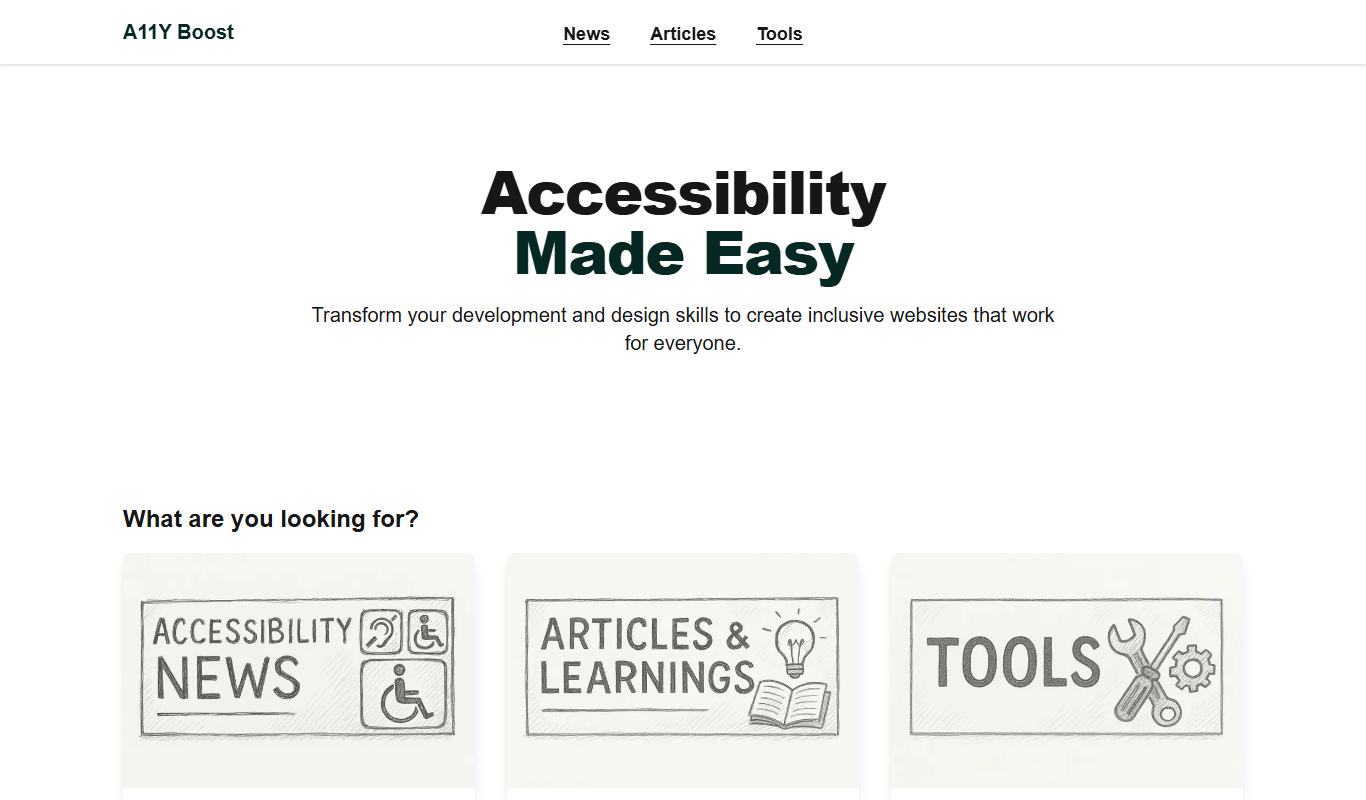
What is A11YBoost?
A11Y Boost is a web accessibility resource made in Australia that educates developers and designers to create accessible, inclusive websites. It publishes accessibility news and articles on topics such as headings, landmarks, focus indicators and WCAG colour contrast, and offers free tools: the A11Y Boost Heading Checker as a browser extension and as a web portal for checking a page’s heading structure.
Key features of A11YBoost
A11Y Boost publishes web accessibility news and articles and offers a free Heading Checker as a Chrome Extension and a web portal to check and visualize a page’s heading structure.
Heading Checker Chrome Extension
Check a webpage heading structure directly in your browser, free.
Heading Checker web portal
Visualize and validate a webpage heading structure on the web, free.
Accessibility articles
Articles on web accessibility topics such as headings, landmarks, focus indicators and colour contrast.
Accessibility news
The latest news and updates about web accessibility.
User-Friendly Dashboard
Intuitive interface to manage scans, view reports, and track progress over time.
Pros and cons of A11YBoost
Pros
- Free Heading Checker as a Chrome Extension and web portal
- Articles cover beginner and expert accessibility topics
- Open to new sponsors and contributors
- User-friendly interface suitable for non-experts
Cons
- The tools check only the heading structure of a webpage
- No mobile app available
- Pricing may be high for small businesses
Key use cases for A11YBoost
Learning web accessibility
Learn web accessibility through articles for beginners and experts.
Checking heading structure
Check and visualize a webpage heading structure for free.
Following accessibility news
Keep up with the latest news and updates about web accessibility.
Developer Collaboration
Provide actionable insights and recommendations to developers for fixing accessibility barriers.
User Experience Improvement
Enhance usability for people with disabilities by identifying and resolving accessibility gaps.
How A11YBoost works
- 1
Choose a section
Pick news, articles or tools depending on what you are looking for.
- 2
Read and learn
Explore the articles to learn more about web accessibility.
- 3
Check your headings
Use the free Heading Checker extension or web portal to validate a page heading structure.
- 4
Review Results
Examine the detailed report highlighting issues, severity, and suggested fixes.
- 5
Monitor and Remediate
Set up ongoing monitoring to track accessibility status and collaborate with developers to resolve issues.
Who is using A11YBoost
A11YBoost pricing
Free
Free
The Heading Checker Chrome Extension and web portal are free.
Professional
$49/month
Includes unlimited scans, detailed reports, and continuous monitoring.
Enterprise
Custom pricing
Tailored solutions with advanced features and dedicated support.
Plans and prices are as published by the vendor and can change. Check the official site before you buy. Open the pricing page (opens in a new tab)
Frequently asked questions about A11YBoost
A web accessibility resource made in Australia that educates developers and designers through news, articles and tools.
Yes. The Heading Checker Chrome Extension and web portal are both listed as free.
It checks, visualizes and validates the heading structure of a webpage, in the browser or on the web portal.
Topics include headings, focus indicators, and WCAG and APCA colour contrast.
Yes, it can help with that use case depending on how you configure it and what features are available. You’ll get the best results with clear inputs and a defined goal.
It depends on your specific needs and how you plan to use the tool. The official website and documentation are the best sources for the latest details.
Some tools offer a free plan or trial with limited features. Availability can vary, so confirm on the official website.
Conclusion
Made in Australia, A11Y Boost is an education site that helps developers and designers build accessible, inclusive websites. Its articles explain topics such as semantic HTML headings for screen reader support, keyboard focus indicators and WCAG versus APCA colour contrast, alongside a news section on web accessibility updates.
The practical tools are the free A11Y Boost Heading Checker, offered as a Chrome Extension that checks a page in the browser and as a web portal that visualizes and validates heading structure. Both free tools check one thing only, the heading structure of a webpage.
Sources
Sign in to review this tool.
Sign In to ReviewNo reviews yet
Be the first to share how this tool worked for you.
Ask about pricing, limits, or how it compares — or answer someone else.
Sign In to AskNo questions yet
Have a question about using or paying for this tool? Be the first to ask.
Featured on TiorAI



Alternative Tools
Explore similar AI tools that might fit your needs

Siteimprove Accessibility Checker
Siteimprove Accessibility Checker is a tool that automates website accessibility audits to help organizations comply with WCAG and ADA standards by identifying and reporting accessibility issues.
More AI Education & Learning Tools tools
Other tools in the same category, for when this one is not quite the fit.

History Timeline Generator
History Timeline Generator is an AI tool that turns a topic such as a person, nation, company or historical event into a customized history timeline.

Narrative Nooks
Narrative Nooks is an AI-driven learning platform for young learners, with interactive story-based lessons, badges, a homework helper and round-the-clock tutoring support.

FGenEds
FGenEds turns a PDF of your lecture slides into a cheat sheet for studying, aimed at students in gen ed classes.

knowt.com
Knowt.com is an AI-driven study tool that converts your notes or any text into interactive flashcards and summaries to enhance learning efficiency.

Terrakotta
Terrakotta is the all-in-one prospecting platform for commercial real estate brokers: source leads, make calls and deliver personalized AI voicemails.
plat.ai
plat.ai is a comprehensive AI development platform that enables users to build, train, deploy, and manage custom machine learning models with scalable infrastructure and API integration.

Quino
Quino is the LMS that marks every exam: courses, lessons, online exams and diplomas, with AI that marks handwritten answers in seconds and writes tests from your notes.

MockTok
MockTok is an AI mock interview app with 50+ interactive questions, follow-up questions, job post analysis, multi-stage interviews, feedback and AI extracted cases.