

Dispute Panda AI Credit Repair Software for Businesses
Dispute Panda is AI credit repair software for credit repair businesses that generates dispute letters, mails them in one click and tracks every client from one place.
- Best for
- Automated Credit Dispute Generation
- Key capability
- Automated Letter Generation
Save Dispute Panda, follow its updates and vote on it — everything stays in your account.
Sign in or create a free account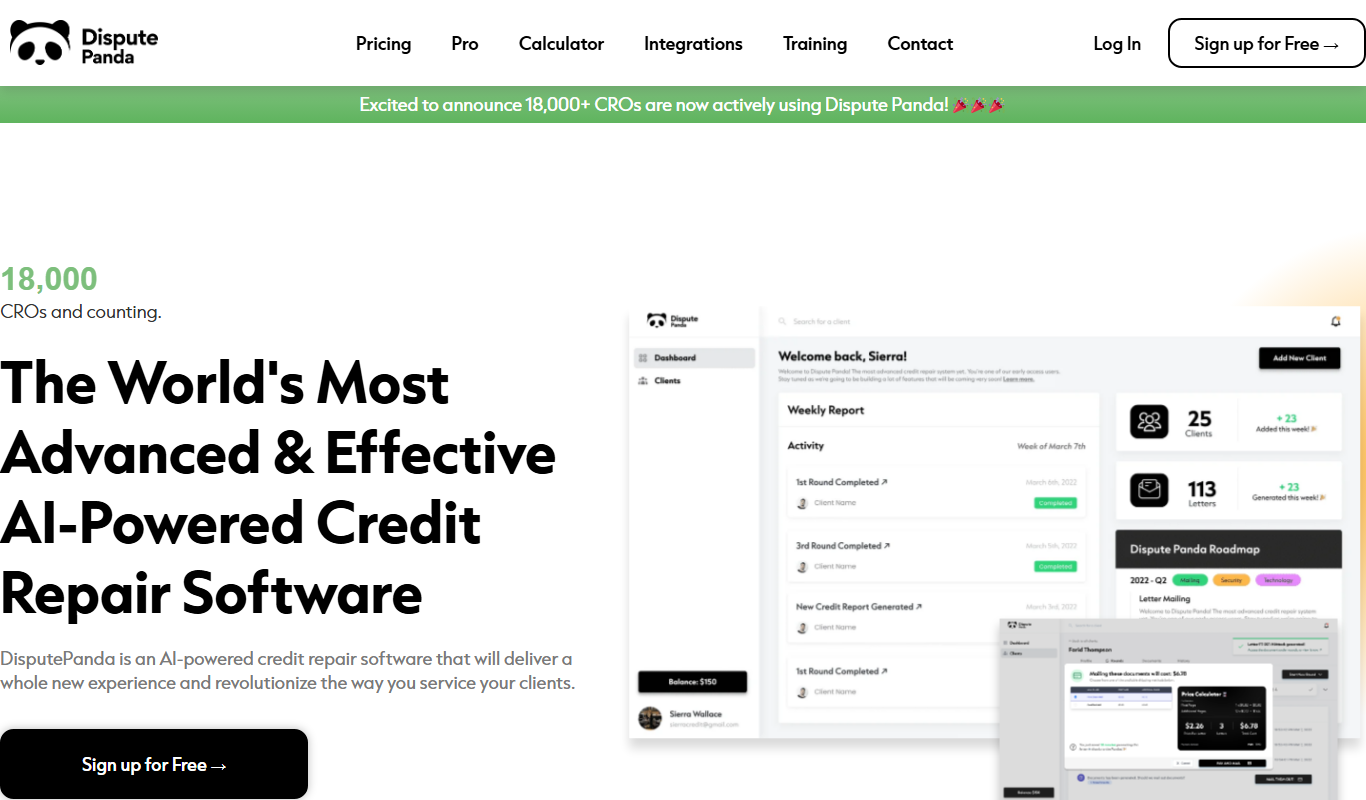

What is Dispute Panda?
Dispute Panda is AI-powered credit repair software built for credit repair businesses. It generates dispute letters, mails them in one click and tracks every client from one place.
Key features of Dispute Panda
Dispute Panda writes AI dispute letters, Factual and Metro 2, plans each round and picks which creditors each one goes to. Letters can be mailed from the platform and every client is tracked in one place.
Automated Letter Generation
Creates customized dispute letters based on specific credit report errors.
Credit Report Parsing
Analyzes credit reports to detect inaccuracies and dispute-worthy items.
Dispute Tracking Dashboard
Allows users to track the status and outcomes of their credit disputes.
Educational Resources
Provides guidance on credit reporting and dispute best practices.
Pros and cons of Dispute Panda
Pros
- Automates complex dispute letter creation
- User-friendly interface for beginners
- Affordable subscription pricing
- Includes educational credit repair resources
Cons
- Limited to English language support
- No mobile app available
- Requires users to upload credit reports manually
Key use cases for Dispute Panda
Automated Credit Dispute Generation
Automatically generate personalized credit dispute letters to challenge inaccurate or outdated information on credit reports.
Credit Report Analysis
Analyze credit reports to identify errors and items eligible for dispute, streamlining the credit repair process.
Client Dispute Management
Track every client and each round of disputes from one place.
Credit Education
Provide users with insights and guidance on credit reporting and dispute processes.
How Dispute Panda works
- 1
Import Credit Report
Import a client’s JSON credit report through Credit Monitoring in one click.
- 2
Identify Disputes
The software scans the report to highlight potential errors and items eligible for dispute.
- 3
Generate Dispute Letters
Dispute Panda creates personalized dispute letters tailored to the user’s credit issues.
- 4
Mail Disputes
Mail the letters yourself or use the built-in mailing system, USPS first-class or certified mail in one click.
- 5
Track Progress
The platform helps users monitor responses and updates to their disputes.
Who is using Dispute Panda
Dispute Panda pricing
Free
$0
Free to sign up and use; you only buy credits for the Attacks you send, with no monthly fees
Pro Monthly
$1 for the first 14 days, then $197 every month
For those looking to start scaling their credit repair business
Pro Yearly
$1,970 billed annually
For businesses ready to run and automate their whole credit repair operation
Plans and prices are as published by the vendor and can change. Check the official site before you buy. Open the pricing page (opens in a new tab)
Frequently asked questions about Dispute Panda
Yes, Dispute Panda is designed with an easy-to-use interface and educational resources to assist users new to credit repair.
The software focuses on common inaccuracies such as outdated information, incorrect account details, and unverifiable debts.
Credit bureaus typically respond within 30 to 45 days, but timelines can vary depending on the dispute complexity.
No software can guarantee specific credit score changes, but Dispute Panda helps remove inaccuracies that may positively impact scores.
It depends on your specific needs and how you plan to use the tool. The official website and documentation are the best sources for the latest details.
It depends on your specific needs and how you plan to use the tool. The official website and documentation are the best sources for the latest details.
Pricing depends on the plan and included features. For the most accurate and up-to-date details, check the official pricing page.
Yes, it can help with that use case depending on how you configure it and what features are available. You’ll get the best results with clear inputs and a defined goal.
Conclusion
Credit repair businesses, rather than individual consumers, are the customers for this AI-powered software. Each round of disputes is called an Attack, and the software writes the letters for all three bureaus: Equifax, Experian and TransUnion. Users pick one of five Non-Static Attacks, send Static Letters, or let Panda AI plan the round. Client credit reports can be imported as JSON through Credit Monitoring in one click, and finished letters can be mailed by USPS first-class or certified mail from the platform.
It is free to sign up and use, and the pay-as-you-go credit system charges only for the Attacks sent, with no monthly fees. A paid Pro plan adds the tools that run the rest of the business, such as a branded client portal, client billing, onboarding forms and Zapier. According to the Pro page, that subscription does not include unlimited Attacks.
Sources
Sign in to review this tool.
Sign In to ReviewNo reviews yet
Be the first to share how this tool worked for you.
Ask about pricing, limits, or how it compares — or answer someone else.
Sign In to AskNo questions yet
Have a question about using or paying for this tool? Be the first to ask.
Featured on TiorAI



Alternative Tools
Explore similar AI tools that might fit your needs
Credit Karma
Credit Karma is a free online platform that provides users with access to their credit scores, credit reports, personalized financial recommendations, identity monitoring, and tax filing services.
More AI Financial Services Tools tools
Other tools in the same category, for when this one is not quite the fit.

trueaccord.com
TrueAccord is an AI-powered debt collection platform that automates customer outreach and payment management through digital channels, improving recovery rates while ensuring compliance.

Aurum KuberX
Aurum KuberX is an Indian digital investment platform offering portfolio management, personalized advisory, and mutual fund investments through web and mobile apps.