

Paint Calculator
A paint calculator is a tool that helps you determine how much paint you need for a painting project by calculating the surface area to be covered. Instead of guessing or buying too much paint, this tool uses your measurements to provide an estimate based…
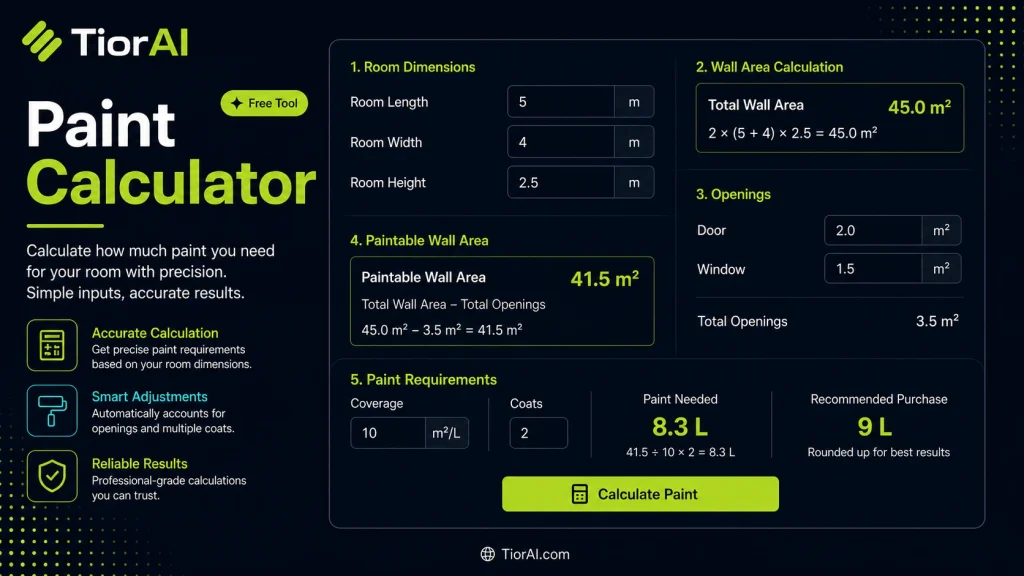
Paint Calculator
Estimate how much paint you need for your room. Enter room dimensions and the number of doors and windows to calculate the paintable surface area.
~21 sq ft each
~12 sq ft each
Results
| Measure | Value |
|---|---|
| Paint Needed | -- gallons |
| Paint Needed (Metric) | -- litres |
| Paintable Area | -- sq ft |
| Wall Area | -- sq ft |
| Ceiling Area | -- sq ft |
| Deductions | -- sq ft |
Formulas
Wall area = 2 × (L + W) × H— Perimeter times ceiling heightCeiling area = L × W— Room length times widthDeductions = (doors × 21) + (windows × 12)— Standard door and window areas in sq ftPaintable area = (wall area − deductions) + ceiling area— Only the selected surfaces are countedGallons = paintable area × coats ÷ coverage— Coverage defaults to 350 sq ft per gallon1 gallon ≈ 3.785 litres
How to use it
- Enter Your Values Input your numbers or parameters into the Paint Calculator. Fill in all required fields for an accurate calculation.
- Calculate Results Click the calculate button to process your inputs. The Paint Calculator delivers instant, accurate results.
- Review and Use Review your calculated results, explore the breakdown, and copy or share the output for your needs.
Tip Share your Paint Calculator results by copying the output — great for reports, homework, or team discussions.
Understanding Paint Calculations
A paint calculator is a practical tool designed to estimate the amount of paint required to cover a given surface area. It simplifies the process of converting measurements of walls, ceilings, or other surfaces into the volume of paint needed, typically measured in liters or gallons.
Why is this important? Accurate paint estimation helps avoid both shortages and excess purchases, saving time and money. It also reduces waste, which is beneficial for both the environment and your budget.
How does it work? Users input dimensions such as length, height, and width of the area to be painted. The calculator then computes the total surface area and factors in paint coverage rates, which vary depending on the type of paint and surface texture. Some calculators also allow adjustments for the number of coats and surface conditions.
Common use cases include:
- Home renovation projects where walls or ceilings need repainting.
- New construction sites requiring initial paint estimates.
- Commercial spaces planning large-scale painting jobs.
- DIY projects where precise material planning is essential.
What is a Paint Calculator?
A paint calculator is a tool that helps you determine how much paint you need for a painting project by calculating the surface area to be covered. Instead of guessing or buying too much paint, this tool uses your measurements to provide an estimate based on paint coverage rates.
When to Use a Paint Calculator
- Before starting a home painting project to avoid running out of paint mid-job.
- When planning a renovation or new construction to budget materials accurately.
- For commercial painting jobs where precise material estimates are critical.
- During DIY projects involving furniture or small surfaces to save time and cost.
Common Mistakes to Avoid
- Failing to subtract non-paintable areas like windows and doors, which leads to overestimating paint needs.
- Not accounting for multiple coats, which can cause you to underestimate the total paint required.
- Mixing measurement units without converting them properly, resulting in inaccurate calculations.
- Assuming all paints cover the same area per liter or gallon without checking product details.
Technical Context
Paint calculators rely on basic geometry and standard coverage rates, which are usually provided by paint manufacturers. Coverage rates indicate how much surface area a unit of paint can cover, typically expressed as square feet or meters per liter/gallon. Adjustments for surface texture and number of coats improve accuracy. While these calculators provide reliable estimates, actual paint consumption can vary due to factors like application method and surface porosity.
Frequently asked questions
Reviews and questions
Whether this tool gave people the answer they needed, and what they asked about it.
Sign in to review this tool.
Sign In to ReviewNo reviews yet
Be the first to say whether this tool gave you what you needed.
Ask how to read the result, or what the tool does with an edge case — or answer someone else.
Sign In to AskNo questions yet
Not sure how to read a result? Be the first to ask.