

From my experience with RedactNow, I found it excels at automating the tedious and error-prone task of manually redacting sensitive information in documents. The AI’s ability to accurately detect various types of confidential data saves significant time, especially when handling multiple files. This makes it particularly well-suited for legal professionals, compliance teams, and businesses needing to protect privacy and meet regulatory requirements. However, the tool currently supports only English and is limited to a web platform, which might restrict flexibility for some users. Overall, if you require reliable and efficient document redaction, RedactNow delivers a practical solution.
RedactNow AI Tool for Secure Document Redaction and Privacy Protection
RedactNow is an AI-based document redaction tool that automatically detects and removes sensitive information from digital documents to protect privacy and help comply with data regulations.
- Best for
- Legal Document Redaction
- Key capability
- AI-Powered Sensitive Data Detection
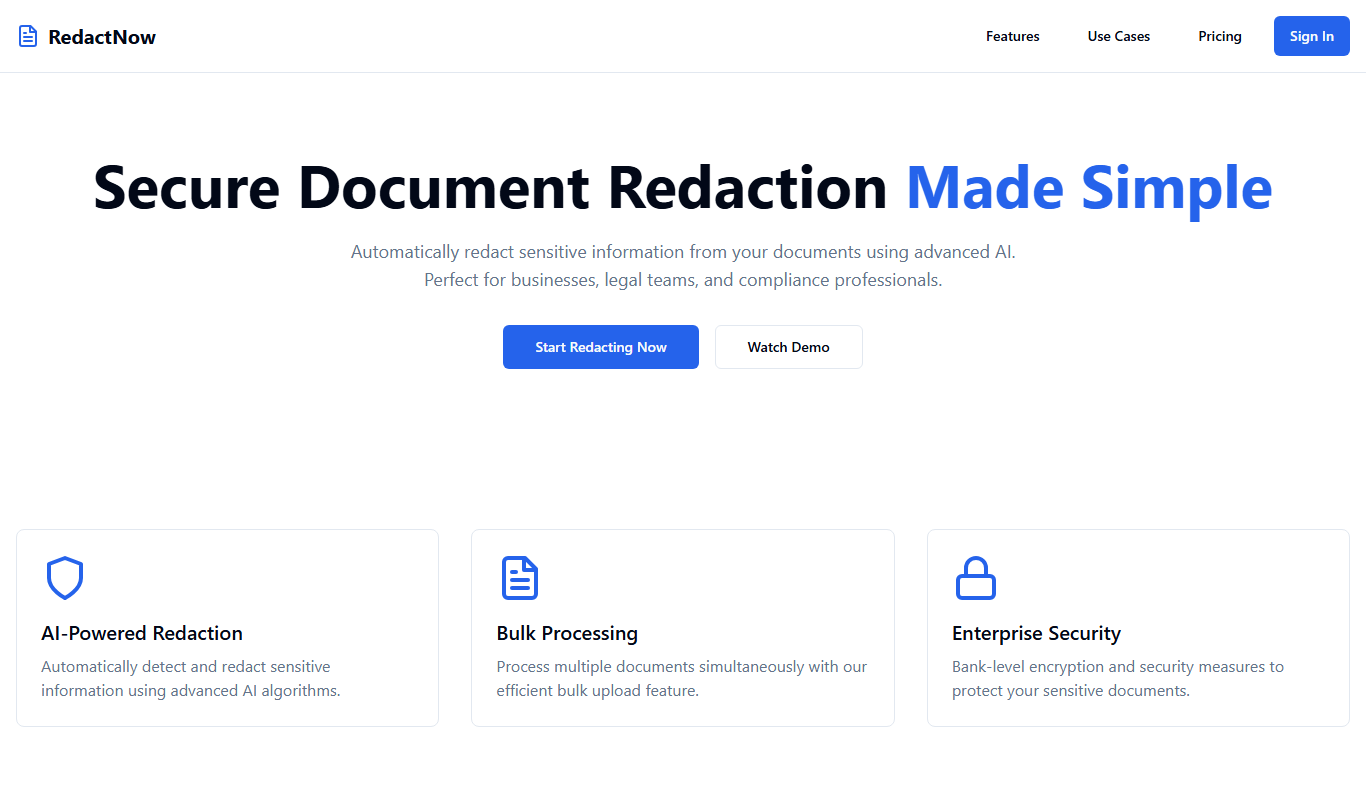
What is RedactNow?
RedactNow is an AI-powered document redaction tool designed to automatically identify and remove sensitive information from digital documents. It helps individuals and organizations protect privacy and comply with data protection regulations by securely masking confidential data such as personal identifiers, financial details, and proprietary information.
Key features of RedactNow
RedactNow offers automated detection and redaction of sensitive content, batch processing of multiple documents, customizable redaction rules, and secure export options to ensure privacy and compliance across various industries.
AI-Powered Sensitive Data Detection
Automatically identifies various types of sensitive information with high accuracy.
Batch Processing
Redact multiple documents simultaneously to save time and improve workflow efficiency.
Customizable Redaction Rules
Allows users to define specific terms or patterns to redact beyond automatic detection.
Secure Export Options
Exports redacted documents in common formats ensuring that sensitive data is permanently removed.
Pros and cons of RedactNow
Pros
- Automates time-consuming manual redaction tasks
- High accuracy in detecting sensitive information
- Supports batch processing for efficiency
- Customizable redaction options
- Secure export ensures permanent data removal
Cons
- Limited language support (English only)
- No desktop or mobile app versions currently available
- Pricing may be high for occasional users
Key use cases for RedactNow
Legal Document Redaction
Automatically redact sensitive information such as names, addresses, and financial data from legal documents to ensure compliance and confidentiality.
Business Data Privacy
Protect confidential business information in reports and communications by securely removing or masking sensitive data before sharing.
Compliance with Privacy Regulations
Help organizations comply with data privacy laws like GDPR and HIPAA by efficiently redacting personal and sensitive information.
Secure Document Sharing
Enable safe sharing of documents by removing or obscuring private details that should not be disclosed to unauthorized parties.
How RedactNow works
-
1
Upload Document
Users upload documents in supported formats such as PDF or Word to the RedactNow platform.
-
2
Automatic Detection
The AI scans the document to identify sensitive information like names, dates, addresses, and financial data.
-
3
Review and Customize
Users review detected redactions and can customize or add additional redaction areas as needed.
-
4
Export Redacted Document
The tool generates a securely redacted version of the document ready for safe sharing or archiving.
Who is using RedactNow
Legal professionals
Compliance officers
Small to medium businesses
Data privacy teams
Healthcare organizations
RedactNow pricing
Free Trial
$0
Limited access to redaction features for evaluation purposes.
Professional
$29/month
Full access to all redaction features including batch processing and priority support.
Plans and prices are as published by the vendor and can change. Check the official site before you buy. Open the pricing page (opens in a new tab)
Frequently asked questions about RedactNow
RedactNow supports common document formats including PDF, Microsoft Word, and text files.
Yes, once a document is redacted and exported, the sensitive information is permanently removed and cannot be recovered.
Yes, users can add custom redaction rules to target specific words or patterns beyond the AI’s automatic detection.
RedactNow is designed to help users comply with regulations like GDPR and HIPAA by securely removing personal and sensitive data.
It depends on your specific needs and how you plan to use the tool. The official website and documentation are the best sources for the latest details.
Yes, it can help with that use case depending on how you configure it and what features are available. You’ll get the best results with clear inputs and a defined goal.
It depends on your specific needs and how you plan to use the tool. The official website and documentation are the best sources for the latest details.
Yes, it can help with that use case depending on how you configure it and what features are available. You’ll get the best results with clear inputs and a defined goal.
Sign in to review this tool.
No reviews yet
Be the first to share how this tool worked for you.
Ask about pricing, limits, or how it compares — or answer someone else.
No questions yet
Have a question about using or paying for this tool? Be the first to ask.
Featured on TiorAI



Alternative Tools
Explore similar AI tools that might fit your needs
One-time purchase
PDFpen
PDFpen is a Mac and iOS PDF editor that lets you edit text and images, annotate, fill forms, sign documents, and use OCR to convert scanned PDFs into editable text.

Enterprise
Redactable
Redactable is a secure cloud-based software that enables legal and compliance teams to permanently redact sensitive information from documents, ensuring privacy and regulatory compliance.
More Business Management tools
Other tools in the same category, for when this one is not quite the fit.

Free
Roadtrippers
Roadtrippers is a travel planning app that helps users create detailed road trip itineraries by mapping routes, discovering attractions, and optimizing travel plans.

Free
TripIt
TripIt is a travel app that automatically organizes your travel plans into a single itinerary by parsing confirmation emails, providing real-time flight alerts, and allowing itinerary sharing.

Free
FormSwift
FormSwift is an online platform that provides customizable legal and business document templates, PDF editing, and electronic signature capabilities to help users create and manage important documents easily.

Pay As You Go
TextMagic
TextMagic is a cloud-based SMS marketing platform that enables businesses to send bulk text messages, automate notifications, and engage customers with two-way messaging and API integration.

Free Trial
EZ Texting
EZ Texting is a cloud-based SMS marketing platform that enables businesses to send mass text messages, automate campaigns, and engage customers with two-way messaging.

Free Trial
SimpleTexting
SimpleTexting is a cloud-based SMS marketing platform that enables businesses to send mass text messages, automate SMS workflows, and engage customers with two-way messaging to improve communication and marketing effectiveness.

Free
Spocket
Spocket is a dropshipping platform that helps ecommerce entrepreneurs source products from vetted US and EU suppliers, automate order fulfillment, and integrate with major online store platforms like Shopify and WooCommerce.

Free
Oberlo
Oberlo is a dropshipping app for Shopify that automates product importing, inventory management, and order fulfillment, enabling entrepreneurs to run ecommerce stores without holding inventory.